
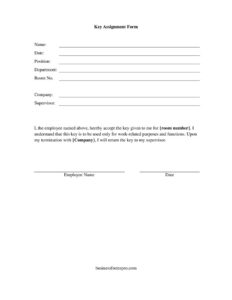
Key Assignment Form
Track keys issued to employees with this free Key Assignment Form template, available as a free download in PDF and DOCX with no signup required.
PDF
DOCX
3 downloads
0
likes
Download Files
- DOCX
A Key Assignment Form is a simple record that documents which keys, access cards, or fobs have been issued to an employee or contractor. The most common reason organizations use one is to maintain accountability for physical access — knowing exactly who holds each key and when it was handed over. You can download this template free in both PDF and DOCX formats, with no signup required.
What Is a Key Assignment Form?
A Key Assignment Form is a tracking document issued by an employer, facilities manager, or office administrator to record the assignment of physical keys, electronic access cards, or building fobs to a specific person. It captures who received the key, which key or area it grants access to, the date it was issued, and the recipient’s acknowledgment that they are responsible for it. The form creates a clear chain of custody so that the organization always knows where its keys are. It is widely used in offices, schools, warehouses, retail stores, property management companies, and any setting where controlled physical access matters. Both the issuer and the recipient typically sign and retain a copy for their records.
When Do You Need a Key Assignment Form?
Anytime a key or access device leaves the front office and goes into someone’s pocket, a written record protects everyone involved. Common situations include:
- Onboarding a new employee who needs access to the building, a department, or a secure storage area on their first day.
- Issuing keys to maintenance or janitorial staff who require after-hours access to multiple parts of a facility.
- Assigning a master or sub-master key to a supervisor or manager responsible for an entire floor or wing.
- Loaning a key to a contractor or vendor for the duration of a project, with a clear expectation of return.
- Providing access cards or fobs for parking garages, server rooms, or equipment cages.
- Reissuing a key after a loss, so the replacement is documented and the old key can be flagged or deactivated.
What a Key Assignment Form Should Have
A complete Key Assignment Form should clearly identify the recipient, the property issuing the key, and the key itself. Essential elements include the employee or recipient’s full name and job title or department, a description or identification number of each key or device assigned, the area or door it opens, the date issued, and an expected or actual return date. It should also include a brief statement of the recipient’s responsibilities — for example, that the key must not be duplicated, loaned to others, or removed from the premises without permission — followed by signature lines for both the recipient and the issuing authority. A space to log returns keeps the record current over the life of the assignment.
How to Fill Out a Key Assignment Form
Work through the form one section at a time so nothing is left blank:
- Enter the recipient’s details. Write the full name of the employee or contractor receiving the key, along with their job title, department, and employee ID if applicable.
- Record the company or property information. Note the business name, building address, or site where the keys belong.
- Describe each key. List the key number, tag, or label, and identify what it opens — a specific door, suite, cabinet, gate, or area.
- Add access devices. If cards or fobs are included, note their serial or badge numbers as well.
- Fill in the issue date. Record the date the key is physically handed to the recipient.
- Set the return expectation. Enter an expected return date or note that the key is held for the duration of employment.
- Review responsibilities. Have the recipient read the terms about duplication, loaning, and reporting lost keys.
- Sign and date. Both the recipient and the issuing manager sign to confirm the handover.
Managing Returns and Deactivation
The form does not end its usefulness on the day a key is issued. When an employee leaves, transfers, or finishes a project, the return section should be completed with the actual return date and the initials of the person who received the key back. This closes the loop on accountability and protects the organization from disputes about whether a key was ever returned. For electronic cards and fobs, returning the physical device should be paired with deactivating it in the access-control system so a lost or unreturned card cannot be used. Keeping the completed form on file — ideally with the employee’s other personnel records — gives you an at-a-glance audit trail of every key currently in circulation.
Why a Written Record Matters
Verbal handoffs lead to confusion. When keys go missing, an organization may have to rekey locks or reprogram an entire access system, which is costly and disruptive. A signed Key Assignment Form establishes that a specific person accepted responsibility for a specific key on a specific date. That documentation discourages careless handling, supports security audits, and makes offboarding cleaner because HR or facilities can quickly confirm what must be collected before a final paycheck or system access is cut off.
Common Mistakes to Avoid
- Leaving the key description vague. “Office key” is not enough — record the key number and the exact door or area it opens.
- Skipping the return log. Failing to document returns leaves you unable to prove who still holds a key.
- Forgetting signatures. An unsigned form does not establish that the recipient accepted responsibility.
- Not tracking duplicates. If multiple copies of the same key exist, each should have its own line and recipient.
- Ignoring access cards and fobs. Electronic devices need the same accountability as metal keys.
- Storing the form where it can be lost. Keep copies in a secure, central location accessible to facilities and HR.
Frequently Asked Questions
What is a Key Assignment Form used for? It is used to document which keys, access cards, or fobs an organization has issued to a particular employee or contractor. The form records the recipient, the key details, the issue date, and a signed acknowledgment of responsibility, creating a clear chain of custody.
How do I fill out a Key Assignment Form? Enter the recipient’s name and department, describe each key and the area it opens, record the issue date and expected return date, and have both the recipient and the issuing manager sign. Complete the return section later when the key comes back.
Is a Key Assignment Form legally binding? It is primarily an internal record rather than a contract, but a signed form does serve as evidence that the recipient acknowledged receiving and being responsible for the key. For employment-related matters, pair it with your broader workplace policies.
Does a Key Assignment Form need to be notarized? No. Notarization is not required for a routine key assignment record. The signatures of the recipient and the issuing authority are generally sufficient for internal accountability purposes.
How much does this Key Assignment Form cost? Nothing — it is completely free to download from Business Forms Pro in both PDF and DOCX formats, with no signup or account required. You can edit the DOCX version to match your company’s fields and branding.
Can I customize the form for my organization? Yes. Download the DOCX version and add your logo, adjust the responsibility statement, include extra rows for multiple keys, or add columns for serial numbers. Tailor it to fit your facility’s access-control needs.
This Key Assignment Form template is provided as a general example for informational purposes only and does not constitute legal, HR, or security advice. Requirements and best practices vary by organization and jurisdiction; consult a qualified professional to ensure your access-control policies meet your needs.
Official resource: for the rules that apply to your situation, see the U.S. Department of Labor.
Related Forms
- Accrued Benefits Statement
- Praising Employee Input
- Interview Invitation
- Bi-Weekly Time Card With Approval
- Adverse Action Notice
- Termination Checklist
Browse more in Employment.