
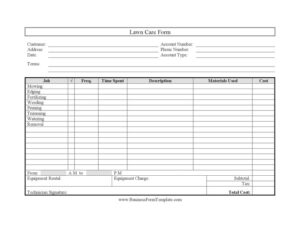
Lawn Care Form
Download a free Lawn Care Form template to log services, materials, and costs for every visit — free PDF and DOCX download, no signup required.
PDF
0
likes
Download Files
A Lawn Care Form is a service record used by lawn maintenance providers to document the work performed at a property, the materials used, and the total cost of each visit. The most common reason people use it is to give customers a clear, itemized record of mowing, fertilizing, and other yard services while keeping accurate billing records. You can download this Lawn Care Form for free in both PDF and DOCX formats, with no signup required.
What Is a Lawn Care Form?
A Lawn Care Form is a structured worksheet that a landscaping technician or lawn service company fills out for each scheduled job. It captures who the customer is, where the property is located, what services were completed, how long the work took, and what was charged. Property managers, independent landscapers, and full-service lawn companies all use it to track recurring visits and justify invoices. For rental and real estate professionals, it documents grounds upkeep on the properties they manage. The form serves three purposes at once: a service log, a materials and equipment record, and a billing summary that ties everything together with subtotals, tax, and a final total cost.
When Do You Need a Lawn Care Form?
This form is useful any time lawn work needs to be tracked, billed, or proven. Common situations include:
- Recurring maintenance contracts — logging each weekly or biweekly mowing visit under a standing service agreement.
- One-time cleanups — recording a single large job such as seasonal pruning, weed removal, or fall debris cleanup.
- Property management upkeep — documenting grounds care across rental units so owners can see what was done on each property.
- Billing and invoicing — providing an itemized record of labor, materials, and equipment charges before sending a final bill.
- Fertilizer and chemical applications — tracking what products were applied, in what quantity, and on which date.
- Dispute resolution — giving both the company and the customer a signed paper trail if a question about service or charges comes up later.
What a Lawn Care Form Should Have
A complete Lawn Care Form combines customer identification, a service breakdown, and a cost summary. At minimum it should include customer and account details, the property address, the visit date, a checklist or list of services performed, time spent, materials and equipment used with their charges, and a total cost. A space for the technician’s signature confirms who completed the work. Account type and payment terms help connect the visit to the broader billing arrangement, while frequency notes whether the job is part of a recurring schedule. The clearer each line, the easier the form is to turn into an accurate invoice.
How to Fill Out a Lawn Care Form
- Enter the customer name and account number at the top so the visit links to the right billing record.
- Write the service address and phone number where the work was performed and how to reach the client.
- Record the date of the visit, the account type (residential, commercial, recurring), and the payment terms.
- Describe the job and mark each service with an x: mowing, edging, fertilizing, weeding, pruning, trimming, watering, and removal.
- Note the freq. (frequency), time spent, and the hours worked from a.m. to p.m.
- Add a description of the work, list materials used and their cost, and record any equipment rental with its equipment charge.
- Calculate the subtotal, add tax, and write the total cost.
- Have the technician signature confirm the completed work.
Tracking Services and Materials Accurately
The service checklist is the heart of this form. Marking each completed task — mowing, edging, fertilizing, weeding, pruning, trimming, watering, and removal — with an x creates a quick visual summary of the visit. Pair that checklist with the description field to add detail the boxes can’t capture, such as which beds were weeded or how much debris was hauled away. When listing materials used, be specific: note the product type and quantity, especially for fertilizers and treatments, since that information may matter for follow-up applications and customer questions. Recording equipment rental separately keeps your labor charges clean and shows the customer exactly why a particular visit cost more than a routine mow.
Turning the Form Into an Invoice
Because the form already itemizes labor time, materials cost, and equipment charges, it doubles as the source document for billing. Once you total the subtotal, tax, and total cost, you can either hand the customer a copy as their receipt or transfer the figures directly into your invoicing software. Keeping a copy on file for each visit builds a service history that helps with seasonal planning, renewing contracts, and answering billing inquiries. For property managers, a stack of these forms organized by address provides a clean record of grounds maintenance spending across a portfolio.
Common Mistakes to Avoid
- Leaving the account number blank — this disconnects the visit from the customer’s billing record and slows invoicing.
- Skipping the time fields — without the from a.m. to p.m. range and time spent, labor charges are hard to justify.
- Vague material entries — “fertilizer” without product or quantity creates confusion on repeat visits.
- Forgetting equipment charges — omitting rental costs means you absorb expenses that should be billed.
- Math errors — double-check that subtotal plus tax equals the total cost before presenting it.
- Missing technician signature — an unsigned form weakens the record if the work or charges are ever questioned.
Frequently Asked Questions
What is a Lawn Care Form used for? It documents the lawn and landscaping services performed at a property during a single visit, along with the materials, equipment, time, and total cost. It works as both a service log and the basis for an itemized invoice. Companies and property managers use it to keep accurate records of recurring and one-time jobs.
How do I fill out the service checklist? Mark an x next to each task you completed — mowing, edging, fertilizing, weeding, pruning, trimming, watering, or removal. Then use the description field to add any details the checklist doesn’t cover. This combination gives the customer a clear and accurate summary of the visit.
Does a Lawn Care Form need to be signed? The template includes a technician signature line, which is good practice because it confirms who performed the work. A customer signature is optional but helpful as an acknowledgment that the service was completed. Signatures strengthen the record if a billing or service question arises later.
How do I calculate the total cost? Add up labor, materials used, and any equipment charges to reach the subtotal, then apply your applicable sales tax. The subtotal plus tax equals the total cost shown at the bottom of the form. Always double-check the math before presenting it to the customer.
Is this Lawn Care Form free to download? Yes. You can download it for free in both PDF and DOCX formats with no signup required. The DOCX version is fully editable, so you can add your company logo, adjust the service list, or change the layout to match your business.
Can I use it for recurring service contracts? Absolutely. The frequency, account type, and terms fields are designed to connect each visit to a standing schedule or agreement. Filing one form per visit builds a complete service history for ongoing maintenance accounts.
This Lawn Care Form template is a general example provided for informational purposes only and is not legal, financial, or tax advice. Billing, tax, and service requirements vary by jurisdiction and business type — consult a qualified professional to ensure your forms and practices meet local rules.
Official resource: for the rules that apply to your situation, see HUD.
Related Forms
- Rental Agreement
- Lease Extension Approval
- Reasonable Accommodation Request Deaf
- Rent Increase
- Home Showing Tracker
- Rental Lease Extension Request
Browse more in Rental and Real Estate.