
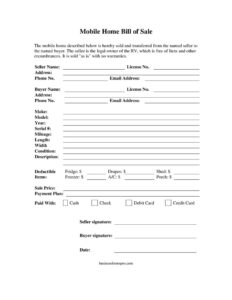
Mobile Home Bill Of Sale
Download a free Mobile Home Bill of Sale template in PDF and DOCX to document the sale, included items, and transfer ownership with a clear paper trail.
PDF
DOCX
6 downloads
0
likes
Download Files
- DOCX
A Mobile Home Bill of Sale is a written record that documents the sale and transfer of a manufactured or mobile home from a seller to a buyer. People most often use it to create proof of purchase and to record exactly what was included in the deal, and you can download it here free in PDF or DOCX with no signup required.
What Is a Mobile Home Bill of Sale?
A Mobile Home Bill of Sale is a document that records the transfer of ownership of a mobile or manufactured home between two private parties. It is typically created by the seller and signed by both the seller and buyer at the time of sale. The form identifies the home by make, model, year, serial number, and dimensions, states the agreed sale price, lists any appliances or fixtures included, and confirms the condition of the property. Because mobile homes are often sold “as is” between individuals, this document protects both sides by putting the terms of the deal in writing and serving as a receipt for the transaction.
When Do You Need a Mobile Home Bill of Sale?
This form is useful any time a mobile or manufactured home changes hands outside of a real estate brokerage. Common situations include:
- Selling a mobile home parked in a rented lot or mobile home community to a private buyer.
- Buying a used single- or double-wide unit and needing a receipt for your records.
- Transferring ownership of a home that sits on leased land rather than property you own.
- Documenting which appliances and fixtures — such as the fridge, freezer, or A/C — are part of the sale.
- Providing proof of purchase when applying to retitle the home with your state agency.
- Settling an estate or family transfer where a written record of the agreed price is needed.
What a Mobile Home Bill of Sale Should Have
A complete bill of sale leaves no ambiguity about what was sold and on what terms. The essential elements include the full legal names and contact details of the seller and buyer, a thorough description of the home (make, model, year, serial number, dimensions, and license number), the agreed sale price, the method of payment, a list of included or excluded items, a statement of condition and any “as is” language, and the dated signatures of both parties. Including the serial number is especially important, since it is the primary identifier used to distinguish one manufactured home from another.
How to Fill Out a Mobile Home Bill of Sale
- Enter the Date of the transaction at the top of the form.
- Fill in the Seller Name and Buyer Name, then add the buyer’s or seller’s Address, Phone No., and Email Address.
- Describe the home by recording its Make, Model, Year, Serial #, and License No.
- Note the home’s dimensions in the Length and Width fields, and add Mileage if the unit is towable.
- Write a clear Description and indicate the overall Condition of the home.
- Check off the included fixtures and appliances — A/C, Fridge, Freezer, Drapes, Porch, and Shed — and list any Deductible Items that are excluded.
- Enter the agreed Sale Price and select how it was Paid With: Cash, Check, Credit Card, Debit Card, or a Payment Plan.
- Have both parties sign in the Seller signature and Buyer signature lines to finalize the document.
Listing Included Items and Fixtures
One feature that makes a mobile home sale different from many other transactions is the number of items that may or may not convey with the home. This template’s checklist — covering the A/C unit, Fridge, Freezer, Drapes, Porch, and Shed — lets you spell out precisely what the buyer is paying for. Use the Deductible Items field to record anything the seller is keeping or removing before closing, such as a portable appliance, furniture, or a detachable structure. Clarifying these details up front prevents disputes on moving day, when buyers sometimes expect items that the seller never intended to leave behind. When in doubt, write it down.
Payment, Liens, and Title Transfer
The template confirms the seller is the legal owner and that the home is free of liens and other encumbrances, sold “as is” with no warranties. Before signing, the buyer should verify that no lender or lienholder has a claim on the home, because outstanding liens can follow the property to a new owner. Use the Paid With and Payment Plan fields to document the full payment terms, including any installment schedule. After the sale, most states require you to update the title and registration with the appropriate motor vehicle or housing agency, and some localities treat mobile homes as personal property while others tax them as real estate. Keep the signed bill of sale, as it is usually required for that paperwork.
Common Mistakes to Avoid
- Leaving the Serial # blank — it is the key identifier and may be required for retitling.
- Failing to specify which included items, like the Shed or A/C, actually convey with the home.
- Forgetting to record the exact Sale Price and the Paid With method.
- Skipping signatures — the document is incomplete without both Buyer and Seller signatures.
- Not verifying the home is lien-free before transferring funds.
- Each party keeping no copy; both buyer and seller should retain a signed original.
Frequently Asked Questions
What is a Mobile Home Bill of Sale used for? It documents the transfer of a mobile or manufactured home from a seller to a buyer and serves as a receipt for the transaction. It records the price, the home’s identifying details, included items, and both parties’ signatures. Buyers often need it to retitle the home in their name.
Is a Mobile Home Bill of Sale legally binding? Once both parties sign it voluntarily and exchange payment, a bill of sale generally functions as a binding record of the agreed terms. Its weight can depend on your state’s rules for transferring manufactured homes. Keeping a complete, accurate, and signed copy strengthens its usefulness as evidence of the sale.
Does a Mobile Home Bill of Sale need to be notarized? Notarization is not required in every state, but some jurisdictions request it for mobile home transfers, especially when retitling. Having the signatures notarized adds an extra layer of authentication and can help avoid later disputes. Check your local motor vehicle or housing agency to confirm what is needed.
What does “as is” mean on this form? Selling “as is” means the buyer accepts the home in its current condition without any warranties from the seller. The seller is not promising to fix defects or guarantee performance after the sale. Buyers should inspect the home thoroughly and note its Condition on the form before signing.
What information do I need before filling it out? Gather the home’s make, model, year, serial number, license number, and dimensions, along with both parties’ names and contact details. You will also need the agreed sale price, the payment method, and a list of which appliances and fixtures are included. Having these ready makes completing the form quick and accurate.
How much does this template cost? It is completely free to download from Business Forms Pro in both PDF and DOCX formats, with no signup required. You can fill it in digitally or print it for handwritten use. Edit the DOCX version to add or remove fields to match your specific sale.
This template is a general example provided for informational purposes only and is not legal, financial, or tax advice. Requirements for selling and titling mobile homes vary by state and locality. Consult a qualified professional or your local titling authority to ensure your transaction meets all applicable requirements.
Official resource: for the rules that apply to your situation, see your state DMV.
Related Forms
- Large-Print Bill of Sale
- Salon Receipt
- Dock Receipt
- Horse Bill Of Sale
- Business Bill of Sale
- As-Is Bill Of Sale
Browse more in Bills of Sale.