
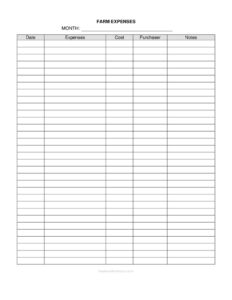
Monthly Farm Expenses Form
Track every farm cost with our free Monthly Farm Expenses Form template, keep tax-ready records, and download it free in PDF and DOCX today.
PDF
DOC
7 downloads
0
likes
Download Files
- DOC
A Monthly Farm Expenses Form is a simple recordkeeping sheet used to log every business purchase your farm makes during a single month, capturing the expense, date, cost, purchaser, and supporting notes. Most farmers use it to stay organized for tax season and to see exactly where their money goes. It’s free to download here in both PDF and DOCX formats, with no signup required.
What Is a Monthly Farm Expenses Form?
A Monthly Farm Expenses Form is a structured log that documents the operating costs of running an agricultural business over the course of one calendar month. It is typically filled out by the farm owner, a family member, a bookkeeper, or whoever handles purchasing. The form records what was bought, when, how much it cost, who bought it, and any context worth remembering. Unlike a shoebox full of loose receipts, this form turns scattered purchases into a clean, line-by-line summary. It serves as a working ledger that feeds into your annual tax preparation and gives you a month-by-month picture of cash going out the door for feed, seed, fuel, repairs, supplies, and more.
When Do You Need a Monthly Farm Expenses Form?
This form is useful any time money leaves your farm operation. Common situations include:
- Tax preparation — when you need an organized record of deductible business expenses for your Schedule F or equivalent farm tax filing.
- Tracking seasonal costs — comparing what you spent on inputs like seed and fertilizer in planting months versus harvest months.
- Reconciling receipts — matching each purchase to a paper or digital receipt so nothing gets lost before year-end.
- Managing multiple buyers — when a spouse, partner, or hired hand also makes purchases and you want every expense attributed correctly.
- Applying for loans or grants — lenders and agricultural programs often want to see documented operating expenses.
- Monitoring cash flow — spotting unexpected spikes in fuel, vet bills, or equipment repairs before they hurt your budget.
What a Monthly Farm Expenses Form Should Have
A complete and useful expense form keeps each entry clear and verifiable. At minimum it should capture the month being recorded, a row for each individual purchase, the date the money was spent, a description of the expense, the exact cost, the name of the person who made the purchase, and a notes column for extra detail. The header reminder to keep all receipts is part of the form’s purpose: the log and the receipts work together. Together these elements create a record that you, your accountant, or a tax preparer can rely on without guessing what a charge was for or whether it qualifies as a business expense.
How to Fill Out a Monthly Farm Expenses Form
Work through the form field by field, adding one line for each purchase:
- Month — Enter the calendar month and year this sheet covers, such as “March 2025.” Use one form per month so totals stay clean.
- Date — Record the exact date of each purchase. This matters for matching receipts and for falling inside the correct tax year.
- Expenses — Describe what was bought in plain terms: “50 lb bags layer feed,” “diesel for tractor,” “fence posts,” or “vet visit, cattle.” Be specific enough that you’ll understand it months later.
- Cost — Write the amount paid, including tax. Enter the full figure for that line item exactly as shown on the receipt.
- Purchaser — Name the person who made the purchase. This helps when more than one household or staff member buys on the farm’s behalf.
- Notes — Add useful context: the vendor name, payment method, whether it was paid by cash or card, or a reminder that the receipt is filed.
At month’s end, total the Cost column and file the sheet with that month’s receipts.
Keeping Receipts and Staying Tax-Ready
The header note on this form says it plainly: for tax purposes, keep all of your receipts and careful notes on every business purchase. The expense log is only as strong as the documentation behind it. Tax authorities generally expect you to be able to back up each deduction with proof of the purchase, so staple, scan, or file receipts alongside the corresponding monthly sheet. Many farmers categorize expenses in the Notes column — for example, tagging entries as feed, fuel, supplies, repairs, or labor — so that at year-end they can quickly group costs into the categories their tax form requires. Keeping these monthly forms together in a binder or folder builds a complete annual record that makes filing far less stressful.
Tips for Getting the Most From Your Expense Log
Fill out the form as purchases happen rather than trying to reconstruct a whole month from memory. Keep the blank form handy near where you do paperwork, or use the DOCX version on a computer and back it up regularly. If two people make purchases, agree on who enters them so nothing is double-counted or missed. Round nothing — record exact costs. And separate personal purchases from farm purchases entirely; mixing them is one of the fastest ways to create headaches at tax time.
Common Mistakes to Avoid
- Vague descriptions — Writing only “supplies” or “store” leaves you guessing later; name the item and vendor.
- Forgetting the Purchaser field — When several people buy for the farm, an unattributed expense can be hard to verify.
- Letting receipts pile up unmatched — Log purchases promptly so receipts and entries always line up.
- Mixing months — Putting purchases from different months on one sheet defeats the monthly tracking purpose.
- Combining personal and farm costs — Only business purchases belong on this form.
- Skipping the notes — A blank Notes column today becomes a mystery at tax time.
Frequently Asked Questions
What is a Monthly Farm Expenses Form used for? It is used to record every business purchase your farm makes in a given month, including the date, description, cost, and who bought it. Farmers rely on it to stay organized for taxes and to monitor where their operating dollars go throughout the year.
How do I fill out the Monthly Farm Expenses Form? Enter the month at the top, then add one line per purchase with the date, a clear description, the exact cost, the purchaser’s name, and any helpful notes. Total the costs at the end of the month and file the sheet with the matching receipts.
Do I need to keep receipts if I use this form? Yes. The form itself reminds you to keep all receipts, because the log and the receipts work together as proof of your expenses. Tax authorities generally expect documentation to support deducted business costs, so store receipts alongside each monthly sheet.
Is this form legally binding? It is a recordkeeping tool, not a contract, so it is not “binding” in the way an agreement is. However, accurate, well-kept expense records are important for tax filing and may be requested during an audit or loan application.
How much does the Monthly Farm Expenses Form cost? It is completely free to download from Business Forms Pro in both PDF and DOCX formats, with no signup or payment required. You can print copies or edit the DOCX version to fit your farm.
Can I customize the form for my farm? Absolutely. The DOCX version can be edited to add expense categories, a running total, vendor columns, or anything else your operation needs. Many farmers tweak the Notes column to tag entries by category for easier tax sorting.
This template is provided as a general example for informational purposes only and does not constitute legal, financial, or tax advice. Recordkeeping and tax requirements vary by jurisdiction and by individual circumstances, so consult a qualified accountant or tax professional about your specific farm.
Related Forms
- Farm Store Order Form
- Farm Equipment Record
- Animal Profile Record
- Field History Sheet
- Dairy Record Keeping Form
- Farmers Market Sales Record
Browse more in Agriculture.