
Navigation Log
Plan and track your VFR cross-country flights with this free Navigation Log template — record checkpoints, headings, fuel, and times. Free download.
PDF
14 downloads
0
likes
Download Files
A Navigation Log is a structured flight-planning worksheet pilots use to organize a cross-country route into measurable legs — recording courses, headings, distances, fuel burn, and time estimates before takeoff and actual values in flight. The most common reason pilots reach for one is to plan a VFR cross-country and stay oriented leg by leg while airborne. This template is free to download in PDF and DOCX, with no signup required.
What Is a Navigation Log?
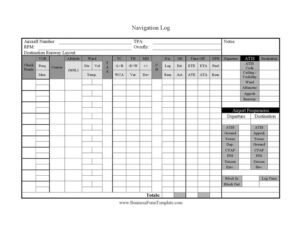
A Navigation Log is a pilot’s working document for dead-reckoning and pilotage navigation. It breaks a planned route into checkpoints and captures the calculations needed to fly from one to the next — true course, wind correction angle, true heading, magnetic heading, compass heading, leg distance, groundspeed, estimated time en route, and fuel consumption. It also gathers the operational data you need before and during the flight: departure and destination ATIS, tower, ground, approach, CTAF, FSS, and Unicom frequencies, field elevations, runway information, and block times. Student pilots use it to learn navigation discipline, while experienced pilots use it as a quick-reference planning sheet and an in-flight workload manager.
When Do You Need a Navigation Log?
- Planning a VFR cross-country flight where you must navigate by checkpoints, headings, and timing rather than rely solely on GPS.
- Completing dual or solo cross-country requirements during primary or instrument training and demonstrating planning skills to an instructor or examiner.
- Calculating fuel reserves and ETEs to confirm you can reach the destination — and an alternate — with legal margins.
- Preparing a backup plan in case of GPS or electronic failure, so you can continue navigating with paper, a watch, and the compass.
- Briefing a flight with a safety pilot or passenger and tracking actual times against estimates en route.
- Logging arrival data, block times, and totals for your personal records or aircraft logs after the flight is complete.
What a Navigation Log Should Have
A complete Navigation Log captures three layers of information. First, route data: aircraft number, departure and destination, checkpoints, VOR frequencies and identifiers, courses, altitudes, and the wind, temperature, and speed values that feed your heading math. Second, the navigation calculations themselves: true airspeed, true course with left/right wind correction angle, true heading with east/west variation, magnetic heading with deviation, compass heading, leg and remaining distance, estimated and actual groundspeed, time off, ETE, ETA, ATE, ATA, fuel per hour, and fuel remaining. Third, the operational reference block: ATIS codes, ceiling and visibility, altimeter settings, approach and runway assignments, field elevations, and a tidy list of airport frequencies for both departure and destination airports.
How to Fill Out a Navigation Log
- Enter the Aircraft Number, Departure, and Destination at the top, along with planned TPA, RPM, and the cruise Altitude (MSL).
- List your Check Points down the rows, adding any VOR Freq./Iden. and noting Overfly points and the Destination Runway Layout.
- Record forecast Wind Dir/Vel/Temp. for each leg, then enter TAS and the Course.
- Work the heading chain: apply TC -L+R/WCA to get true heading, TH -E+W/Var for variation, MH +/- / Dev for deviation, and arrive at CH.
- Fill Dis. Leg/Rem for each segment and compute GS Est./Act. groundspeeds.
- Enter Time Off ETE/ETA/ATE/ATA and the GPH Fuel/Rem fuel figures, then log Notes.
- Pull weather into the brief: ATIS, ATIS Code, Ceiling / Visibility, Wind, Altimeter, Apprch, and Runway.
- Complete the Airport Frequencies blocks — Departure and Destination ATIS, Ground, Tower, Dep./Apprch, CTAF, FSS, Unicom, and Elev. — then record Block In, Block Out, Log Time, and Totals.
Working Through the Heading Calculations
The heart of this log is the dead-reckoning sequence that converts a course on the chart into a number you can hold on the compass. Start with the true course measured between checkpoints, then apply the wind correction angle — adding for a right correction and subtracting for a left — to find true heading. Apply magnetic variation (east subtract, west add) to get magnetic heading, and finally the aircraft’s compass deviation card value to reach the compass heading you actually fly. Pair each leg’s heading with its distance and groundspeed to predict time en route and fuel burn. Updating the actual columns in flight tells you immediately whether winds aloft are stronger or weaker than forecast.
Using It in the Cockpit
A Navigation Log is only as useful as the discipline behind it. Before departure, get the current ATIS and note the code so you can confirm it hasn’t changed. Set your watch or timer at Block Out and again at Time Off so your timing references match the leg estimates. As you cross each checkpoint, mark the ATA and recompute remaining time and fuel — this rolling check is your early warning if the flight is running behind. Keep the destination frequency block visible so the descent and approach sequence stays unhurried, and capture Block In and Totals after shutdown for your records.
Common Mistakes to Avoid
- Confusing the sign conventions — adding when you should subtract variation or wind correction — which produces a heading that drifts you off course.
- Planning fuel with no reserve, leaving no margin for headwinds, diversions, or holding.
- Choosing vague checkpoints that are hard to identify from the air, instead of distinct, unmistakable landmarks.
- Forgetting to note the ATIS code, so you can’t tell whether the weather broadcast has been updated.
- Leaving the actual columns blank in flight and losing the comparison that reveals stronger-than-forecast winds.
- Using outdated winds-aloft or weather data, which throws off every downstream heading and time calculation.
Frequently Asked Questions
What is a Navigation Log used for? It is a flight-planning and in-flight tracking worksheet that organizes a cross-country route into legs with courses, headings, distances, times, and fuel figures. Pilots use it to navigate by dead reckoning and pilotage and to monitor progress against their plan.
How do I fill out the heading columns? Begin with true course, apply the wind correction angle to get true heading, then variation for magnetic heading, then deviation for the compass heading you actually fly. Each step is a small addition or subtraction noted in the TC, TH, MH, and CH columns.
Do I still need a paper Navigation Log if I use GPS? Many pilots keep one as a backup and a planning tool, since electronics can fail and a log gives you a fallback for headings, timing, and fuel. It is also a core skill demonstrated during flight training and checkrides.
What do ETE, ETA, ATE, and ATA mean? ETE is estimated time en route for a leg, ETA is estimated time of arrival, ATE is actual time en route, and ATA is actual time of arrival. Comparing estimates to actuals shows whether winds are affecting your groundspeed.
Is this Navigation Log free to download? Yes. You can download this template free in both PDF and DOCX formats with no signup required, and print as many copies as you need for your flights.
Can I customize the template for my aircraft? Absolutely. The DOCX version lets you adjust columns, add checkpoint rows, or pre-fill recurring data such as aircraft number and typical cruise figures to suit your airplane and routes.
This Navigation Log template is a general example provided for informational purposes only and is not flight instruction or operational advice. Always rely on current charts, weather, and your aircraft’s documentation, and follow applicable aviation regulations and your training; consult a qualified flight instructor or aviation professional for guidance specific to your operation.
Related Forms
- Pilot Record of Certificates and Ratings
- Pilot Logbook
- Flight Review Log
- Flight Proficiency And Medical Certificate History
- Ground Instruction Log
- Private Pilot Endorsements
Browse more in Pilot.