
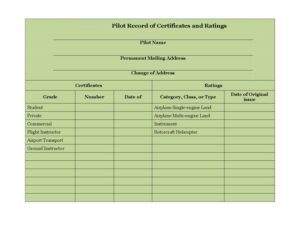
Pilot Record of Certificates and Ratings
Track your airman certificates, ratings, and grades with the free Pilot Record of Certificates and Ratings template — free download in PDF and DOCX.
PDF
DOCX
0
likes
Download Files
- DOCX
The Pilot Record of Certificates and Ratings is a personal logging document that lets a pilot list every airman certificate and rating they hold, along with the grade, certificate number, and dates earned. Pilots most often use it to keep an organized, at-a-glance summary of their flight credentials for recordkeeping, flight reviews, and job applications. It is free to download here in both PDF and DOCX, with no signup required.
What Is a Pilot Record of Certificates and Ratings?
A Pilot Record of Certificates and Ratings is a one-page summary that a pilot maintains to document the credentials they have earned over their flying career. Rather than digging through a wallet certificate or scattered logbook endorsements, this form consolidates the grade of each certificate (Student, Private, Commercial, Flight Instructor, and so on), the certificate number, the category and class or type of aircraft, and the dates of issue. It is a personal recordkeeping tool — not an official issuance document — that helps pilots, instructors, and flight schools quickly verify what a pilot is authorized to do and when each privilege was obtained.
When Do You Need a Pilot Record of Certificates and Ratings?
This form is useful any time you need a clean, accurate snapshot of your aviation credentials. Common situations include:
- Applying for a flying job — employers and chief pilots want a clear list of your certificates, ratings, and dates.
- Preparing for a flight review or checkride — bring an organized record to confirm currency and qualifications.
- Adding a new rating — update the record each time you earn an instrument rating, multi-engine class, or type rating.
- Renting aircraft or joining a flying club — operators often ask for proof of your grade and ratings before checkout.
- Tracking instructor credentials — flight and ground instructors can document CFI and ground instructor authorizations in one place.
- Replacing a lost certificate — having your certificate number and issue date recorded speeds up requesting a duplicate.
What a Pilot Record of Certificates and Ratings Should Have
A complete record ties each credential to identifying details so the entry is unambiguous. At minimum, an effective form captures the pilot’s name and current mailing address, every certificate grade held, the corresponding certificate number, and the category, class, or type associated with each rating. It should also note the date of original issue and the date each subsequent rating was added. Because certificates build on one another — a Commercial certificate, for example, sits atop earlier Student and Private grades — listing them in sequence with dates creates a useful timeline. A change-of-address line keeps the document current, since pilots are expected to keep their address up to date.
How to Fill Out a Pilot Record of Certificates and Ratings
- Pilot Name: Enter your full legal name exactly as it appears on your airman certificate.
- Permanent Mailing Address: Write your current permanent address used for official aviation correspondence.
- Change of Address: If you have moved, note your new address here so the record reflects your current location.
- Certificates: List each certificate you hold, then record its Grade — for example Student, Private, Commercial, Airline Transport, Flight Instructor, or Ground Instructor.
- Number: Enter the certificate number for each credential.
- Date of (original issue): Record the Date of Original Issue for the certificate.
- Ratings: Under each certificate, list your ratings by Category, Class, or Type — such as Airplane Single-engine Land, Airplane Multi-engine Land, Rotorcraft Helicopter, or Instrument.
- Dates for added ratings: Note the date each rating was added so your progression is traceable.
- Review: Check spelling, numbers, and dates against your physical certificate before saving or printing.
Understanding Grades and Ratings on the Form
The form distinguishes between a certificate grade and a rating, and keeping the two straight makes the record far more useful. The grade describes your level of privilege — Student, Private, Commercial, or Airline Transport — while flight and ground instructor grades describe teaching authority. Ratings, by contrast, describe what you may fly or operate: a category such as Airplane or Rotorcraft, a class such as Single-engine Land or Multi-engine Land or Helicopter, and an Instrument rating that expands your privileges in instrument conditions. A pilot might therefore hold a Commercial grade with an Airplane Multi-engine Land class rating and an Instrument rating, all recorded as separate lines. Listing each clearly avoids confusion when others read your record.
Keeping the Record Accurate Over Time
Treat this document as a living record. Each time you earn a new rating, pass a checkride, or upgrade your certificate, add a dated entry rather than rewriting the page. Store a copy alongside your logbook and a scanned backup in case the original is misplaced. If you move, update the change-of-address line promptly. While this personal record is convenient, remember that your actual airman certificate remains the authoritative proof of your privileges — the form simply summarizes it for your own reference and for sharing with employers, instructors, or rental operators.
Common Mistakes to Avoid
- Mismatched names: Using a nickname instead of the legal name printed on the certificate.
- Wrong certificate number: Transposing digits — always copy directly from the physical certificate.
- Missing dates: Leaving the original issue date or rating dates blank, which breaks the timeline.
- Confusing grade with rating: Listing a class like Multi-engine Land under grade, or a grade under ratings.
- Outdated address: Forgetting to update the mailing or change-of-address fields after a move.
- Treating it as official: Relying on this summary instead of your actual certificate for legal proof of privileges.
Frequently Asked Questions
What is a Pilot Record of Certificates and Ratings used for? It is a personal summary that consolidates all of a pilot’s certificates, grades, ratings, certificate numbers, and issue dates in one place. Pilots use it for job applications, flight reviews, rental checkouts, and general recordkeeping so they don’t have to search through multiple documents.
Is this form an official certificate? No. This is a personal recordkeeping template, not an issued credential. Your actual airman certificate is the authoritative document that proves your privileges; this form simply organizes the same information for quick reference.
How do I fill in the grade versus the rating? The grade is your level of privilege — such as Student, Private, Commercial, Airline Transport, Flight Instructor, or Ground Instructor. The rating describes the category, class, or type you are authorized for, such as Airplane Single-engine Land, Multi-engine Land, Rotorcraft Helicopter, or Instrument.
Do I need to update it every time I add a rating? Yes, it is good practice. Each time you earn a new rating or upgrade your certificate, add a dated entry so your record stays current and accurately reflects your privileges and progression.
How much does this template cost? Nothing. The Pilot Record of Certificates and Ratings is available as a free download in both PDF and DOCX formats, with no signup or payment required.
Where should I keep the completed record? Store a copy with your logbook and keep a scanned backup in a secure location. Having both a physical and digital copy makes it easy to share with employers or instructors and to reference if your original certificate is misplaced.
This template is provided as a general example for informational purposes only and is not legal, regulatory, or aviation-compliance advice. Certificate and rating requirements vary by country and aviation authority — always verify the details against your official airman certificate and consult the appropriate aviation regulator or a qualified professional.
Related Forms
- Flight Proficiency And Medical Certificate History
- Pilot Logbook
- Navigation Log
- Ground Instruction Log
- Private Pilot Endorsements
- Flight Review Log
Browse more in Pilot.