
Pilot Logbook
Download a free Pilot Logbook template to record flight time, landings, and endorsements accurately in PDF or DOCX — free download, no signup required.
PDF
DOCX
46 downloads
0
likes
Download Files
- DOCX
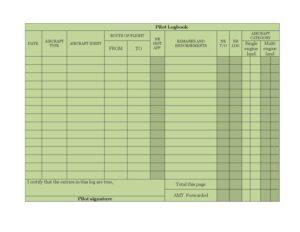
A Pilot Logbook is the official record a pilot keeps to document every flight, including date, aircraft, route, conditions, and the type of piloting time accumulated. Pilots use it most often to log flight experience toward certificates, ratings, currency, and recency requirements. This template is free to download in PDF and DOCX, with no signup required.
What Is a Pilot Logbook?
A Pilot Logbook is a chronological record of a pilot’s aeronautical experience. It is maintained by the pilot personally and is used to track total flight time, takeoffs and landings, instrument approaches, cross-country experience, and instructional endorsements. Aviation authorities and flight schools rely on logbook entries to verify that a pilot meets the experience and currency standards for a given certificate, rating, or flight operation. Each row captures a single flight or training session, and columns are totaled per page and carried forward to a running grand total. Whether you fly single-engine land aircraft, multi-engine aircraft, or log simulator sessions, the logbook is your primary proof of training and qualification over time.
When Do You Need a Pilot Logbook?
A logbook is essential any time flight experience must be recorded, demonstrated, or verified. Common situations include:
- Student pilot training — recording dual-received instruction and tracking progress toward a private certificate.
- Solo and cross-country flights — documenting pilot-in-command and cross-country time required for ratings.
- Instrument currency — logging actual instrument, simulated instrument (hood), and the number of instrument approaches to maintain recency.
- Night currency — recording night takeoffs and landings to stay legal for carrying passengers after dark.
- Flight reviews and checkrides — presenting verified totals and endorsements to an instructor or examiner.
- Instructor record-keeping — a CFI logging time given as a flight instructor and signing student endorsements.
What a Pilot Logbook Should Have
A complete logbook entry ties the flight details to the experience it earned. Every row should clearly identify the flight, the aircraft, and how the time breaks down. Key elements include the date, aircraft type and identification, the route flown (from and to), takeoffs and landings, instrument approaches, and remarks or endorsements. It should categorize the aircraft (single-engine land, multi-engine land) and class, capture conditions of flight (day, night, actual or simulated instrument, flight simulator), and break time down by type of piloting time — cross country, as flight instructor, dual received, and pilot-in-command including solo. A signature line and per-page totals that carry forward complete the record.
How to Fill Out a Pilot Logbook
- Date: Enter the date of the flight or training session.
- Aircraft Type and Aircraft Ident: Record the make/model designation and the registration (tail) number.
- Route of Flight, From, To: Note the departure and destination airports and any intermediate points in the route.
- Nr Inst App.: Enter the number of instrument approaches flown during the session.
- Nr T/O and Nr Ldg: Log the number of takeoffs and landings, noting day versus night where required.
- Aircraft Category and Class: Mark the appropriate column — Single Engine Land or Multi Engine Land — to categorize the time.
- Conditions of Flight: Allocate time to Night, Actual Instrument, Simulated Instrument (Hood), or Flight Simulator as applicable.
- Type of Piloting Time: Distribute the duration across Cross Country, As Flight Instructor, Dual Received, and Pilot In Command (Incl. Solo).
- Total Duration of Flight: Record the total time for the flight.
- Remarks and Endorsements: Add notes, lesson content, or instructor endorsements.
- Pilot Signature: Sign the entry, then complete Total This Page, Amt. Forwarded, and Total To Date.
Understanding Totals and Carrying Forward
The running-total system is what gives a logbook its value over years of flying. At the bottom of each page, sum every numeric column to produce Total This Page. The Amt. Forwarded line copies the cumulative totals from the previous page, and adding the two gives the Total To Date — your career running figures. When you start a new page, the prior page’s Total To Date becomes the new Amt. Forwarded. Done consistently, this lets you read your total time, cross-country time, night time, instrument time, and landings at a glance without re-adding every entry. Accurate column math matters because errors compound across pages, so double-check that each category’s individual times add up to the Total Duration of Flight for the row.
Tips for Accurate Logging
Make entries as soon as possible after each flight while details are fresh. Record times in the same unit (typically decimal hours) throughout to keep totals consistent. When the flight involves dual instruction, the same duration usually appears under both Dual Received and Total Duration of Flight, while your instructor logs it As Flight Instructor in their own book. For instrument practice, distinguish carefully between Actual Instrument (in real conditions) and Simulated Instrument (Hood). Keep the Remarks column meaningful — note maneuvers practiced, airports visited, or the specific endorsement given — because that context is invaluable during a checkride or job interview. Many pilots keep both a paper logbook and a digital backup so a lost book never means lost experience.
Common Mistakes to Avoid
- Mismatched totals: The sum of piloting-time categories should reconcile with the Total Duration of Flight for each row.
- Forgetting to carry forward: Skipping the Amt. Forwarded step breaks your running Total To Date.
- Confusing instrument types: Mixing Actual Instrument with Simulated Instrument (Hood) or simulator time misrepresents your experience.
- Omitting endorsements: Failing to record solo, cross-country, or flight-review endorsements in Remarks can cost you proof when you need it.
- Inconsistent time units: Switching between minutes and decimal hours creates totaling errors.
- Leaving entries unsigned: An unsigned or incomplete row weakens the record’s reliability.
Frequently Asked Questions
What is a Pilot Logbook used for? It is the official record of a pilot’s flight experience, documenting each flight’s date, aircraft, route, conditions, and time. Pilots use it to prove they meet the experience, currency, and recency requirements for certificates, ratings, and specific operations.
How do I fill out a Pilot Logbook? Record one flight per row: enter the date, aircraft type and identification, route, takeoffs, landings, and approaches, then allocate the duration across the condition and piloting-time columns. Finish by signing the entry and updating the per-page and to-date totals.
Does a Pilot Logbook need to be signed or witnessed? The pilot signs their own entries, and a flight instructor signs the endorsements and instructional flights they give. Formal witnessing or notarization is generally not required, but instructor endorsements must be properly worded and dated according to your aviation authority’s rules.
Is a paper logbook still acceptable? Yes, paper logbooks remain widely accepted, and many pilots keep both paper and electronic records. Requirements for how experience must be documented vary by country and authority, so confirm what your regulator and employer accept.
What’s the difference between Dual Received and Pilot in Command time? Dual Received is time flown while receiving instruction from an authorized instructor, while Pilot In Command (Incl. Solo) is time when you are the sole manipulator or legally acting as PIC. The same flight may count differently depending on your role and the rules that apply.
How much does this Pilot Logbook template cost? This template is completely free to download in both PDF and DOCX formats with no signup required. You can print it for a physical logbook or edit the DOCX version to suit your training and recording needs.
This Pilot Logbook template is a general example provided for informational purposes only and is not legal, regulatory, or professional aviation advice. Logging requirements, currency standards, and endorsement rules vary by country and aviation authority — consult your applicable regulations and a qualified flight instructor or aviation professional before relying on it.
Related Forms
- Navigation Log
- Pilot Record of Certificates and Ratings
- Flight Proficiency And Medical Certificate History
- Ground Instruction Log
- Flight Review Log
- Private Pilot Endorsements
Browse more in Pilot.