
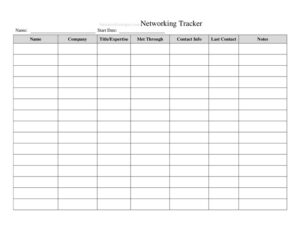
Networking Tracker
Organize your professional contacts and follow-ups with a free Networking Tracker template, available as a free download in PDF and DOCX.
PDF
DOCX
6 downloads
0
likes
Download Files
- DOCX
A Networking Tracker is a simple log used to record the people you meet, where you met them, and what you agreed to do next so no valuable connection slips through the cracks. The most common reason people use one is to manage follow-ups after conferences, interviews, or industry events. It’s free to download in both PDF and DOCX, with no signup required.
What Is a Networking Tracker?
A Networking Tracker is a structured record that captures the details of your professional relationships in one place. It’s used by job seekers, sales professionals, founders, freelancers, and anyone building a career network to document who they met, how to reach them, and what action comes next. Rather than letting business cards pile up or contacts disappear into a crowded inbox, the tracker turns scattered introductions into an organized, searchable list. It documents names, companies, contact details, the context of the meeting, and follow-up status. The goal is consistency: a single place to see whom you owe an email, who owes you one, and which relationships deserve more attention. Used regularly, it transforms networking from a series of one-off conversations into an intentional, trackable habit.
When Do You Need a Networking Tracker?
A Networking Tracker earns its keep any time you meet more people than you can comfortably remember. Common situations include:
- Attending conferences or trade shows where you collect dozens of cards in a single day and need to follow up before the connections go cold.
- Running a job search and tracking recruiters, hiring managers, referrals, and informational-interview contacts across multiple companies.
- Building a sales or business-development pipeline where each prospect needs timely, personalized outreach.
- Launching a startup or freelance business and nurturing relationships with potential investors, partners, mentors, and clients.
- Joining a new industry or association and wanting to remember context about each person you meet at chapter meetings or mixers.
- Reconnecting periodically with past colleagues, alumni, and dormant contacts so your network stays warm rather than transactional.
In each case, the tracker answers the questions that derail good intentions: Who was that? Where did we meet? What did I promise to send?
What a Networking Tracker Should Have
A useful tracker balances enough detail to be helpful without becoming a chore to maintain. The essential elements include the contact’s name and role, their company or organization, and at least one reliable way to reach them, such as an email address, phone number, or LinkedIn profile. It should capture the date and place you connected, a short note about the conversation or how you met, and the relationship type or category. Crucially, it needs a follow-up section: the next action you plan to take, a due date, and a status field to mark whether you’ve reached out. A priority or rating column helps you focus on the most promising relationships, and a notes field gives you space for personal details that make future outreach feel genuine.
How to Fill Out a Networking Tracker
- Enter the contact’s name as soon as possible after meeting them, while the spelling and pronunciation are fresh.
- Add their title and company so you remember their role and where they fit in your industry.
- Record contact details — email, phone, and LinkedIn or other social profiles. Include whatever they shared and verify the email if you can.
- Log the date and location you met, whether it was a specific event, a referral, or an online introduction.
- Write a short context note describing the conversation, shared interests, or the reason you connected.
- Assign a category or relationship type such as prospect, mentor, peer, recruiter, or partner.
- Define the next action — send a resume, share an article, schedule a call, or simply send a thank-you.
- Set a follow-up date and update the status field (To Do, Sent, Waiting, Done) each time you make contact.
- Rate the priority so high-value relationships rise to the top of your list.
Tips for Getting the Most From Your Tracker
The best tracker is the one you actually update, so make logging a contact part of your routine rather than an afterthought. Set aside ten minutes after every event to transfer business cards and notes into the sheet while details are still vivid. Sort or filter by follow-up date to see who needs attention this week, and add a recurring reminder to revisit dormant contacts every few months. Personalize each follow-up using your context notes — referencing a shared interest or a specific moment from your conversation makes your outreach memorable. Treat the status column honestly; a connection marked “Done” with no real value exchanged is worse than one you’re still working. Over time, patterns emerge that show which events, introductions, and outreach styles produce the strongest relationships.
Networking Tracker vs. a Full CRM
A Networking Tracker is intentionally lightweight, and that’s its strength. A customer relationship management (CRM) platform is built for sales teams managing complex pipelines, automated email sequences, and revenue forecasting, often at a recurring cost and with a learning curve. A simple tracker, by contrast, requires no subscription, opens instantly, and is easy to customize. For individuals managing personal networking, a job search, or early-stage business development, a spreadsheet-style tracker captures everything you need. Many people start with this template and graduate to a CRM only once their volume of contacts genuinely outgrows a single document — and even then, the habits built here transfer directly.
Common Mistakes to Avoid
- Delaying entry until you’ve forgotten names and context — log contacts the same day you meet them.
- Skipping the follow-up date, which turns the tracker into a contact list instead of an action plan.
- Writing vague notes like “nice person” that give you nothing useful to reference later.
- Never updating the status, so you lose track of who is waiting to hear back from you.
- Treating every contact as equal instead of prioritizing the relationships most worth your time.
- Letting connections go cold by never scheduling periodic check-ins with valuable contacts.
Frequently Asked Questions
What is a Networking Tracker used for? It’s used to organize the professional contacts you meet, record where and how you connected, and manage follow-up actions. People rely on it during job searches, conferences, sales outreach, and ongoing relationship building so no opportunity is forgotten.
How do I fill out a Networking Tracker? Add each new contact’s name, title, company, and contact details, then note the date and place you met along with a short conversation summary. Finally, set the next action, a follow-up date, and a status so you always know what to do next.
Is the Networking Tracker free to download? Yes. You can download it from Business Forms Pro at no cost, in both PDF and DOCX formats, with no signup or account required. Use the DOCX version if you want to add or rename columns.
How often should I update my tracker? Add new contacts within a day of meeting them, and review your follow-up dates at least weekly so pending outreach doesn’t pile up. Revisiting the full list every couple of months also helps you reconnect with relationships that have gone quiet.
Can I use this tracker for a job search? Absolutely. It’s well suited to logging recruiters, hiring managers, referrals, and informational-interview contacts, with the status and next-action fields helping you stay on top of thank-you notes and follow-ups across multiple applications.
Do I need special software to use it? No. The DOCX version opens in common word processors and the PDF can be printed or filled digitally, so you can start tracking contacts immediately without buying anything.
This template is provided as a general example for informational purposes only and does not constitute legal, financial, or professional career advice. Networking practices and privacy expectations vary by context and jurisdiction — when handling others’ personal data, follow applicable regulations and consult a qualified professional where appropriate.
Related Forms
- Work Seeking Log
- Wine Tasting Log
- Document Tracker
- Auction Buy List
- Prospect List
- Monthly Project Timetable
Browse more in Log and Inventory.