
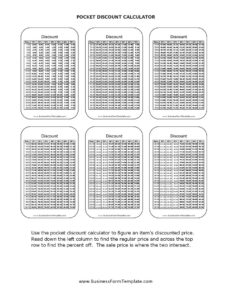
Pocket Discount Calculator
Use the free Pocket Discount Calculator template to figure out sale prices, savings, and final costs fast — free download in PDF and DOCX.
PDF
0
likes
Download Files
A Pocket Discount Calculator is a simple, portable worksheet that helps you quickly figure out the sale price of an item, the dollar amount you save, and what you’ll actually pay after a markdown is applied. People most often use it while shopping or comparing deals to avoid mental-math mistakes at the register. It’s free to download in both PDF and DOCX formats, with no signup required.
What Is a Pocket Discount Calculator?
A Pocket Discount Calculator is a compact reference and worksheet for converting a percentage-off offer into real numbers. Instead of guessing whether “30% off” is a genuine bargain, you write down the original price, the discount percentage, and let the form guide you to the final amount. It’s used by everyday shoppers, retail staff verifying register totals, small-business owners pricing clearance items, and budget-conscious households tracking savings. The form documents each part of a discount calculation in one place — the starting price, the reduction, the savings, and the price you pay — so the math is transparent and easy to double-check. Because it’s pocket-sized, you can print it, fold it, and keep it in a wallet or bag for instant use anywhere.
When Do You Need a Pocket Discount Calculator?
This calculator earns its keep in any situation where a percentage or markdown turns into a buying decision. Common scenarios include:
- In-store sales: Quickly check whether a “40% off” rack item fits your budget before you carry it to the till.
- Comparing two offers: Decide between “25% off” at one shop and a flat “$10 off” at another by working out both final prices.
- Coupon stacking: Apply a percentage coupon on top of an already-reduced price and see the true final cost.
- Retail and pricing work: Staff and small-business owners can verify markdown tickets or set clearance prices consistently.
- Budgeting and saving goals: Track how much you actually saved across a shopping trip to feel the impact of waiting for a sale.
- Teaching percentages: Parents and educators use it as a hands-on tool to show how discounts work in real life.
What a Pocket Discount Calculator Should Have
A useful discount calculator captures every figure needed to trust the result. At minimum it should include a field for the original (list) price, the discount percentage or dollar amount, the calculated savings, and the resulting final price. Many versions also add an optional sales tax line so you arrive at the true out-of-pocket total, a space for the item name or description, and a date for record-keeping. A small reference note showing the discount formula — final price = original price × (1 − discount %) — makes the worksheet self-explanatory even if you haven’t used it in a while.
How to Fill Out a Pocket Discount Calculator
- Note the item: Write the product name or a short description so you can tell entries apart when comparing several items.
- Enter the original price: Record the regular, pre-discount price exactly as shown on the tag or shelf.
- Enter the discount: Write the percentage off (for example, 30%) or, if it’s a flat reduction, the dollar amount off.
- Calculate the savings: Multiply the original price by the discount percentage (price × 0.30) to find the dollars saved, or simply copy the flat amount.
- Calculate the final price: Subtract the savings from the original price to get the discounted price.
- Add sales tax (optional): Multiply the discounted price by your local tax rate and add it to find the true total you’ll pay.
- Record the date and total: Note the date and the final out-the-door figure so you have a clear record of the deal.
Quick Tips for Faster, More Accurate Discounts
To estimate a discount in your head, round the price to an easy number first, then adjust. For 10% off, simply move the decimal one place left; for 20%, double that; for 50%, halve the price. A 25% discount is the same as taking a quarter off, and 75% off means you pay only a quarter of the original. When two discounts apply in sequence — say 20% off then an extra 10% — never add them to 30%. Instead, apply them one after another: take 20% off first, then 10% off the new price. The pocket calculator’s step-by-step layout keeps these stacked deals honest so you always see the real number.
Discount Calculator vs. Mental Math
Mental math is fast but error-prone, especially with odd prices like $47.99 or stacked offers. Writing each figure on the Pocket Discount Calculator forces you to slow down for just a few seconds and gives you a paper trail you can review. That matters most when a small percentage applies to a large purchase, where a rounding slip can cost real money. The worksheet is also handy for verifying a cashier’s total or a self-checkout screen, since you can compare your calculated final price against what the register shows before you pay.
Common Mistakes to Avoid
- Adding stacked discounts together: Two 20% offers are not 40% off — apply them sequentially instead.
- Forgetting sales tax: The discounted price isn’t always your final cost; tax can change the comparison between two deals.
- Confusing percent off with percent of: “30% off” means you pay 70% of the price — make sure you subtract correctly.
- Using the wrong original price: Some tags show an inflated “was” price; base your math on the real regular price when you can.
- Rounding too early: Round only at the final step to avoid compounding small errors.
- Skipping the savings line: Knowing the dollars saved — not just the final price — helps you judge whether a deal is genuinely worth it.
Frequently Asked Questions
What is a Pocket Discount Calculator? It’s a small printable worksheet that walks you through converting a percentage-off or dollar-off deal into a final price and total savings. You enter the original price and discount, and the form guides you to the amount you’ll actually pay. It’s designed to be portable and quick to use while shopping.
How do I calculate a discount? Multiply the original price by the discount percentage written as a decimal to find your savings (for example, $80 × 0.25 = $20). Subtract that from the original price to get the final price ($80 − $20 = $60). The form lays out each step so the math is easy to follow.
How do I handle two discounts at once? Apply them one after another rather than adding the percentages. Take the first discount off the original price, then apply the second discount to that new, lower price. The result is always slightly higher than simply adding the two percentages together.
Does the calculator include sales tax? The template includes an optional tax line so you can find your true out-the-door total. Multiply the discounted price by your local tax rate and add it to the final price. Tax rates vary by location, so use the rate that applies where you’re buying.
Can I use this for my retail business? Yes. Store staff and small-business owners can use it to verify markdown tickets, set consistent clearance prices, or double-check register totals. It’s a handy reference for keeping pricing transparent.
Is the Pocket Discount Calculator free to download? Yes, it’s completely free to download in both PDF and DOCX formats with no signup required. Print the PDF for pocket use or edit the DOCX to add your own fields, logo, or tax rate.
This template is a general example provided for informational purposes only and is not financial, tax, or accounting advice. Sales tax rates, pricing rules, and promotional terms vary by location and retailer — verify figures and consult a qualified professional where appropriate.
Official resource: for the rules that apply to your situation, see the Consumer Financial Protection Bureau.
Related Forms
- Date Night Cash Envelope
- Pocket Tip Calculator
- Truth In Lending Statement
- Credit Change Notice
- Simple Payroll Cost Report
- Fun Cash Envelope
Browse more in Money.