
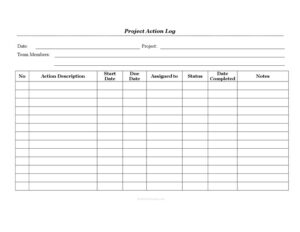
Project Action Log
Track every task, owner, and deadline with our free Project Action Log template, available as a free download in editable PDF and DOCX formats.
PDF
DOC
1 downloads
0
likes
Download Files
- DOC
A Project Action Log is a running list of the tasks, decisions, and follow-up items a team must complete to keep a project on schedule. People most often use it to capture action items from meetings and assign clear owners and due dates so nothing slips through the cracks. You can download this template for free in editable PDF and DOCX formats — no signup required.
What Is a Project Action Log?
A Project Action Log is a structured tracking document that records each outstanding task tied to a project, along with who owns it, when it started, when it’s due, and its current status. It’s typically maintained by a project manager, team lead, or coordinator and updated continuously as work progresses. Unlike a static to-do list, an action log creates accountability by pairing every item with an assigned person, a deadline, and a completion date. It serves as a single source of truth that the whole team can reference during stand-ups, status meetings, and reviews, ensuring everyone knows what’s been done, what’s in progress, and what’s overdue.
When Do You Need a Project Action Log?
An action log is useful any time a project involves multiple tasks, several people, and moving deadlines. Common scenarios include:
- After a kickoff or status meeting — to capture every action item raised so commitments aren’t forgotten once the meeting ends.
- Cross-functional projects — when tasks are spread across different team members or departments and need clear ownership.
- Tracking dependencies — when one task can’t start until another finishes, and you need visibility into start and due dates.
- Resolving open issues — to log corrective actions, blockers, or risks that require follow-up.
- Client or stakeholder reporting — to show progress, completed items, and outstanding work at a glance.
- Project audits or close-out — to demonstrate that every committed action was completed and recorded.
What a Project Action Log Should Have
A complete action log balances brevity with enough detail to be actionable. The essentials include a clear identifier for each action, a concise description of what needs to be done, the person responsible, and the timeline (start and due dates). A status field shows whether the item is open, in progress, or closed, while a completion date confirms when it was finished. A notes column captures context, blockers, or updates. Header fields — the project name, the team members involved, and the log date — frame the document so anyone picking it up understands the scope immediately. Sequential numbering keeps items easy to reference in conversation and email.
How to Fill Out a Project Action Log
- Date: Enter the date you create or last update the log so readers know how current it is.
- Project: Write the project name or code this log belongs to.
- Team Members: List the people working on the project so ownership references are clear.
- No.: Assign each action a sequential number for easy reference.
- Action Description: Describe the task in a short, action-oriented phrase — start with a verb, such as “Draft budget summary.”
- Start Date: Record when work on the item begins or is expected to begin.
- Due Date: Enter the agreed deadline for completion.
- Assigned to: Name the single person accountable for delivering the action.
- Status: Update this as the item moves — for example, Not Started, In Progress, Blocked, or Complete.
- Date Completed: Fill in the actual finish date once the action is done.
- Notes: Add context, dependencies, blockers, or links to supporting documents.
Tips for Keeping Your Action Log Useful
An action log only works if it’s maintained. Review it at the start of every status meeting and update statuses live so the document reflects reality rather than last week’s assumptions. Assign each action to one named individual rather than a group — shared ownership often means no ownership. Keep descriptions specific and measurable so the assignee knows exactly what “done” looks like. Use the notes column to record why a date slipped or who a task is waiting on, which creates a helpful audit trail. Color-coding or sorting by due date can make overdue and high-priority items jump out, but the core discipline is simply touching the log regularly and closing items as they finish.
Action Log vs. Project Plan and Issue Log
It’s easy to confuse an action log with related project documents, but each has a distinct job. A project plan or schedule maps out the broad phases, milestones, and timeline of the whole project, while the action log tracks the granular, day-to-day tasks that keep work moving between those milestones. An issue log or risk register focuses specifically on problems, risks, and their resolutions, whereas an action log captures all follow-up items — routine tasks included. In practice, many teams use the action log as the operational companion to the plan: the plan tells you where you’re going, and the log tells you who is doing what this week to get there.
Common Mistakes to Avoid
- Vague descriptions: Entries like “Follow up” leave the assignee guessing — state exactly what action and outcome are expected.
- No single owner: Assigning items to “the team” or two people dilutes accountability and stalls progress.
- Missing due dates: An action without a deadline has no urgency and tends to drift indefinitely.
- Letting it go stale: A log that isn’t updated between meetings quickly loses credibility and usefulness.
- Never closing items: Forgetting to record the completion date makes it impossible to tell finished work from open tasks.
- Overloading the log: Mixing major risks, decisions, and trivial reminders without structure makes priorities hard to see.
Frequently Asked Questions
What is a Project Action Log used for? It’s used to track every task and follow-up item a project team needs to complete, along with who owns each item and when it’s due. It turns meeting commitments and to-dos into an accountable, trackable record that the whole team can reference.
How do I fill out a Project Action Log? Start by entering the project name, date, and team members at the top, then log each task with a number, description, owner, start and due dates, and status. Update the status and completion date as work progresses, and use the notes field to capture blockers or context.
Who is responsible for maintaining the action log? Usually the project manager, team lead, or a designated coordinator owns the log and keeps it current. However, individual assignees are responsible for updating the status of their own items so the log stays accurate.
What’s the difference between a status and a completion date? The status field shows the current state of an item — such as Not Started, In Progress, or Complete — and changes throughout the task’s life. The completion date is a fixed record of the exact day the action was finished.
Is this template editable? Yes. The template is available in both PDF and DOCX formats, so you can fill it out digitally, add or remove columns, and adapt the status labels to match your team’s workflow.
How much does this Project Action Log template cost? It’s completely free to download from Business Forms Pro in PDF and DOCX, with no signup or payment required. You can use it as-is or customize it for your specific project.
This template is provided as a general example for informational purposes only and does not constitute legal, financial, or professional project-management advice. Project requirements and best practices vary by organization and context — consult a qualified professional for guidance specific to your situation.
Related Forms
- Employee Covid Attestation Log
- Monthly Cleaning Log
- List of Insurance Policies
- Customer Care Log
- Conference Room Schedule
- Quotation Record
Browse more in Log and Inventory.