
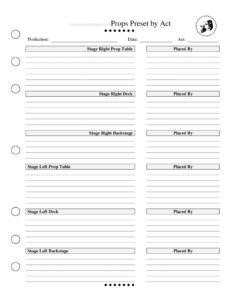
Props Preset By Act
Track every stage prop placement with the free Props Preset By Act template, organized by location and act for smooth shows — free PDF and DOCX download.
PDF
DOCX
5 downloads
0
likes
Download Files
- DOCX
The Props Preset By Act is a stage management worksheet that lists exactly which props must be placed where before a given act begins. Theater crews use it most often to guarantee that every prop table, deck position, and backstage spot is loaded correctly so no actor reaches for a missing item mid-scene. It’s free to download here in both PDF and DOCX formats, with no signup required.
What Is a Props Preset By Act?
A Props Preset By Act is a preset chart that organizes prop placement by stage location and by act. Created and maintained by the stage manager or properties crew, it documents what sits on the stage right and stage left prop tables, what is placed on the deck (the stage floor or scenery), and what waits in the backstage areas for each act of a production. Rather than relying on memory, the crew works from this written reference during the preset—the period before the house opens and at intermissions—so the stage is reset identically for every performance. It is part checklist, part communication tool, ensuring consistency across rehearsals, previews, and the entire run.
When Do You Need a Props Preset By Act?
This form earns its place anytime a production relies on physical props that must appear in specific spots at specific moments. Common situations include:
- Loading the preset before each performance — the crew sets every table and deck position using the chart before the house opens.
- Resetting at intermission — between acts, props get cleared, replaced, or repositioned, and the chart shows exactly what Act Two requires.
- Training swing or understudy crew — a new prop runner can preset accurately without having seen the show.
- Touring or transferring a show — when moving into a new venue, the chart translates the preset to unfamiliar wings and tables.
- Tech rehearsals — as blocking and prop tracks are finalized, the chart captures decisions so they aren’t lost overnight.
- Stage management handoffs — covering a sick crew member or rotating staff becomes seamless with a documented preset.
What a Props Preset By Act Should Have
A complete preset chart identifies the production and act clearly, then maps every prop to a precise location. The essential elements are the production name, the date the chart reflects, the act being preset, and a breakdown of each storage and placement zone: stage right prop table, stage right deck, stage right backstage, stage left prop table, stage left deck, and stage left backstage. It should also record who placed the props so accountability is clear. The best charts use exact prop names and quantities, note any special handling (fragile, pre-loaded, food items), and stay legible enough to scan quickly under low light during a live run.
How to Fill Out a Props Preset By Act
- Production — enter the show’s title so the chart isn’t confused with another production sharing the same space or crew.
- Date — record the date this preset reflects; update it when the prop track changes during tech or previews.
- Act — specify which act the chart covers (Act 1, Act 2, etc.), since presets differ between acts.
- Stage Right Prop Table — list every prop staged on the SR table, with quantities and any handoff notes.
- Stage Right Deck — note props placed directly on the stage floor or set on the stage right side before the act.
- Stage Right Backstage — record items waiting in the SR wings for later entrances.
- Stage Left Prop Table — list everything preset on the SL table the same way.
- Stage Left Deck — capture props positioned on the deck on stage left.
- Stage Left Backstage — note items held in the SL wings.
- Placed By — sign or initial to confirm who completed the preset and is accountable for it.
Organizing by Location for a Faster, Safer Preset
The power of this chart is in its spatial logic. By splitting the stage into stage right and stage left and then layering in prop table, deck, and backstage for each, you mirror how a crew physically moves through the wings. A prop runner working stage right only needs to scan the three SR sections; the deck crew focuses on the two deck columns. This separation reduces collisions in tight backstage corridors and prevents the classic problem of a prop being set on the wrong side, leaving an actor empty-handed for an entrance. Group items in the order an actor or crew member will reach for them, and keep naming consistent with the prop list and run sheets so the whole team speaks the same language.
Keeping the Chart Current Through the Run
Prop tracks rarely survive tech week unchanged. As directors cut business, actors swap which hand carries a letter, or a new prop replaces a broken one, the preset chart must be revised. Date each version, mark superseded copies clearly, and post the current chart at both prop tables. After strike or at the end of a run, the completed charts also serve as a record for remounts, archives, or a future company licensing the show.
Common Mistakes to Avoid
- Leaving the act blank — without specifying the act, crew may load the wrong preset entirely.
- Vague prop names — “the bag” or “papers” causes confusion; name and number each item precisely.
- Forgetting to update the date — an old chart still posted leads to outdated presets after changes.
- Mixing up stage right and stage left — remember directions are from the actor’s perspective, not the audience’s.
- Skipping the Placed By field — no signature means no accountability if something is missing.
- Omitting backstage items — props for later entrances are easy to forget if only tables are tracked.
Frequently Asked Questions
What is a Props Preset By Act used for? It tells the props crew exactly where every prop must be placed—on which table, deck position, or backstage area—before a specific act begins. This keeps the preset consistent across every performance and prevents missing props during the show.
Who fills out the Props Preset By Act? Usually the stage manager, assistant stage manager, or head of properties creates and maintains it, while the prop runners who execute the preset sign the Placed By field. It becomes a shared reference for the entire backstage team.
Why is the form split by stage right and stage left? Backstage space is divided by side, and crew members typically work one wing. Organizing by side and by zone (table, deck, backstage) lets each person quickly find their responsibilities and avoids props being set on the wrong side.
Do I need a separate chart for each act? Yes. Presets change between acts as props are used, cleared, and reset, so each act gets its own chart. Note the act clearly at the top so crew load the right configuration after intermission.
Is this form legally binding? No—it’s an internal production and stage management tool, not a contract. Its purpose is operational consistency and safety backstage, not any legal effect.
Is the Props Preset By Act template free to download? Yes. You can download it here for free in both PDF and DOCX formats with no signup required, then customize the fields to match your production’s prop list and venue layout.
This template is provided as a general example for informational purposes only and is not professional advice. Backstage layouts, safety requirements, and production needs vary by venue and company—adapt the form to your specific show and consult your production’s stage management or technical staff for guidance.
Related Forms
- Costume Information Sheet
- Line Notes Breakdown
- Lighting Inventory Sheet
- Entrance Exit Tracker
- Production Meeting Notes
- Costume Measurement Form
Browse more in Theater.