
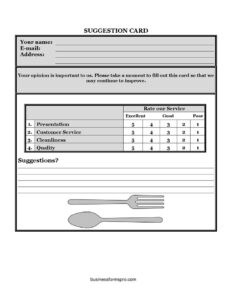
Restaurant Suggestion Card
Download a free Restaurant Suggestion Card template in PDF and DOCX to collect honest guest feedback on food, service, and atmosphere — free download.
PDF
DOCX
8 downloads
0
likes
Download Files
- DOCX
A Restaurant Suggestion Card is a short comment form that invites diners to share feedback on their meal, service, and overall experience. Restaurants use it most often to capture honest, in-the-moment opinions before guests leave so they can fix problems quickly and celebrate what works. You can download this Restaurant Suggestion Card free in both PDF and DOCX formats — no signup required.
What Is a Restaurant Suggestion Card?
A Restaurant Suggestion Card is a compact feedback tool placed on tables, tucked inside check presenters, or offered at the host stand. It lets guests rate and comment on aspects of their visit — food quality, service speed, cleanliness, value, and atmosphere — and to leave suggestions for improvement. Owners, managers, and front-of-house staff use it to gather direct customer input without the cost of a formal survey platform. Unlike an online review, it is private, immediate, and easy to act on the same day. The card documents the guest’s impressions while details are still fresh, giving the restaurant a paper trail of trends, recurring complaints, and the highlights worth keeping.
When Do You Need a Restaurant Suggestion Card?
This card fits almost any food-service setting where you want structured guest input rather than scattered comments. Common situations include:
- Daily table feedback: Place a card on every table or with the check so diners can rate their meal before they leave.
- Menu changes or new dishes: Collect reactions when you launch a seasonal menu, a new chef’s special, or a recipe revamp.
- Service training: Track how guests perceive wait times, attentiveness, and friendliness to coach your team.
- Special events and catering: Hand cards to attendees after a private party, banquet, or holiday service to measure satisfaction.
- Soft openings and grand openings: Gather candid first impressions while you fine-tune operations before going fully public.
- Recovering an unhappy guest: Offer a card when a complaint surfaces so the issue is recorded and a manager can follow up.
What a Restaurant Suggestion Card Should Have
An effective suggestion card stays short enough to finish in under two minutes while still capturing useful detail. Strong cards typically include the date and time of the visit, the server’s name or table number, a set of rating questions (food, service, cleanliness, value, atmosphere), an open comment area for suggestions, and an optional space for the guest’s name, phone, or email so management can reach out. A simple scale — such as excellent, good, fair, or poor, or a 1-to-5 rating — keeps responses easy to tally. A short thank-you line and a note about how feedback is used encourage honest participation.
How to Fill Out a Restaurant Suggestion Card
Whether the card is completed by a guest or set up by the restaurant, the flow is straightforward:
- Visit details: Enter the date and approximate time of the meal so feedback can be matched to a shift.
- Server or table: Note the server’s name or your table number to help managers identify the team involved.
- Rate the food: Mark how the dishes scored on taste, temperature, and presentation using the provided scale.
- Rate the service: Indicate whether staff were attentive, friendly, and timely from greeting to check.
- Rate cleanliness and atmosphere: Score the dining room, restrooms, lighting, and overall ambiance.
- Rate value: Reflect whether the experience felt worth the price paid.
- Add comments and suggestions: Use the open space to explain ratings, name a standout dish or staff member, or suggest improvements.
- Optional contact info: Provide your name, phone, or email if you would like a manager to respond.
- Drop it off: Leave the completed card with your server, in a designated box, or at the host stand.
Designing Cards That Guests Actually Complete
Response rates climb when the card feels effortless. Keep it to one side of a small card or half-sheet, lead with the most important questions, and use checkboxes instead of long writing prompts wherever possible. Position cards where guests have a natural pause — alongside the check or after dessert — and have staff briefly mention that you value their input. Offering a small incentive, such as entry into a monthly drawing or a discount on the next visit, can lift participation, though be sure the reward never pressures guests into inflated scores. Print a few cards in each language your regulars speak if your neighborhood is diverse.
Turning Feedback Into Action
A suggestion card only helps if someone reads it. Set a routine: a manager reviews new cards at the end of each shift, logs scores into a simple spreadsheet, and flags any card with contact information for a personal follow-up within a day or two. Watch for patterns over weeks — a dish that repeatedly draws complaints, a server consistently praised, or slow service on busy nights. Share wins with the team to boost morale and address recurring problems with concrete changes. Closing the loop with guests who left their contact details often converts a one-time critic into a loyal regular.
Common Mistakes to Avoid
- Making it too long: A card with twenty questions discourages completion; keep it focused on what you can act on.
- Forgetting the date and server fields: Without these, you cannot connect feedback to a specific shift or team member.
- Ignoring the cards: Collecting feedback and never reviewing it wastes guests’ goodwill and your printing.
- Leading questions: Phrasing that nudges guests toward positive answers produces useless data.
- No follow-up: Failing to contact guests who requested a response can deepen frustration.
- Pens that don’t work: A small detail, but a missing or dry pen kills participation at the table.
Frequently Asked Questions
What is a Restaurant Suggestion Card used for? It is used to collect direct, structured feedback from diners about their food, service, cleanliness, value, and atmosphere. Restaurants use the cards to spot problems quickly, recognize strong staff, and guide menu and service improvements.
How do I fill out a Restaurant Suggestion Card? Note the date and your server or table number, then rate each category using the provided scale and add written comments or suggestions. Include your contact details only if you would like a manager to follow up, then leave the card with staff or in the drop box.
Is a suggestion card better than online reviews? They serve different purposes; suggestion cards are private, immediate, and let you fix issues before a guest goes online. Many restaurants use both — cards for internal improvement and reviews for public reputation.
Should guests put their name on the card? Names and contact information are optional. Anonymous feedback can be more candid, but providing details lets the restaurant respond personally to a complaint or thank-you.
How much does this template cost? Nothing — the Restaurant Suggestion Card is completely free to download here in both PDF and DOCX formats, with no signup or account required. You can edit the DOCX version to match your branding, questions, and rating scale.
Can I customize the categories on the card? Yes. The DOCX version is fully editable, so you can add questions about specific dishes, delivery, reservations, or anything relevant to your concept while keeping the card short and easy to complete.
This template is a general example provided for informational purposes only and is not legal, financial, or business advice. Feedback practices and any privacy obligations vary by jurisdiction — consult a qualified professional to ensure your forms and data handling meet local requirements.
Related Forms
- Hotel Feedback Card
- Restaurant Your Opinion Card
- Product Feedback Form
- Business Customer Survey Card
- Bar Your Opinion Card
- Event Feedback Survey
Browse more in Feedback.