
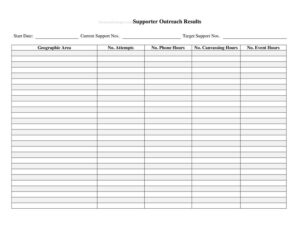
Support Outreach Hours
Track volunteer canvassing and phone banking with our free Support Outreach Hours template, available as a free download in PDF and DOCX.
PDF
DOCX
4 downloads
0
likes
Download Files
- DOCX
A Support Outreach Hours form is a simple tracking sheet that records the time volunteers and staff spend on campaign outreach activities such as canvassing, phone banking, and event support. People most often use it to log volunteer contributions, verify hours for stipends or service credit, and measure the reach of a political or advocacy effort. It is free to download here in both PDF and DOCX formats, with no signup required.
What Is a Support Outreach Hours Form?
A Support Outreach Hours form is a record-keeping document used by campaigns, advocacy groups, nonprofits, and community organizations to capture how much time individuals devote to outreach work. It is typically completed by the volunteer or coordinator and reviewed by a campaign manager or field organizer. The form documents who performed the work, what activity took place, when it happened, and how long it lasted. Beyond simple time tracking, it creates an accountable paper trail that supports reporting, recognition, and planning. Organizations rely on these logs to understand which efforts are gaining traction, to thank contributors accurately, and to demonstrate grassroots engagement to leadership, donors, or oversight bodies.
When Do You Need a Support Outreach Hours Form?
This form is useful any time outreach effort needs to be measured, verified, or reported. Common situations include:
- Door-to-door canvassing — volunteers record the neighborhoods walked and hours spent reaching voters or residents.
- Phone and text banking — staff log call shifts to track total contact hours and coverage across a calling list.
- Tabling and community events — volunteers note time spent staffing information booths, registering voters, or distributing materials.
- Stipend or reimbursement verification — paid fellows and organizers document hours to support compensation requests.
- Service-hour requirements — students or interns earning credit for civic participation submit verified outreach time.
- End-of-cycle reporting — campaign leadership totals volunteer hours to demonstrate engagement to stakeholders.
Types of Outreach Activities to Track
Not all outreach looks the same, and a good log distinguishes between activity types so totals are meaningful. Direct voter contact—canvassing and phone banking—is usually tracked separately from support work such as data entry, materials prep, and event setup. Some teams also separate training time from active outreach time because training does not produce direct contacts. Capturing the activity type alongside the hours lets coordinators calculate efficiency, such as contacts per hour, and decide where to focus future shifts.
What a Support Outreach Hours Form Should Have
A complete and useful outreach hours log generally includes the following elements:
- The volunteer or staff member’s full name and contact information.
- The date of each outreach session.
- A description of the activity performed (canvassing, calls, texting, tabling, etc.).
- Start time, end time, and total hours for each entry.
- The location or assigned area, where applicable.
- A field for results or notes, such as doors knocked or calls completed.
- A space for a coordinator or supervisor signature to verify the hours.
- A running total of hours for the reporting period.
How to Fill Out a Support Outreach Hours Form
Follow these steps to complete the log accurately:
- Enter your identifying information. Write your full name, and add a phone number or email if the form requests contact details for verification.
- Record the date. Note the calendar date for each outreach session on its own line so entries stay separate and easy to total.
- Describe the activity. Specify the type of outreach—door knocking, phone banking, texting, tabling, or event support—so totals can be sorted by activity.
- Log start and end times. Enter the time you began and finished, then calculate the total hours for that session.
- Add location or assignment. If the form includes an area field, write the precinct, neighborhood, or call list you covered.
- Note results. Record outcomes such as doors knocked, conversations had, or calls completed where space allows.
- Obtain verification. Have a coordinator or supervisor sign or initial to confirm the hours, then total the period at the bottom.
Tips for Accurate Outreach Tracking
Log hours in real time or immediately after a shift rather than reconstructing them days later, when details blur and totals drift. Use consistent activity labels across the whole team so one person’s “calls” matches another’s, which keeps combined reports clean. If a shift includes a break, deduct it from the total rather than rounding up. Encourage volunteers to record results, not just hours, because contacts and conversations are what campaigns ultimately care about. Finally, store completed logs together in one place so coordinators can total a week or a full cycle quickly.
How This Differs From a Timesheet
A general employee timesheet focuses purely on hours worked for payroll. A Support Outreach Hours form is more activity-aware: it pairs time with the type of outreach and often the results produced, which makes it a planning and reporting tool as well as a record of effort. While both capture start and end times, the outreach log is built for volunteer coordination and grassroots measurement rather than wage calculation, though it can still support stipend verification when needed.
Common Mistakes to Avoid
- Leaving the date blank — undated entries cannot be verified or sorted into a reporting period.
- Lumping multiple sessions together — combining several days into one line hides patterns and complicates totals.
- Skipping the activity description — hours without context make it impossible to measure outreach by type.
- Forgetting supervisor verification — unsigned logs may be rejected for stipends or service credit.
- Rounding aggressively — repeatedly rounding up overstates volunteer effort and distorts reports.
- Not recording results — logging time but no outcomes wastes the chance to measure real impact.
Frequently Asked Questions
What is a Support Outreach Hours form used for? It records the time volunteers and staff spend on outreach activities such as canvassing, phone banking, and tabling. Campaigns and organizations use it to verify hours, recognize contributors, and report grassroots engagement. It also helps coordinators plan future shifts based on real data.
How do I fill out the form correctly? Enter your name, the date, the type of activity, and your start and end times, then calculate total hours for each session. Add location and results where the form allows, and have a coordinator verify the entries. Logging immediately after each shift keeps your numbers accurate.
Does this form need to be signed or notarized? Notarization is not typically required for an outreach hours log. However, many organizations ask a coordinator or supervisor to sign or initial the form to verify the hours before they are counted toward stipends or service credit. Always follow your organization’s specific verification policy.
Is a Support Outreach Hours form legally binding? The form itself is an internal record, not a contract, so it is generally not a binding legal document on its own. That said, when it supports paid stipends or formal service-hour requirements, accuracy matters and falsified entries can have consequences. Treat it as an official record of your contributions.
How much does this template cost? Nothing—it is completely free to download from Business Forms Pro in both PDF and DOCX formats. There is no signup, account, or payment required. You can edit the DOCX version to match your organization’s activity categories.
Can I customize the form for my campaign or group? Yes. The DOCX version is fully editable, so you can add fields for specific precincts, call lists, event names, or contact goals. Many organizations adapt the activity labels and add their logo before distributing it to volunteers.
This template is a general example provided for informational purposes only and is not legal, financial, or tax advice. Recordkeeping and reporting requirements for political and advocacy activities vary by jurisdiction and organization. Consult a qualified professional or your campaign’s compliance team to ensure your outreach records meet applicable rules.
Related Forms
- Voting Demographics By Age
- Opponent Information Form
- Contributor Mailing List
- Campaign Endorsement Request Letter
- Sponsorships Tracker
- Opinion Poll
Browse more in Political.