
Work Order
Free work order template in PDF & DOCX. Learn what a work order is, how to fill one out, and track labor and materials — download and print today.
PDF
DOCX
4 downloads
0
likes
Download Files
- DOCX
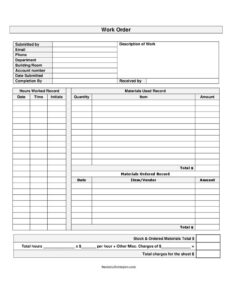
A work order is a form that requests and authorizes a job to be done — repairs, maintenance, or a service — and records the labor and materials it takes to complete. This detailed version doubles as an invoice. Download it free in PDF or DOCX. No signup or email required.
What Is a Work Order?
A work order is the document that turns a request for work into a tracked, authorized job. It captures who asked for the work, what needs doing, where, and by when — then records who carried it out, the hours spent, and the materials used. Because it follows a task from request to completion to billing, a work order keeps maintenance teams, contractors, and clients on the same page and creates a clear record for invoicing. Whether the job is a leaking faucet, a piece of broken equipment, or a scheduled service call, the work order is the single sheet that proves it was requested, approved, and done.
What a Work Order Includes
A complete work order has three parts: the request (who needs the work and where), the authorization and schedule (account, dates, and deadline), and the record of work done (labor hours, materials, and charges). The template above lays these out so nothing gets lost between the person who asks for the job and the person who completes it.
Work Order vs. Purchase Order vs. Invoice
These three documents are related but distinct. A work order authorizes *work to be performed* — labor and the materials that go with it. A purchase order authorizes *goods to be bought* from a supplier. An invoice *requests payment* once work or goods are delivered. On smaller jobs, a single work order like this one can double as the invoice by including total charges, which is why the template has fields for both the work performed and the amount owed.
When Do You Need a Work Order?
- Requesting a repair or maintenance job from an internal team or contractor
- Authorizing and scheduling service work with a clear deadline
- Tracking the labor hours and materials a job actually consumed
- Billing a customer for completed work (this template doubles as an invoice)
- Keeping a record of what was done, by whom, and when
How to Fill Out a Work Order
- Fill in the requester: submitted by, email, phone, department, and the building/room where the work is needed.
- Add the account number, date submitted, and the completion-by date.
- Write a clear description of the work to be done.
- As the job runs, log hours worked (date, time, initials) and materials used (quantity, item, amount).
- Record any materials ordered (item/vendor) and total the labor and materials.
- Note received by and add the total charges so the form can serve as an invoice.
Tips for Tracking Labor and Materials
The value of a work order comes from the detail you capture *while* the job is happening, not from memory afterward. Have technicians log their hours and the parts they use as they go — it keeps the final invoice accurate and makes disputes rare. Give each work order a number, or use the account field, so jobs can be referenced later. For recurring maintenance, keep completed work orders on file; over time they become a service history that helps you spot equipment that fails often and plan replacements.
Common Mistakes to Avoid
- A vague work description that leads to the wrong job being done
- No completion date, so the request sits without priority
- Forgetting to log hours or materials as the work happens
- Leaving out contact details, which slows follow-up questions
- Not totaling charges, so it can’t be used for billing
Types of Work Orders
Although the form looks similar across industries, work orders fall into a few common types. A corrective (or repair) work order fixes something that has broken. A preventive maintenance work order schedules routine upkeep before anything fails — think filter changes or inspections on a set cadence. An inspection work order records a check with no immediate repair. And an emergency work order fast-tracks urgent jobs that affect safety or operations. The template above works for any of them; you simply describe the work and set the priority through the completion date.
Why Work Orders Matter
Beyond getting a single job done, work orders build a history. Over months, completed orders show which equipment fails most often, how long repairs take, and what they cost — information that helps you budget, justify replacements, and hold vendors accountable. For service businesses, that paper trail also protects you: a signed, detailed work order is hard to dispute when it’s time to get paid.
Tracking Work Order Status
On busier sites it helps to track each order’s status — open, in progress, on hold, or complete — so nothing slips through the cracks. Even a handwritten note in the corner of the form keeps everyone clear on what is still outstanding and what has been finished.
Frequently Asked Questions
What is a work order? It’s a form that requests and authorizes a specific job — like a repair or service — and records the labor and materials needed to finish it.
What’s the difference between a work order and a stop work order? A work order authorizes a job to proceed; a stop work order halts work already in progress, usually for safety, payment, or compliance reasons.
What’s the difference between a work order and a purchase order? A work order authorizes work (labor and related materials); a purchase order authorizes buying goods from a supplier. They often work together on larger jobs.
How do you fill out a work order? Enter who requested it and their contact details, describe the work and deadline, then log hours and materials as the job runs and total the charges. The template above has a field for each.
Can a work order be used as an invoice? Yes — this version includes labor, materials, and total charges, so the same form can bill the customer once the job is done.
How much does this work order template cost? It’s free to download in PDF and DOCX.
Related Forms
Maintenance Request · Purchase Order · Job Invoice · Requisition Form · Vehicle Repair Log
This template is provided for general informational purposes only. Adapt the labor, materials, and billing fields to your own business needs.
Related Forms
- Damage Claim
- Repair Under Warranty Request
- Request For Bank Credit Reference
- Stained Items Release Form
- Additional Work Authorization Form
- Suede Leather Items Release Form
Browse more in Request and Authorization.