
Salesperson Commission Voucher
Download a free Salesperson Commission Voucher template to track auto sales commissions, vehicle deals, and payouts — free PDF and DOCX download.
PDF
DOC
0
likes
Download Files
- DOC
A Salesperson Commission Voucher is a record used in auto dealerships to document the commissions a salesperson has earned over a specific pay period, deal by deal. People most often reach for it on payday to calculate and verify exactly what a salesperson is owed before commission checks are cut. You can download this template free in PDF and DOCX with no signup required.
What Is a Salesperson Commission Voucher?
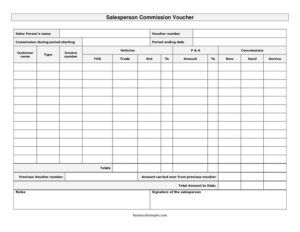
A Salesperson Commission Voucher is a tracking and approval document that itemizes the deals a salesperson closed during a defined period and totals the commissions due. In an auto sales environment, it is typically prepared by the dealership’s accounting or finance office and confirmed by the salesperson. It captures each customer transaction — the vehicle sold, the invoice number, the parts and accessories (P&A), the trade-in, and the resulting net — and rolls those figures into a period total. Because commission pay can be complicated, with new versus used vehicles, service work, and carryovers from previous pay periods, the voucher serves as a transparent, signed paper trail that both the dealership and the salesperson can rely on.
When Do You Need a Salesperson Commission Voucher?
The voucher comes into play in many everyday dealership situations:
- At the end of a weekly, bi-weekly, or monthly commission period when payroll needs to calculate what each salesperson has earned.
- When a salesperson wants to confirm that every deal they closed has been counted and credited correctly.
- When commissions from one period spill into the next and an amount must be carried over to the new voucher.
- When the finance office needs a signed acknowledgment before releasing a commission payment.
- When a manager reviews team performance and wants a clean breakdown of new, used, and service-related commissions.
- During an internal audit or dispute, when documented proof of how a commission figure was reached is essential.
What a Commission Voucher Should Have
A complete Salesperson Commission Voucher should clearly identify who earned the commission and over what time frame. It needs a unique voucher number for filing and reference, the period start and end dates, and a line-by-line list of deals showing the customer, the invoice number, and the vehicle. It should separate the components of each deal — vehicle commission, P&A, trade, and net — and distinguish new, used, and service categories. Finally, it must include running totals, any amount carried over from a prior voucher, the total amount to date, a notes area for explanations, and the salesperson’s signature to confirm the figures.
How to Fill Out a Salesperson Commission Voucher
- Enter the salesperson’s name at the top so the voucher is tied to the right person.
- Assign a voucher number for tracking and cross-referencing.
- Fill in the period starting date and period ending date that the commissions cover.
- For each deal, record the customer name, the type of transaction, and the invoice number.
- Detail the deal components in their columns: vehicles commission, P&A (parts and accessories), commissions, FOB, trade, and the resulting net and amount.
- Categorize each line under new, used, or service as appropriate.
- Add up each column and record the totals.
- Reference the previous voucher number and enter the amount carried over from previous voucher.
- Calculate the total amount to date by combining current totals with the carryover.
- Use the notes field for adjustments or explanations, then add the signature of the salesperson.
Understanding the Deal Columns
The strength of this voucher lies in how it breaks a deal into parts. The vehicles figure reflects commission on the car itself, while P&A captures earnings on parts and accessories added to the sale. FOB (free on board) and trade account for delivery terms and trade-in value that affect the deal’s economics. The net column shows what remains after those factors, and the amount is the commission credited. Keeping these separate matters because dealerships frequently apply different commission rates to vehicles, accessories, and service work — and because separating new, used, and service totals makes performance reporting far easier at month-end.
Handling Carryovers and Running Totals
Many commission structures pay out only when a deal fully funds or finalizes, which means some earnings cross from one pay period into the next. That is where the previous voucher number and amount carried over from previous voucher fields earn their place. By linking each voucher to the one before it and carrying forward any unpaid balance, you create a continuous chain that prevents commissions from being lost or double-counted. The total amount to date then gives both the dealership and the salesperson a single, reliable figure that reflects everything earned up to the current period.
Common Mistakes to Avoid
- Leaving the voucher number blank, which makes it impossible to link carryovers or locate the record later.
- Forgetting to categorize deals as new, used, or service, which throws off category totals and reporting.
- Mixing up the net and amount columns, leading to incorrect commission payouts.
- Skipping the carryover fields when a balance is owed from a prior period.
- Failing to reconcile column totals before signing, so errors slip through to payroll.
- Releasing payment without the salesperson’s signature, leaving no acknowledgment if a dispute arises later.
Frequently Asked Questions
What is a Salesperson Commission Voucher used for? It is used to itemize and total the commissions an auto salesperson earned during a set pay period. By breaking each deal into vehicle, P&A, trade, and net figures, it gives both the dealership and the salesperson a clear, verifiable record before commission payments are made.
Who fills out the commission voucher? Typically the dealership’s accounting or finance office prepares the voucher using deal and invoice data, then the salesperson reviews and signs it. In smaller operations a sales manager may complete it. Either way, the salesperson’s signature confirms agreement with the totals.
What does the carryover field mean? The carryover captures any commission balance from a prior pay period that was not paid out, usually because a deal had not fully funded. You reference the previous voucher number and enter that amount so it rolls into the current total amount to date, keeping the chain of payments accurate.
Is a commission voucher legally binding? The voucher itself is a record and acknowledgment rather than the employment agreement; the binding terms come from your commission or pay plan. Once both parties sign, however, it serves as strong documentation of what was calculated and agreed for that period.
How much does this template cost? Nothing. You can download the Salesperson Commission Voucher template free from Business Forms Pro in both PDF and DOCX formats, with no signup required, and customize the columns to match your dealership’s commission structure.
Can I edit the columns for my dealership? Yes. The DOCX version lets you rename, add, or remove columns so the voucher matches how your dealership tracks vehicles, P&A, FOB, trade, and service commissions, as well as your new and used categories.
This template is a general example provided for informational purposes only and is not legal, financial, or tax advice. Commission structures, payroll rules, and recordkeeping requirements vary by employer and jurisdiction — consult a qualified professional before relying on this document for compensation decisions.
Official resource: for the rules that apply to your situation, see your state DMV.
Related Forms
- Vehicle Registration Tracker
- Auto Bill Of Sale
- Used Car Comparison
- Truck Bill of Sale
- Vehicle Inspection Report
- Deal Recap
Browse more in Auto Sales.