
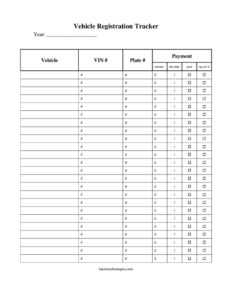
Vehicle Registration Tracker
Download a free Vehicle Registration Tracker template in PDF and DOCX to monitor renewal dates, plate numbers, and fees for every vehicle you manage.
PDF
DOCX
10 downloads
0
likes
Download Files
- DOCX
A Vehicle Registration Tracker is a simple record-keeping sheet used to log each vehicle you own or manage along with its registration details, renewal dates, and associated fees. People most often use it to avoid missing a registration renewal deadline and the late penalties that follow. You can download this Vehicle Registration Tracker free in both PDF and DOCX formats, with no signup required.
What Is a Vehicle Registration Tracker?
A Vehicle Registration Tracker is a worksheet or log that consolidates the registration information for one or more vehicles into a single, easy-to-scan document. It is typically maintained by an individual car owner, a household with multiple vehicles, a small business with company cars, or a fleet manager responsible for trucks and vans. The tracker documents which vehicles are registered, when each registration was issued, when it expires, the license plate and VIN tied to each one, and how much the renewal cost. Its purpose is to give you a clear, at-a-glance overview so nothing slips through the cracks and every vehicle stays road-legal.
When Do You Need a Vehicle Registration Tracker?
This tool is useful any time you are responsible for keeping vehicles legally registered and want to stay ahead of deadlines. Common scenarios include:
- Managing multiple personal vehicles in one household where renewal dates fall in different months and are easy to forget.
- Running a small business fleet of delivery vans, service trucks, or company cars that each require separate registrations.
- Operating a used-car dealership where inventory and dealer-plate vehicles need ongoing registration tracking.
- Renting or leasing vehicles to customers and needing proof that each unit’s paperwork is current.
- Preparing for a sale or transfer, when a buyer asks for current registration status and history.
- Budgeting for the year ahead, by totaling expected renewal fees across every vehicle in advance.
What a Vehicle Registration Tracker Should Have
A complete tracker captures enough detail to identify each vehicle and act on its renewal without hunting through glove boxes or email. At minimum it should include a way to name or number each vehicle, the make, model, and year, the unique identifiers such as the VIN and license plate number, the registration issue and expiration dates, the issuing state or jurisdiction, the registration or renewal fee, and the payment status. A notes or reminder column rounds it out, giving you space to flag inspections, emissions tests, or any conditions tied to a particular renewal.
How to Fill Out a Vehicle Registration Tracker
- List each vehicle: Add a row for every car, truck, or trailer, using a nickname or unit number so you can find it quickly.
- Record the make, model, and year: Enter the basic description exactly as it appears on the title or registration card.
- Add the VIN: Copy the 17-character Vehicle Identification Number to tie the record to the correct vehicle.
- Enter the license plate number: Note the current plate and, if applicable, the plate type (standard, commercial, dealer).
- Note the issuing state or jurisdiction: Record where the vehicle is registered, since rules and fees differ by location.
- Log the registration date and expiration date: These two dates drive your reminders—double-check the expiration against the physical sticker or card.
- Fill in the registration fee: Enter the amount paid or expected so you can budget and reconcile.
- Mark the payment or renewal status: Indicate paid, pending, or overdue.
- Use the notes column: Flag upcoming inspections, emissions deadlines, or follow-up actions.
Setting Up Reminders That Actually Work
A tracker is only as good as the action it prompts. Once you have logged expiration dates, build a buffer into your routine by reviewing the sheet at the start of each month and flagging anything due within the next 30 to 60 days. Many states mail renewal notices, but those notices can be lost or arrive late, so treating your tracker as the primary source of truth keeps you protected. If you use the DOCX version, consider sorting your rows by expiration date so the nearest deadline always sits at the top. For larger fleets, assign one person ownership of the tracker and have them confirm payment status after each renewal so the document stays current and trustworthy.
Tracking a Fleet vs. a Single Vehicle
For one or two personal vehicles, a printed PDF taped inside a folder may be all you need. For a growing fleet, the editable DOCX lets you add columns for insurance expiration, scheduled maintenance, or assigned driver, turning a simple registration log into a lightweight vehicle management sheet. Dealerships and rental operators often track dealer plates and temporary tags separately from titled inventory, so creating distinct sections—or color-coding rows—helps prevent confusion between vehicles ready for sale and those in active use.
Common Mistakes to Avoid
- Skipping the expiration date—the single most important field—which defeats the purpose of the tracker.
- Transposing VIN or plate characters, which can link a record to the wrong vehicle and cause problems at renewal.
- Forgetting to update the status after paying, leaving you unsure whether a renewal actually went through.
- Ignoring state-specific add-ons like emissions tests or safety inspections that must be completed before registration renews.
- Letting the file go stale by not removing sold vehicles or adding newly acquired ones.
- Relying solely on memory or the mailed notice instead of one centralized, regularly reviewed document.
Frequently Asked Questions
What is a Vehicle Registration Tracker used for? It is used to keep all your vehicle registration details in one place so you can monitor renewal dates, plate numbers, VINs, and fees. The main benefit is avoiding lapsed registrations, late penalties, and the risk of driving an unregistered vehicle. It works equally well for a single car owner or a multi-vehicle fleet.
How do I fill out the tracker? Create one row per vehicle and enter its make, model, year, VIN, plate number, issuing state, registration and expiration dates, fee, and payment status. Review the sheet regularly and update the status each time you complete a renewal. The notes column is handy for flagging inspections or other follow-up tasks.
Is this tracker a legal document? No, it is an organizational tool, not an official record. Your actual proof of registration is the card or sticker issued by your state’s motor vehicle agency. The tracker simply helps you stay organized and act on deadlines on time.
Does the tracker replace my official registration? It does not. You should always keep your official registration card and any required documents in the vehicle as your state requires. Use the tracker as a planning and reminder aid alongside those official documents.
Can I customize the tracker for my fleet? Yes. The DOCX version is fully editable, so you can add columns for insurance, inspections, assigned drivers, or maintenance, and you can add as many vehicle rows as you need. The PDF is ideal if you prefer a clean, printable copy.
How much does this template cost? It is completely free to download from Business Forms Pro in both PDF and DOCX formats, with no signup or payment required. You can use it for personal or business purposes and reuse it for as many vehicles as you manage.
This Vehicle Registration Tracker template is provided as a general example for informational purposes only and does not constitute legal, financial, or tax advice. Registration requirements, fees, and deadlines vary by state and jurisdiction—consult your local motor vehicle authority or a qualified professional for guidance specific to your situation.
Official resource: for the rules that apply to your situation, see your state DMV.
Related Forms
- Car Bill of Sale
- Vehicle Inspection Report
- Auto Estimate Form
- Odometer Statement
- Fuel Tracker
- Electric Or Hybrid Car Comparison
Browse more in Auto Sales.