
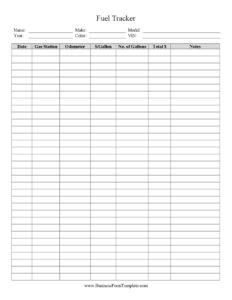
Fuel Tracker
Log mileage, gallons, and fuel costs with our free Fuel Tracker template — monitor MPG and spending easily with a free download in PDF or DOCX.
PDF
1 downloads
0
likes
Download Files
A Fuel Tracker is a simple log used to record every fuel purchase and the mileage driven between fill-ups, so you can monitor fuel costs, calculate fuel economy, and spot problems early. Drivers, fleet managers, and auto dealers reach for it most often to keep accurate per-vehicle running costs and to support expense or tax records. It’s free to download here in both PDF and DOCX formats with no signup required.
What Is a Fuel Tracker?
A Fuel Tracker is a record-keeping sheet that captures the details of each refueling event for a vehicle. It is used by individual car owners, rideshare and delivery drivers, small fleet operators, and dealerships that need to document fuel usage across inventory or loaner cars. Each entry typically notes the date, odometer reading, number of gallons or liters added, the price per unit, and the total amount paid. Over time, those entries reveal how many miles per gallon a vehicle achieves, how fuel spending trends month to month, and whether a vehicle’s efficiency is declining. Whether kept on paper or in a digital file, the goal is the same: clear, ongoing visibility into one of the largest costs of operating any vehicle.
When Do You Need a Fuel Tracker?
Almost anyone who drives regularly or manages vehicles benefits from a consistent fuel log. Common situations include:
- Monitoring a personal vehicle’s MPG to know whether a car is running efficiently or needs service.
- Managing a sales lot or dealership fleet, where test-drive and loaner vehicles need fuel accounted for per unit.
- Tracking business mileage and fuel for tax deductions, where documented purchases support an expense claim.
- Operating rideshare, courier, or delivery work, where fuel is a major recurring cost that must be measured against earnings.
- Reimbursing employees who use company vehicles and submit fuel receipts.
- Diagnosing a sudden drop in fuel economy that may point to tire pressure, a clogged filter, or a mechanical issue.
What a Fuel Tracker Should Have
A useful fuel log captures enough detail to calculate cost and efficiency without becoming tedious to fill in. Essential elements include the vehicle identification (make, model, or unit number), the date of each fill-up, the odometer or trip reading, the volume of fuel added, the price per gallon or liter, and the total cost. Strong templates also leave room for the fuel grade or type, the station or location, the payment method, and a notes column for anything unusual. A running total or summary area at the bottom lets you tally monthly spending and average fuel economy at a glance.
How to Fill Out a Fuel Tracker
- Enter the vehicle details at the top — make, model, year, and a license plate or fleet unit number so the log stays tied to one vehicle.
- Record the date of each fill-up in the date column on its own row.
- Write the odometer reading exactly as shown when you stop to refuel; this is what makes distance and MPG calculations possible.
- Note the gallons or liters added from the pump display.
- Add the price per unit shown at the pump, then the total amount paid from your receipt.
- List the fuel type or grade (regular, mid-grade, premium, or diesel) so you can compare costs accurately.
- Fill in the station or location and the payment method if your version includes those columns.
- Use the notes field for context — a long highway trip, towing a load, or a service visit.
- Update the summary totals periodically to see cumulative spending and average economy.
How to Calculate Fuel Economy from Your Log
One of the biggest reasons to keep a Fuel Tracker is the ability to calculate real-world fuel economy. To do it, fill the tank completely at the start, record the odometer, then fill completely again at the next stop. Subtract the earlier odometer reading from the later one to get the miles driven, then divide that figure by the gallons it took to refill. The result is your miles per gallon for that interval. Tracking this across many fill-ups smooths out the effect of one unusually long or short trip and gives a reliable average. If your numbers steadily decline, it’s a useful early warning to check tire pressure, air filters, or driving habits before a small problem grows into an expensive one.
Tips for Accurate Tracking
Consistency matters more than perfection. Always record the odometer at the same point — at every full fill-up rather than partial top-offs — so your distance math stays clean. Keep the log in the glove box or a phone app so you can jot down numbers immediately rather than relying on memory. Save receipts and match them to your entries, especially if the fuel is a business or reimbursable expense. For fleets, assign one log per vehicle and review them together monthly so an inefficient unit stands out. Small, regular discipline turns a stack of receipts into genuinely useful data.
Common Mistakes to Avoid
- Mixing partial and full fill-ups without noting it, which throws off MPG calculations.
- Forgetting the odometer reading, leaving you unable to calculate distance for that entry.
- Recording total cost but not gallons, so you can track spending but not efficiency.
- Using a shared log for multiple vehicles without a clear unit identifier on each row.
- Letting entries pile up and reconstructing them later from fuzzy memory.
- Ignoring the summary section, which is where the data turns into insight.
Frequently Asked Questions
What is a Fuel Tracker used for? A Fuel Tracker is used to log each fuel purchase and the mileage driven, so you can monitor spending and calculate fuel economy. It’s popular with individual drivers, rideshare and delivery workers, and auto dealers managing lot vehicles. Over time it reveals trends that help control costs and catch mechanical issues.
How do I fill out a Fuel Tracker? Start by entering the vehicle details at the top, then add a new row for each fill-up with the date, odometer reading, gallons added, price per unit, and total paid. Include the fuel type and any notes that explain unusual usage. Update the summary totals regularly to see your average MPG and monthly spending.
Is a Fuel Tracker required by law? No, a fuel log is not legally required for personal use. However, if you claim vehicle fuel as a business or tax expense, keeping accurate records supports your deduction and is strongly recommended. Documentation requirements vary, so check the rules that apply to your situation.
How do I calculate MPG from the tracker? Divide the miles driven between two full fill-ups by the number of gallons it took to refill. For example, 300 miles on 10 gallons is 30 MPG. Averaging this across several fill-ups gives the most reliable picture of your vehicle’s efficiency.
Can I use this for a whole fleet? Yes, but assign a separate log to each vehicle or clearly label every row with a unit identifier. Reviewing each vehicle’s log monthly makes it easy to spot one that is using more fuel than expected. This keeps fleet costs transparent and accountable.
Is this Fuel Tracker template free? Yes. You can download this Fuel Tracker free in both PDF and DOCX formats with no signup required. Use the PDF for quick printing or the DOCX if you want to customize the columns to fit your vehicle or fleet.
This Fuel Tracker template is a general example provided for informational purposes only and does not constitute legal, financial, or tax advice. Recordkeeping and deduction requirements vary by jurisdiction and circumstance — consult a qualified professional for guidance specific to your needs.
Official resource: for the rules that apply to your situation, see your state DMV.
Related Forms
- New Car Comparison
- Electric Or Hybrid Car Comparison
- Vehicle Options Form
- Vehicle Loan Payment Calculator
- Tune-Up Schedule
- Bill Of Sale
Browse more in Auto Sales.