
Contacts Conversation Log
Track every call, meeting, and message with our free Contacts Conversation Log template, available as a free download in PDF and DOCX.
PDF
DOCX
4 downloads
0
likes
Download Files
- DOCX
A Contacts Conversation Log is a simple record-keeping sheet that captures who you spoke with, when, and what was discussed. People most often use it to keep an organized history of calls, meetings, and emails with a single client, vendor, or prospect so nothing slips through the cracks. It’s free to download here in both PDF and DOCX formats, with no signup required.
What Is a Contacts Conversation Log?
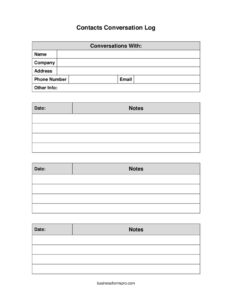
A Contacts Conversation Log is a document that pairs a contact’s identifying details with a running history of every interaction you have with them. At the top you record the person’s name, company, address, phone number, and email; below that you log each conversation by date along with notes on what was said and agreed. It’s used by salespeople, account managers, support staff, recruiters, freelancers, and anyone who needs an audit trail of communication. Rather than relying on memory or scattered sticky notes, the log keeps the full thread of a relationship in one place so you can follow up accurately and hand the record off to a colleague if needed.
When Do You Need a Contacts Conversation Log?
The log is useful any time consistent follow-through matters more than a single phone call. Common situations include:
- Sales follow-up: Tracking a prospect through multiple touchpoints so you know what was offered and when to call back.
- Client account management: Documenting requests, complaints, and resolutions for an ongoing customer relationship.
- Vendor and supplier coordination: Keeping a record of pricing discussions, delivery promises, and order changes.
- Customer support and service: Logging each contact so the next agent has full context without asking the customer to repeat themselves.
- Recruiting and networking: Noting conversations with candidates or contacts at events to remember details before the next outreach.
- Dispute or expectation tracking: Maintaining a dated trail of what was agreed in case there’s later confusion about commitments.
What a Contacts Conversation Log Should Have
A complete log balances contact identification with a clear, chronological interaction history. The essentials are a header block that identifies who the conversations are with — full name, company, mailing address, phone number, email, and a field for any other relevant info. Below that, each entry needs a date and a notes area large enough to capture the substance of the discussion, any decisions made, and the next step. The best logs keep entries brief but specific, use consistent dating, and leave room to add new rows over time so the document grows alongside the relationship.
How to Fill Out a Contacts Conversation Log
- Conversations with: At the top, write the primary person or relationship this log covers so the whole sheet is tied to one contact.
- Name: Enter the contact’s full name as you’d address them in correspondence.
- Company: Record the organization they represent, if any.
- Address: Add their mailing or business address for reference and shipping needs.
- Phone number: List the best number to reach them, noting whether it’s a direct line or mobile.
- Email: Enter their email so you can quickly switch channels and copy correspondence into your notes.
- Other info: Use this catch-all for details like job title, time zone, assistant’s name, or preferred contact method.
- Date: For each interaction, log the exact date it occurred.
- Notes: Summarize what was discussed, what was decided, and the agreed next step. Keep it factual and specific so the entry is useful months later.
Tips for Keeping a Useful Log
A log is only as good as the habit behind it. Fill in each entry immediately after the conversation, while details are fresh — waiting a day often means losing the specifics that matter most. Write notes in a consistent style: a short summary, then any commitments, then the next action and its due date. If you share the log with a team, use plain language and avoid private shorthand others won’t understand. Consider starting each note with a one-word tag such as “call,” “email,” or “meeting” so the channel is obvious at a glance. Finally, review the log before every new contact so you open the conversation already knowing where things left off.
Paper Log vs. CRM Software
This template works well as a standalone document for individuals, small teams, or anyone who prefers a printable sheet they can file by contact. A dedicated CRM system offers automation, reminders, and searchable history, but it also requires setup, subscriptions, and consistent data entry. Many people use both: the printable log for quick capture during or right after a call, then a periodic transfer of key details into a central system. Because this form is free in DOCX, you can also adapt it into a spreadsheet or duplicate the entry rows to fit longer relationships without rebuilding the structure.
Common Mistakes to Avoid
- Vague notes: Writing “talked about order” instead of what was actually decided makes the entry useless later.
- Skipping the date: Without a date, you can’t reconstruct the sequence of events or prove when something was discussed.
- Delaying entries: Logging conversations days later leads to forgotten details and inaccurate records.
- Mixing multiple contacts on one sheet: Keep one log per person so the history stays clean and easy to scan.
- Omitting the next step: A note that doesn’t capture the follow-up action leaves you guessing about what to do next.
- Recording sensitive data carelessly: Store logs securely, especially when they contain personal contact details.
Frequently Asked Questions
What is a Contacts Conversation Log used for? It’s used to keep a dated, organized record of every interaction you have with a specific person or company. This helps with follow-up, accountability, and continuity when more than one person handles the relationship. It turns scattered notes into a single reliable history.
How do I fill out a Contacts Conversation Log? Start by completing the header with the contact’s name, company, address, phone, email, and any other useful info. Then add a new dated row each time you communicate, summarizing the discussion and the agreed next step in the notes field. Keep entries short, factual, and consistent.
Is a Contacts Conversation Log a legal document? It is primarily an internal record-keeping tool rather than a binding contract. That said, a clear, dated log can serve as useful supporting documentation if questions later arise about what was discussed or agreed. For anything legally significant, keep formal signed agreements separately.
How much does this template cost? It is completely free to download from Business Forms Pro in both PDF and DOCX formats, with no signup or payment required. You can print it as-is or edit the DOCX version to match your workflow. There are no usage limits.
Can I use one log for several contacts? It’s best to keep a separate log for each person or company so the history stays focused and easy to read. If you manage many contacts, create a copy of the template for each one and file or name them clearly. This avoids confusion when reviewing past conversations.
How is this different from a CRM? A CRM is software that automates reminders and stores data centrally, while this log is a simple printable or editable document. The log is ideal for quick, low-overhead tracking and works well for individuals or small teams, and you can always transfer key details into a CRM later.
This template is provided as a general example for informational purposes only and does not constitute legal, financial, or professional advice. Record-keeping and data-privacy requirements vary by jurisdiction and industry; consult a qualified professional to ensure your practices meet applicable rules.
Related Forms
- Phone List
- Class Reunion Student Update Form
- Team Roster
- Address List
- Address Book
- Team Contact List
Browse more in Contact.