
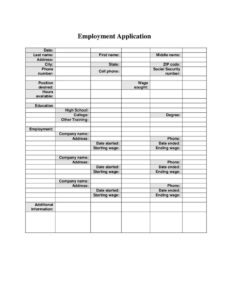
Job Application Form
Download a free Job Application Form template in PDF and DOCX to collect applicant details, work history, and education quickly with no signup required.
PDF
DOCX
0
likes
Download Files
- DOCX
A Job Application Form is a standardized document employers use to collect consistent information from everyone applying for an open position. The most common reason people use it is to gather an applicant’s contact details, education, and work history in one place so candidates can be compared fairly. You can download this form free in PDF and DOCX formats, with no signup required.
What Is a Job Application Form?
A Job Application Form is a structured questionnaire that an employer or hiring manager provides to candidates seeking employment. Unlike a resume, which a candidate formats however they like, a Job Application Form asks every applicant the same questions in the same order, making it easier to evaluate qualifications side by side. It typically captures personal identifying information, the position desired, desired wage and availability, educational background, and prior employment. Small businesses, retail stores, restaurants, and offices all rely on it to begin the hiring process. Because it creates a uniform record, the completed form often becomes part of an employee’s personnel file once a candidate is hired, supporting documentation and verification later on.
When Do You Need a Job Application Form?
This form is useful any time you are bringing new people into your organization or applying for a role yourself. Common situations include:
- Hiring hourly or seasonal staff — collect uniform details from a high volume of applicants for retail, food service, or warehouse roles.
- Filling a single open position — gather standardized information so you can compare candidates against the same criteria.
- Walk-in applicants — provide a paper form at the counter for people who inquire about jobs in person.
- Replacing a resume requirement — when you want consistent data on availability, wage expectations, and references rather than free-form documents.
- Building a candidate pipeline — keep completed forms on file for future openings even when you are not actively hiring.
- Documenting the hiring process — maintain a record of who applied and what they reported about their background.
What a Job Application Form Should Have
A complete Job Application Form balances the information an employer needs with respect for the applicant’s privacy. At minimum it should capture full name and contact details, the specific position desired, desired wage and available hours, a clear education section, and a chronological employment history with dates and wages. It should also leave room for additional information the applicant wants to share. Because the form may request sensitive data such as a Social Security number, it should be stored securely and only collected when genuinely needed for the hiring or verification stage. Clear labeling and adequate space for each answer help applicants complete it accurately the first time.
How to Fill Out a Job Application Form
Work through the form top to bottom, completing every field that applies to you:
- Enter the date you are completing the application.
- Provide your last name, first name, and middle name as they appear on official identification.
- Fill in your address, city, state, and zip code so the employer can reach you by mail.
- List your phone number and cell phone for contact during the hiring process.
- Enter your Social Security number only if required by the employer for verification.
- State the position desired, the wage sought, and the hours available you can work.
- Complete the education section, including high school, college, other training, and any degree earned.
- Detail your employment history: company name, date started, starting wage, ending wage, and date ended for each prior job.
- Use the additional information area to note skills, certifications, or anything relevant.
Protecting Sensitive Information
Because this form may request a Social Security number, both applicants and employers should treat the completed document carefully. Employers should collect such data only when necessary and store the forms in a locked file or restricted digital folder, limiting access to staff involved in hiring. If you are an applicant uncomfortable providing a Social Security number before an offer is made, it is reasonable to ask whether you can supply it later. Many employers only require it once a candidate is selected, for background checks or payroll setup. Keeping the form’s sensitive fields blank until that point can reduce exposure while still allowing the rest of the application to be reviewed.
Job Application Form vs. Resume
A resume is a candidate-created summary that emphasizes whatever the applicant chooses to highlight, while a Job Application Form is employer-created and asks every applicant the same questions. The form is better for collecting specific, comparable data such as exact employment dates, starting and ending wages, and availability. Many employers use both: the resume offers a narrative of accomplishments, and the application form fills in standardized details and creates an official record. Requesting both gives a fuller picture of each candidate and supports consistent, defensible hiring decisions.
Common Mistakes to Avoid
- Leaving fields blank — incomplete applications are harder to evaluate; write “N/A” where a question does not apply.
- Inaccurate dates — misstating employment start and end dates can raise red flags during verification.
- Vague availability — be specific about the hours and days you can actually work.
- Inflating wages — list accurate starting and ending wages, since employers may verify them.
- Illegible handwriting — print clearly or type the DOCX version so your answers can be read.
- Storing sensitive forms insecurely — employers should protect Social Security numbers and personal details.
Frequently Asked Questions
What is a Job Application Form used for? It is used to collect standardized information from every job candidate, including contact details, desired position, education, and prior employment. This lets employers compare applicants fairly and keep an official record of who applied. The completed form often becomes part of an employee’s file after hiring.
How do I fill out a Job Application Form? Start with the date and your full name, then provide your address and phone numbers. Enter the position desired, wage sought, and available hours, complete the education and employment sections with accurate dates and wages, and use the additional information area for relevant skills. Print clearly or fill out the DOCX version on a computer.
Do I have to provide my Social Security number? The form includes a field for it, but many employers only require a Social Security number once you receive a job offer, for background checks or payroll. If you prefer, you can ask whether you may provide it later in the process. Always make sure the employer stores it securely.
Is a Job Application Form legally binding? The form itself is not a contract of employment. However, the information you provide is expected to be truthful, and many employers note that false statements can be grounds for denial or termination. It serves as an official record rather than a binding agreement.
How much does this Job Application Form cost? This template is completely free to download from Business Forms Pro in both PDF and DOCX formats. There is no signup or payment required. You can edit the DOCX version to add your company name or adjust fields to fit your hiring process.
Can I customize the form for my business? Yes. Download the DOCX version and add your logo, additional questions, equal-opportunity statements, or a signature line as needed. Make sure any added questions comply with applicable employment laws in your area before using the form.
This Job Application Form template is a general example provided for informational purposes only and is not legal, financial, or tax advice. Employment and data-privacy requirements vary by jurisdiction, so consult a qualified professional before using it in your hiring process.
Official resource: for the rules that apply to your situation, see the U.S. Department of Labor.
Related Forms
- Employee Official Warning Letter
- Consent to Release Personnel Information
- First Warning Notice Employee Behavior
- Employee Checkout
- Tarjeta De Tiempo Contratista Miniatura
- Employee Exit Interview
Browse more in Employment.