
Employee Checkout
Download a free Employee Checkout form template to track returned company property and exit paperwork during offboarding — free PDF and DOCX download.
PDF
DOCX
1 downloads
0
likes
Download Files
- DOCX
An Employee Checkout form is a simple offboarding document that records the company property and paperwork an employee returns when they leave a role or position. The most common reason people use it is to create a clear, signed record that laptops, keys, badges, and final documents were handed back so nothing falls through the cracks. It’s free to download here in both PDF and DOCX formats, with no signup required.
What Is an Employee Checkout Form?
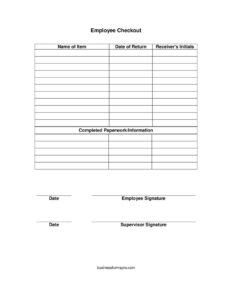
An Employee Checkout form is a brief itemized record used by employers, HR teams, and supervisors to confirm that a departing employee has returned all company-owned items and completed required exit paperwork. It typically lists each asset by name, the date it was returned, and who received it, then closes with signatures from both the employee and supervisor. The purpose is twofold: it protects the company by documenting returned equipment and access credentials, and it protects the employee by confirming they fulfilled their obligations. Whether the departure is voluntary, the result of a layoff, or a role transfer within the organization, this checklist keeps the handover orderly and accountable.
When Do You Need an Employee Checkout Form?
This form is useful any time an employee’s relationship with company property is changing. Common scenarios include:
- Voluntary resignation — an employee gives notice and you need to collect their laptop, phone, and access cards before their last day.
- Termination or layoff — you want a documented record that all assets were recovered on the final day of employment.
- End of a fixed-term or seasonal contract — temporary staff return uniforms, tools, or equipment at the close of an assignment.
- Internal transfer or promotion — an employee moving to a new department returns items tied to their old role.
- Extended leave of absence — collecting devices or keys while an employee is away for a long period.
- Remote or hybrid offboarding — confirming a mailed-back laptop and accessories were received and logged.
What an Employee Checkout Form Should Have
A complete Employee Checkout form leaves no ambiguity about what was returned and when. The essential elements are an itemized list where each returned asset is named individually, a return date for each item, and the initials of the person receiving each item. It should also confirm that all required exit paperwork and information has been completed, include a dated certification, and provide spaces for both the employee’s and the supervisor’s signatures. Together these fields turn a casual handover into a verifiable record. Many organizations also keep a copy in the personnel file so the documentation is available if a question about company property arises later.
How to Fill Out an Employee Checkout Form
Walk through the form one field at a time as items are physically handed over:
- Name of item — list each piece of company property on its own line, such as “laptop (serial #),” “office key,” “access badge,” “company phone,” or “corporate credit card.” Be specific so there’s no confusion later.
- Date of return — record the exact date each listed item was returned. Items may come back on different dates, so fill this in per line.
- Receiver’s initials — the person accepting each item (often the supervisor or IT staff) initials beside it to confirm receipt.
- Completed paperwork/information — check or note that exit documents, final timesheets, expense reports, or knowledge-transfer notes have been submitted.
- Date — enter the date the checkout is finalized, typically the employee’s last working day.
- Employee signature — the departing employee signs to confirm the list is accurate and complete.
- Supervisor signature — the supervisor signs to certify that all listed items were received and the offboarding is complete.
Tips for a Smooth Offboarding Handover
Prepare the form before the employee’s final day by pre-filling the names of items you know were issued — pull this from your asset register or onboarding records if you keep one. Walking into the checkout meeting with a ready list speeds things up and reduces the chance of forgetting an item. Coordinate with IT and facilities so device wipes, account deactivations, and badge access removal happen on the same timeline as the physical return. If an item cannot be returned on the last day, note it on the form along with an agreed return date rather than leaving the line blank. Finally, give the employee a copy of the signed form so both parties hold matching documentation.
How This Differs From an Exit Interview Form
An Employee Checkout form and an exit interview form serve related but distinct purposes. The checkout form is operational — it tracks physical assets, access credentials, and completed paperwork. An exit interview form is conversational, gathering feedback about the employee’s experience, reasons for leaving, and suggestions for improvement. Many companies use both during offboarding: the checkout protects the organization’s property while the exit interview captures institutional knowledge. Keeping them separate makes each document clearer and easier to file.
Common Mistakes to Avoid
- Listing items vaguely — “equipment” instead of naming the specific laptop, charger, and serial number makes the record nearly useless.
- Skipping receiver’s initials — without them, there’s no proof of who actually accepted each item.
- Leaving the paperwork field blank — failing to confirm exit documents were completed can delay final pay or benefits processing.
- Forgetting one signature — a form signed by only the employee or only the supervisor is incomplete and easier to dispute.
- Not dating each return — when items come back on different days, a single date can misrepresent the timeline.
- Failing to keep a copy — both the company and the employee should retain the signed form for their records.
Frequently Asked Questions
What is an Employee Checkout form used for? It is used to document the company property and exit paperwork an employee returns when they leave a role. The form creates a signed, itemized record so both the employer and employee can confirm everything was handed back. It is a standard part of a thorough offboarding process.
How do I fill out an Employee Checkout form? List each returned item on its own line with its return date and the receiver’s initials, confirm that all required paperwork has been completed, then add the date and have both the employee and supervisor sign. Work through it together as items are physically handed over to keep the record accurate.
Does an Employee Checkout form need to be notarized? No, notarization is not typically required. It is an internal administrative document, so the signatures of the employee and supervisor are generally sufficient. Your organization’s HR policy determines exactly what’s needed.
Is an Employee Checkout form legally binding? The form itself is primarily a record rather than a contract, but the signatures make it a meaningful piece of documentation that can support the employer’s records if a property dispute arises. Its weight depends on your company policies and applicable employment rules. Keep it consistent with any agreements the employee already signed.
How much does this Employee Checkout template cost? Nothing — it’s completely free to download from Business Forms Pro in both PDF and DOCX formats. There is no signup, subscription, or payment required. You can edit the DOCX version to add fields specific to your organization.
Who should keep the completed form? Typically the supervisor or HR retains the original in the employee’s personnel file, and the departing employee receives a copy. Keeping matching copies protects both parties if a question about returned property comes up later. Store it securely alongside other offboarding records.
This Employee Checkout template is provided as a general example for informational purposes only and does not constitute legal, financial, or HR advice. Employment and recordkeeping requirements vary by jurisdiction and by organization — consult a qualified professional or your HR department to ensure your offboarding process meets all applicable requirements.
Official resource: for the rules that apply to your situation, see the U.S. Department of Labor.
Related Forms
- Employee Official Warning Letter
- Education Verification
- New Hire Checklist
- Key Assignment Form
- Employment Verification Letter
- Job Description Template
Browse more in Employment.