
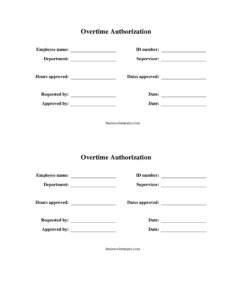
Overtime Authorization Form
Download a free Overtime Authorization Form template in PDF and DOCX to approve, document, and track employee overtime hours before they are worked.
PDF
DOCX
3 downloads
0
likes
Download Files
- DOCX
An Overtime Authorization Form is a simple document used by employers to approve extra working hours before an employee performs them. The most common reason people use it is to control labor costs and create a clear paper trail showing that overtime was requested, justified, and approved by a supervisor. You can download this Overtime Authorization Form for free in both PDF and DOCX, with no signup required.
What Is an Overtime Authorization Form?
An Overtime Authorization Form is an internal employment document that records a request for an employee to work beyond their normal scheduled hours and the supervisor or manager’s approval of those hours. It is typically initiated by a department lead or an employee and signed off by someone with budget authority. The form captures who will work the overtime, how many hours are approved, the dates the approval covers, who requested it, and who authorized it. Its purpose is twofold: it gives management the chance to evaluate whether the extra hours are necessary before money is spent, and it documents the approval so payroll, HR, and the employee all agree on what was authorized.
When Do You Need an Overtime Authorization Form?
Companies use this form whenever planned or unplanned extra hours need a manager’s sign-off. Common situations include:
- Project deadlines: A team must work late or over a weekend to finish a deliverable, and the supervisor wants to cap the approved hours in advance.
- Seasonal or peak demand: Retail, warehouse, or customer-service teams ramp up hours during busy periods and need documented approval for each block.
- Coverage gaps: An employee is asked to cover a colleague’s absence, vacation, or sick leave, creating hours beyond their regular schedule.
- Maintenance or shutdowns: Facilities or operations staff complete equipment repairs or installations outside normal business hours.
- Compliance and cost control: Organizations with strict labor budgets require written authorization before any non-exempt employee crosses into overtime to avoid surprise payroll costs.
- Audit readiness: Employers keep signed forms on file to demonstrate that overtime followed company policy if questioned later.
In each case, the form turns an informal “can you stay late?” conversation into a documented, approved decision that protects both the employee and the company.
What an Overtime Authorization Form Should Have
A complete and useful form leaves no ambiguity about who approved what and when. The essential elements are the employee’s full identifying information, the specific number of hours being authorized, the exact dates the approval applies to, the reason or requesting party behind the request, and the signatures or names of both the requester and the approving manager. Including the department and supervisor ties the request to the correct budget and chain of command. Together these fields ensure payroll processes the hours correctly and that the approval can be matched against actual timesheets.
How to Fill Out an Overtime Authorization Form
- Employee name: Enter the full legal name of the employee who will work the overtime, matching payroll records.
- ID number: Add the employee’s company or payroll identification number so HR can link the form to the right person.
- Department: Write the department or team the employee belongs to, which determines the budget the hours are charged against.
- Supervisor: List the employee’s direct supervisor or manager responsible for their schedule.
- Hours approved: Record the exact number of overtime hours being authorized. Be specific (for example, “6 hours”) rather than open-ended.
- Dates approved: Enter the date or date range the overtime applies to so the authorization is not used outside its window.
- Requested by: Note the name of the person initiating the request, whether the employee or a team lead.
- Date: Add the date the form is being completed and submitted.
- Approved by: Have the authorizing manager print and sign their name, confirming the overtime is approved before it is worked.
Submit the completed form to payroll or HR according to your company’s process, and keep a copy for the employee’s records.
Why Pre-Approval Matters
The value of an Overtime Authorization Form lies in the word “authorization.” When overtime is approved before it happens, managers can weigh alternatives such as redistributing work, adjusting deadlines, or bringing in temporary help. After-the-fact overtime, by contrast, often arrives as a payroll surprise that the budget never accounted for. Pre-approval also protects employees: a signed form is proof they were authorized to work the extra hours and should be paid accordingly. For non-exempt employees, overtime pay is generally governed by wage-and-hour rules, so accurate documentation helps everyone stay aligned. Keep in mind that even when a form has not been signed in advance, hours that were actually worked typically must still be paid under applicable labor laws.
Tips for Managing Overtime Effectively
Use the form consistently rather than only for large requests, so the approval habit is established across the team. Set clear expectations about who has authority to sign off and what dollar or hour thresholds require higher-level approval. Store completed forms alongside the corresponding timesheets so the approved hours and actual hours can be reconciled at payroll time. Reviewing patterns in your authorization forms over a quarter can also reveal whether certain roles are chronically understaffed and may justify additional hiring instead of recurring overtime.
Common Mistakes to Avoid
- Approving open-ended hours: Leaving the “hours approved” field blank or vague defeats the purpose of cost control. Always specify a number.
- Skipping the date range: Without clear “dates approved,” the form can be misused for unrelated shifts.
- Getting signatures after the work: Authorization is meant to happen before the overtime, not as an afterthought.
- Mismatched employee details: An incorrect ID number or name can delay payroll processing.
- No copy retained: Failing to keep the signed form removes the documentation it was designed to provide.
- Approver lacks authority: Make sure the person in the “approved by” field actually has budget sign-off power.
Frequently Asked Questions
What is an Overtime Authorization Form used for? It is used to request and approve extra working hours before an employee performs them. The form documents the approved hours, the dates, and the manager who authorized them, helping employers control labor costs and keep clear payroll records.
How do I fill out an Overtime Authorization Form? Enter the employee’s name, ID number, department, and supervisor, then specify the number of hours approved and the dates they apply to. Note who requested the overtime, add the date, and have the authorizing manager sign in the “approved by” field before the work begins.
Does an Overtime Authorization Form need to be notarized? No. It is an internal company document and does not require notarization or witnesses. It only needs the signature or name of the manager with authority to approve the hours.
Is an Overtime Authorization Form legally binding? The form itself is an internal approval record rather than a contract, but it carries weight as documentation. It demonstrates that overtime was authorized according to company policy, which can matter for payroll and wage-and-hour compliance.
Do employees still get paid if overtime was not authorized first? Generally, hours an employee actually works must still be paid under applicable labor laws, even without prior authorization. The form helps prevent unapproved hours and documents intent, but it does not override an employer’s obligation to pay for time worked. Check your local wage rules.
How much does this Overtime Authorization Form cost? Nothing. You can download the template for free here in both PDF and DOCX formats, with no account or signup required, and customize it with your company’s name and policy details.
This Overtime Authorization Form template is provided as a general example for informational purposes only and is not legal, financial, or tax advice. Wage-and-hour and overtime requirements vary by jurisdiction and may change over time. Consult a qualified human resources or legal professional to ensure your overtime practices comply with applicable laws.
Official resource: for the rules that apply to your situation, see the U.S. Department of Labor.
Related Forms
- Notice of Probation
- Request To Attend Training
- Applicant Interview Schedule
- Employee Evaluation Form
- Arrival And Departure Record
- Employee Turnover Rate
Browse more in Employment.