
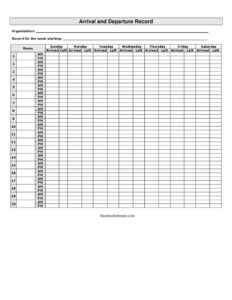
Arrival And Departure Record
Track employee arrival and departure times with this free Arrival and Departure Record template, available as a free download in PDF and DOCX.
PDF
DOCX
10 downloads
1
likes
Download Files
- DOCX
An Arrival and Departure Record is a simple weekly attendance log used to capture when each employee arrives at and leaves work. The most common reason people use it is to keep an accurate, day-by-day record of working hours for payroll, scheduling, and accountability. It is free to download here in both PDF and DOCX formats, with no signup required.
What Is an Arrival and Departure Record?
An Arrival and Departure Record is a workplace document that tracks the time each worker enters and exits the workplace across a single week. It is typically maintained by a manager, supervisor, receptionist, or the employees themselves, and it provides a clear written history of attendance. Unlike a full timesheet that may break down tasks or projects, this form focuses specifically on two data points per day: the arrival time and the departure time. Organizations use it to confirm attendance, support payroll calculations, monitor punctuality, and create a paper trail for hours worked. Because it is organized by the days of the week, it is easy to scan, total, and file at the end of each pay period.
When Do You Need an Arrival and Departure Record?
This record is useful any time an organization needs a reliable, low-effort way to document who was present and for how long. Common situations include:
- Hourly payroll: Calculating wages for staff paid by the hour based on documented arrival and departure times.
- Small businesses without time-clock software: Shops, clinics, restaurants, and offices that need an inexpensive manual system.
- Attendance monitoring: Tracking patterns of lateness or early departures for performance discussions.
- Front-desk or reception logs: Recording when team members sign in and out at the start and end of shifts.
- Volunteer or temporary staff: Logging hours for grant reporting, stipends, or service-hour verification.
- Compliance and disputes: Keeping evidence of hours worked in case of a wage question or audit.
What an Arrival and Departure Record Should Have
A complete and useful record contains a handful of clearly labeled elements. At the top, it should identify the organization so the document is tied to the correct employer, and the week starting date so the record covers a defined seven-day period. The body should clearly list each person by name and provide space to enter an arrived time and a left time for every day from Monday through Sunday. Consistent time formatting, legible handwriting or typed entries, and a confirmation or signature from a supervisor make the document more dependable. Keeping a clean, single-week structure also makes it easy to total hours and file each completed sheet.
How to Fill Out an Arrival and Departure Record
- Organization: Enter the company, department, or team name so the record is attributed to the correct employer.
- Record for the week starting: Write the date of the first day of the week the sheet covers (for example, the Monday date) so the period is unambiguous.
- Name: Enter the full name of the employee whose attendance is being tracked. Use a separate row or sheet per person where needed.
- Monday – Sunday rows: Move through each day of the week in order.
- Arrived: For each day, record the exact time the person started work (for example, 8:00 AM). Use a consistent 12- or 24-hour format throughout.
- Left: Record the time the person finished work that day (for example, 4:30 PM). Leave a clear mark for days off or absences.
- Review and total: At the end of the week, check each pairing of arrived and left times, calculate daily and weekly hours, and have the appropriate person confirm or sign the record before filing it.
Tips for Accurate Time Tracking
The value of an Arrival and Departure Record depends entirely on consistency. Decide on one time format and use it across every entry to avoid confusion between AM and PM. Encourage staff to record times as they happen rather than reconstructing them from memory at the end of the week, since recalled times tend to drift. If your workplace includes unpaid breaks or lunch periods, agree on whether those are reflected in the departure and arrival columns or noted separately, and apply the rule the same way for everyone. Finally, store completed weekly sheets in date order so totals can be checked against payroll quickly.
How It Differs From a Full Timesheet
An Arrival and Departure Record and a timesheet overlap, but they are not identical. This record captures only entry and exit times by day, making it lightweight and quick to complete. A traditional timesheet often adds break tracking, project or job codes, overtime calculations, and approval workflows. Many organizations use the arrival and departure log as the raw data source and then transfer the totals into a payroll system or timesheet. If you need detailed cost allocation across clients or projects, a dedicated timesheet may suit you better; for straightforward attendance and hours, this record is ideal.
Common Mistakes to Avoid
- Mixing time formats: Switching between 12-hour and 24-hour notation, or omitting AM/PM, which makes hours impossible to verify.
- Forgetting the week-starting date: Without it, completed sheets become hard to file and reconcile against pay periods.
- Filling in times after the fact: Recording remembered times instead of actual ones reduces accuracy and reliability.
- Leaving cells ambiguous: Not distinguishing between a blank for a day off and a missing entry that should have been filled in.
- No review or sign-off: Skipping a supervisor check allows errors to flow straight into payroll.
- Illegible handwriting: Smudged or unclear times that can be misread when totals are calculated.
Frequently Asked Questions
What is an Arrival and Departure Record used for? It is used to document the time each employee arrives at and leaves work each day for a single week. Organizations rely on it for payroll, attendance monitoring, and as written evidence of hours worked. It is a simple alternative to electronic time-clock systems.
How do I fill out the arrived and left columns? For each day from Monday to Sunday, write the exact time the person started work in the arrived column and the exact time they finished in the left column. Use one consistent time format throughout, and leave a clear marker for days the person did not work.
Is an Arrival and Departure Record legally binding? The form itself is a record rather than a contract, but accurate attendance records can serve as important evidence in wage disputes or audits. Many jurisdictions require employers to keep records of hours worked, so a well-maintained log helps support compliance. Keep completed sheets on file according to your local retention rules.
Does it need to be signed or witnessed? Signatures are not strictly required, but having a supervisor or the employee confirm or sign the weekly record strengthens its reliability. A sign-off shows the entries were reviewed and accepted before they were used for payroll. Adapt this step to your organization’s internal policy.
How much does this template cost? Nothing. This Arrival and Departure Record template is completely free to download from Business Forms Pro in both PDF and DOCX formats, with no signup required. You can reuse it for as many weeks and employees as you need.
Can I edit the template for my workplace? Yes. Download the DOCX version to add your logo, adjust the columns, include a break or overtime field, or change the days shown. The PDF version is convenient for printing and filling out by hand.
This template is a general example provided for informational purposes only and does not constitute legal, financial, or employment advice. Recordkeeping and wage-and-hour requirements vary by jurisdiction, so consult a qualified professional or your local labor authority to ensure your practices comply with applicable rules.
Official resource: for the rules that apply to your situation, see the U.S. Department of Labor.
Related Forms
- Interview Invitation
- Employee Evaluation
- Manual Timecard Bi-Weekly Mini
- Interview Schedule
- Harassment Report Form
- Job Interview Schedule
Browse more in Employment.