
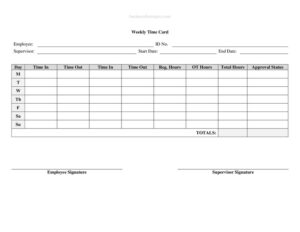
Weekly Time Card With Approval
Track and verify employee hours with this free Weekly Time Card With Approval template, ready for free download in PDF and DOCX formats.
PDF
DOCX
0
likes
Download Files
- DOCX
A Weekly Time Card With Approval is a simple form employees use to record the hours they work each day of the week, with a built-in section for a supervisor to review and sign off before payroll is processed. The most common reason people use it is to create an accurate, signed record of hours worked so wages are calculated correctly. You can download it free in PDF and DOCX formats — no signup required.
What Is a Weekly Time Card With Approval?
A Weekly Time Card With Approval is a payroll document that captures the start time, end time, breaks, and total hours an employee works across a single workweek, plus a dedicated approval line where a manager confirms the entries are correct. It is typically issued by an employer or HR department and completed by the employee, then verified by a supervisor. The form documents regular hours, overtime, and unpaid breaks so that the company can pay accurately and keep compliant records. Because it includes an approval signature, it doubles as both a timekeeping tool and an internal control, reducing disputes over hours and creating a clear paper trail for every pay period.
When Do You Need a Weekly Time Card With Approval?
This form is useful any time hours worked need to be recorded and verified rather than assumed. Common situations include:
- Paying hourly employees who do not clock in through an automated system and need a manual record of their hours.
- Tracking overtime so that hours beyond the standard schedule are clearly documented and approved before payout.
- Managing part-time, seasonal, or temporary staff whose schedules vary from week to week.
- Billing clients for time worked on a project, where a supervisor must confirm the hours before invoicing.
- Documenting time for contractors or staffing agencies that require a signed weekly summary.
- Maintaining records for audits, wage disputes, or labor compliance, where signed approval shows the hours were reviewed.
What a Weekly Time Card Should Have
A complete weekly time card leaves no room for guesswork. At minimum it should identify the employee and the workweek, show daily in and out times, account for breaks, total the hours for each day and the week, and include a place for both the employee and the approver to sign and date. Many cards also distinguish between regular and overtime hours, note the employee ID or department, and leave space for comments explaining unusual entries. The approval section is what sets this form apart from a basic timesheet: it requires a supervisor’s signature confirming the recorded hours are accurate and authorized for payment.
How to Fill Out a Weekly Time Card With Approval
Follow these steps to complete the form accurately:
- Enter the employee name, and if applicable an employee ID number and department, at the top of the card.
- Write the week ending date or the date range that the card covers so the pay period is clear.
- For each day of the week, record the time in and time out for your morning and afternoon sessions.
- Note any unpaid break or lunch time so it is excluded from paid hours.
- Calculate the total hours worked for each day, then split into regular and overtime where the form provides separate columns.
- Add the daily totals to produce the weekly total at the bottom of the card.
- Use the comments area to explain any irregular entries, such as early departures or missed punches.
- The employee signs and dates the card; the supervisor or manager reviews and signs the approval line to authorize payment.
Tips for Accurate Timekeeping
Accuracy starts with recording times as they happen rather than reconstructing the week from memory on Friday afternoon. Encourage employees to enter their in and out times daily, and to round consistently if your workplace uses rounding rules. Keep break policies clear so everyone knows whether lunch is paid or unpaid. Managers should review each card against schedules and any electronic logs before approving, and they should question entries that look unusual rather than signing automatically. Finally, store completed cards securely — many jurisdictions require employers to retain payroll records for a set number of years, so a consistent filing system protects the business if questions arise later.
How It Differs From a General Timesheet
A standard timesheet simply collects hours, while a Weekly Time Card With Approval adds a verification layer. The approval signature shifts the document from a self-reported log into an authorized record, which matters for both payroll integrity and dispute resolution. If an employee later claims they worked more hours, or a manager questions an overtime entry, the signed approval shows the figures were reviewed and accepted at the time. This is why many employers prefer the approval version for hourly staff, contractors, and any role where overtime is common — the extra signature is a small step that prevents bigger problems later.
Common Mistakes to Avoid
- Leaving the approval line blank — without a supervisor signature, the card may not be valid for payroll.
- Forgetting to subtract unpaid breaks, which inflates total hours and overpays the employee.
- Mixing up the week ending date so hours are applied to the wrong pay period.
- Failing to separate regular and overtime hours when overtime is paid at a different rate.
- Writing times illegibly or using inconsistent formats (mixing 12-hour and 24-hour entries).
- Approving cards without actually checking the entries, which defeats the purpose of the approval step.
Frequently Asked Questions
What is a Weekly Time Card With Approval? It is a form on which an employee records the hours they worked each day of a single week, with a section for a supervisor to review and sign off before the hours are paid. The approval signature confirms that the recorded hours are accurate and authorized.
How do I fill out a weekly time card? Enter your name and the week ending date, then record your time in, time out, and any unpaid breaks for each day. Total the hours per day and for the week, add comments for anything unusual, then sign and have your supervisor approve and sign the card.
Does the time card need a signature? Yes — the value of this version is the approval line. The employee typically signs to certify their hours are accurate, and the supervisor or manager signs to approve them for payment. Both signatures create a stronger record than an unsigned timesheet.
Is a weekly time card legally required? Many jurisdictions require employers to keep accurate records of hours worked, especially for non-exempt hourly employees. While the exact format is usually not mandated, a signed weekly card is a practical way to meet recordkeeping obligations. Check your local labor rules for retention periods and required details.
How much does this template cost? Nothing. The Weekly Time Card With Approval template is completely free to download from Business Forms Pro in both PDF and DOCX formats, with no account or signup required.
Can I edit the template for my business? Yes. The DOCX version is fully editable, so you can add your company name, adjust columns for your pay rules, include an employee ID or department field, or change the break tracking to match your policies before printing or distributing it.
This template is a general example provided for informational purposes only and is not legal, financial, or tax advice. Timekeeping and payroll recordkeeping requirements vary by jurisdiction and by employer classification. Consult a qualified professional or your local labor authority to ensure your practices comply with applicable laws.
Official resource: for the rules that apply to your situation, see the U.S. Department of Labor.
Related Forms
- Termination Checklist
- Employee Termination Notice
- Harassment Report Form
- Employee Referral Form
- Disciplinary Action Form
- Employee Incident Report Form
Browse more in Employment.