
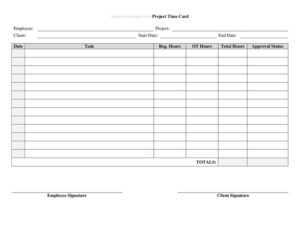
Project Time Card With Approval
Download a free Project Time Card With Approval template in PDF and DOCX to log project hours, track tasks, and capture supervisor sign-off easily.
PDF
DOCX
0
likes
Download Files
- DOCX
A Project Time Card With Approval is a worksheet that records the hours an employee or contractor spends on a specific project and includes a sign-off line for a supervisor or manager to verify those hours. People most often use it to accurately bill clients, track labor costs per project, and create an approved paper trail before payroll runs. You can download it free in PDF and DOCX, with no signup required.
What Is a Project Time Card With Approval?
A Project Time Card With Approval is a document that captures the time a worker dedicates to a defined project or job, broken down by date, task, and hours, with a built-in section for managerial review and authorization. It is typically issued by an employer, agency, or project lead and completed by the individual doing the work. Unlike a simple punch clock record, this form ties hours directly to a project so costs can be allocated correctly. The approval portion transforms the card from a personal note into a verified record that supports billing, payroll, and budget reporting. It documents who worked, when, on what, for how long, and who confirmed it.
When Do You Need a Project Time Card With Approval?
This form is useful any time hours need to be tied to a particular project and confirmed by someone in authority. Common situations include:
- Billing a client by the hour for consulting, design, construction, or professional services and needing proof of the time charged.
- Tracking internal labor costs against a project budget so a manager can see whether work is on schedule and on cost.
- Managing contractors or freelancers who submit hours for review before an invoice is paid.
- Running payroll for hourly employees assigned to multiple projects, where each project’s hours must be separated.
- Supporting grant-funded or government work that requires documented, approved time allocation per task.
- Resolving disputes about how many hours were worked by having a signed, dated record on file.
What a Project Time Card Should Have
A complete project time card balances detail with simplicity. At minimum it should identify the employee or contractor, the project name or number, and the pay or reporting period it covers. It needs a structured grid for entering dates, tasks or activity descriptions, start and end times or total hours, and a running total. Many cards include columns for regular versus overtime hours and a notes field for explaining unusual entries. The defining feature is the approval block: spaces for the employee’s signature and date plus the supervisor’s signature, printed name, and date. A clear total-hours line at the bottom makes verification fast and reduces calculation errors.
How to Fill Out a Project Time Card With Approval
- Enter the employee or contractor name and any ID number at the top so the card is tied to the right person.
- Write the project name or number and, if relevant, the client or department the work supports.
- Record the reporting period — the week or pay period dates the card covers.
- For each work day, fill in the date, a short task or activity description, and the start and end times or the total hours worked.
- Separate regular hours from overtime where the form provides columns, and add any notes explaining late starts, breaks, or special tasks.
- Add up the daily entries and write the total hours for the period on the summary line.
- Sign and date the employee signature block to certify the hours are accurate.
- Submit the card to your supervisor, who reviews the entries and completes the approval section with their printed name, signature, and date.
Approval and Recordkeeping Tips
The approval step is what gives this form its value, so build a simple routine around it. Submit cards on a consistent schedule — weekly or per pay period — so approvals do not pile up. Supervisors should compare logged hours against the project plan or schedule before signing, flagging anything that looks off rather than approving blindly. Once signed, store the card with related project documents so billing, payroll, and budget reports all draw from the same approved source. Keeping both a digital scan and the original paper copy protects you if a client questions an invoice or an auditor reviews labor costs later. Many organizations keep time records for several years; check your own retention policy.
Project Time Card vs. a Standard Timesheet
A standard timesheet usually tracks total daily or weekly hours for payroll without tying them to a particular job. A Project Time Card With Approval adds two important layers: it links every block of time to a specific project and task, and it requires verification by a manager before the hours are accepted. That makes it the better choice when you need to allocate costs, bill clients accurately, or prove how time was spent. If you simply need to confirm attendance for hourly pay, a plain timesheet may be enough; if accountability per project matters, the approval-based card is the stronger document.
Common Mistakes to Avoid
- Leaving the project name or number blank, which makes it impossible to allocate the hours correctly.
- Rounding hours inconsistently — pick whole numbers or quarter-hour increments and apply the rule across the whole card.
- Skipping task descriptions, so the supervisor cannot tell what the hours were actually spent on.
- Forgetting to total the hours or making arithmetic errors that throw off billing and payroll.
- Submitting the card without the employee signature, which weakens its value as a certified record.
- Letting a supervisor approve hours without reviewing them, defeating the purpose of the approval block.
Frequently Asked Questions
What is a Project Time Card With Approval used for? It is used to record the hours a worker spends on a specific project and to capture a supervisor’s sign-off confirming those hours are accurate. Organizations rely on it for client billing, payroll, and tracking labor against a project budget. The approval line turns a personal log into a verified business record.
How do I fill out the project time card? Start with the worker’s name, the project name or number, and the reporting period. Then log each day’s date, task, and hours, total them, sign as the employee, and pass it to a supervisor for the approval section. Be specific in the task descriptions so the reviewer can confirm the work easily.
Does the time card need to be signed by both the employee and the supervisor? Yes — both signatures are what make this form complete. The employee signature certifies that the hours are true, and the supervisor signature confirms the hours have been reviewed and authorized. A card missing either signature is not fully approved.
Is a Project Time Card With Approval legally binding? Once signed by both parties, it serves as a documented record of agreed hours that can support payroll, invoices, and disputes. Its weight depends on how it fits into your employment agreement and local wage laws. It is best treated as a reliable internal record rather than a standalone contract.
How much does this template cost? Nothing — it is completely free to download from Business Forms Pro in both PDF and DOCX formats. There is no signup, subscription, or watermark. You can edit the DOCX version to match your project names, columns, and approval workflow.
Can I customize the time card for my company? Absolutely. Open the DOCX file to add your logo, change column headings, insert a project number system, or adjust the overtime fields to match your policies. Keep the core elements — worker details, project, dated hours, totals, and the dual-signature approval block — so the card remains complete.
This template is a general example provided for informational purposes only and is not legal, financial, or tax advice. Wage, recordkeeping, and labor requirements vary by jurisdiction and by employer policy. Consult a qualified professional to ensure your time tracking and approval practices meet applicable rules.
Official resource: for the rules that apply to your situation, see the U.S. Department of Labor.
Related Forms
- Employee Disciplinary Notice
- First Warning Notice Employee Behavior
- Employee Complaint Form
- Raise Request Letter
- Arrival And Departure Record
- Employee Self Evaluation
Browse more in Employment.