
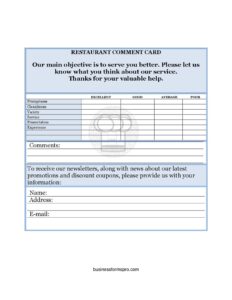
Restaurant Comment Card
Download a free Restaurant Comment Card template to collect honest guest feedback on food, service, and atmosphere — free download in PDF and DOCX.
PDF
DOCX
1 downloads
0
likes
Download Files
- DOCX
A Restaurant Comment Card is a short feedback form that diners fill out to rate and comment on their dining experience, and it’s the easiest way for restaurants to capture honest, in-the-moment opinions about food, service, and atmosphere. Most owners use it to spot problems early and reward staff who shine. You can download this template free in both PDF and DOCX, with no signup required.
What Is a Restaurant Comment Card?
A Restaurant Comment Card is a compact survey, usually placed on the table or tucked inside the check presenter, that invites guests to share their thoughts before they leave. It’s typically issued by the restaurant and completed anonymously by the customer, though many cards offer an optional contact line for follow-up. The card documents satisfaction levels across key areas — meal quality, server attentiveness, cleanliness, and value — and gives space for open-ended remarks. For owners and managers, it serves as a low-cost, ongoing pulse check on guest experience, helping turn fleeting impressions into actionable data that improves the operation over time.
When Do You Need a Restaurant Comment Card?
Comment cards fit a wide range of situations where you want direct customer input without the friction of a digital survey. Common scenarios include:
- Daily dine-in service — leave a card on every table or with the check to gather a steady stream of feedback.
- A new menu launch — measure how guests respond to new dishes, portion sizes, or pricing before committing fully.
- Staff training and reviews — track which servers consistently earn praise and which need coaching.
- Grand openings or soft launches — collect early impressions while you fine-tune kitchen timing and front-of-house flow.
- Catering and private events — hand cards to event hosts to evaluate large-format service.
- Recovering from a complaint — invite a returning guest to confirm that issues were resolved.
Types of Comment Cards
Not every restaurant needs the same format. A quick-service spot might use a simple three-question card focused on speed and accuracy. A fine-dining establishment often uses a longer card covering wine service, ambiance, and the recommendation likelihood. Some operators run themed cards during promotions or holidays, while others keep a permanent table-tent version. The template here is flexible enough to adapt to any of these by adjusting the rating categories and comment prompts to match your concept.
What a Restaurant Comment Card Should Have
A useful comment card balances brevity with enough detail to be meaningful. Strong cards typically include:
- The restaurant name and a short, friendly invitation to give feedback.
- The visit date and, optionally, the time or meal period (lunch, dinner).
- Rating scales for core categories: food quality, service, cleanliness, and atmosphere.
- An overall satisfaction rating and a likelihood-to-return or recommend question.
- The server’s name so praise or concerns can be attributed.
- An open comment box for anything the ratings don’t capture.
- An optional name, email, or phone line for guests who want a response.
How to Fill Out a Restaurant Comment Card
Guests can complete the card in under two minutes. Walk through it like this:
- Date of visit: Note the day you dined so management can match feedback to a specific shift.
- Meal period or table number: If provided, mark whether it was breakfast, lunch, or dinner, which helps pinpoint kitchen performance.
- Server’s name: Write the name of the person who served you so credit or concerns are routed correctly.
- Food quality rating: Rate taste, temperature, and presentation on the scale provided.
- Service rating: Score attentiveness, friendliness, and speed.
- Cleanliness and atmosphere: Rate the dining room, restrooms, and overall ambiance.
- Overall satisfaction: Give a single summary rating of your experience.
- Comments: Use the open box to explain any rating, name a standout dish, or flag a problem.
- Contact information: Optionally add your name and email if you’d like the manager to follow up.
Tips for Getting More (and Better) Responses
The quality of your data depends on how you deploy the card. Keep the form short — guests abandon long cards. Place a pen with every card so there’s no friction. Train servers to mention the card warmly rather than hovering, and consider a small incentive like a discount on a return visit. Read cards daily and act fast on negative feedback; a quick phone call or email to an unhappy guest who left contact details can turn a one-star night into a loyal regular. Finally, share positive comments with your team — public praise is one of the cheapest, most effective morale boosters in hospitality.
Turning Feedback Into Action
A stack of cards only helps if you analyze them. Tally ratings weekly to spot trends: if service scores dip on weekends, you may be understaffed. If a particular dish draws repeated complaints about temperature, the kitchen workflow may need attention. Keep a simple log so you can compare month over month and measure whether changes actually move the numbers. Over time, the comment card becomes a management tool, not just a courtesy.
Common Mistakes to Avoid
- Making the card too long — guests skip cards that feel like homework; keep it to one side.
- Asking only rating questions — without a comment box you lose the context that explains the scores.
- Collecting cards but never reading them — feedback ignored is feedback wasted.
- Forgetting to capture the date or server — without these, you can’t tie comments to a shift or person.
- Pressuring guests to fill it out — coerced feedback is inflated and unreliable.
- Ignoring the positives — failing to recognize praised staff misses an easy retention win.
Frequently Asked Questions
What is a restaurant comment card used for? It’s used to collect guest feedback about food, service, cleanliness, and overall experience while the visit is still fresh. Restaurants use the results to fix recurring problems, recognize strong staff, and track satisfaction trends over time.
How do I fill out a comment card? Add the date and your server’s name, rate each category on the scales provided, give an overall score, and use the comment box for specifics. Adding your contact details is optional but lets management respond to you directly.
Should comment cards be anonymous? They can be either way. Anonymous cards often yield more candid feedback, so the contact line is always optional — guests share their details only if they want a personal follow-up.
Is this comment card template free? Yes. You can download it free in PDF and DOCX with no signup required, and you’re welcome to customize the restaurant name, categories, and comment prompts.
How can I get more guests to complete the card? Keep it short, leave a pen with each card, have servers mention it warmly, and consider offering a small return-visit incentive. Acting visibly on feedback also encourages future participation.
Can I edit the categories on the card? Absolutely. Open the DOCX version and adjust the rating categories, add a likelihood-to-recommend question, or change the wording to match your concept, whether you run a café, food truck, or fine-dining room.
This Restaurant Comment Card template is provided as a general example for informational purposes only and does not constitute legal, business, or professional advice. Feedback collection practices and any related privacy requirements vary by jurisdiction — consult a qualified professional for guidance specific to your situation.
Related Forms
- Restaurant Suggestion Card
- Business Suggestion Card
- Catering Service Feedback
- Restaurant Your Opinion Card
- Bar Your Opinion Card
- Product Feedback Form
Browse more in Feedback.