
Walkie Signout Sheet
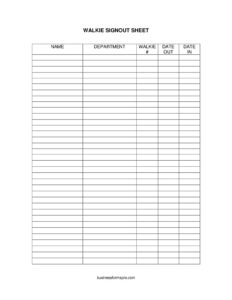
Track two-way radios on set with this free Walkie Signout Sheet template—log name, department, walkie number, and dates. Free PDF and DOCX download.
PDF
DOCX
11 downloads
0
likes
Download Files
- DOCX
A Walkie Signout Sheet is a simple production log used to track who has each two-way radio (walkie-talkie) on a film or television set, the most common reason being to recover expensive rented gear at wrap and hold crew members accountable for the units they carry. It’s free to download here in both PDF and DOCX, with no signup required.
What Is a Walkie Signout Sheet?
A Walkie Signout Sheet is a tracking document, usually maintained by the production office, the locations team, or the assistant directors, that records the distribution and return of two-way radios across a crew. Each row ties a specific walkie number to a person and department, with the dates the radio was checked out and returned. Because walkies are typically rented in bulk from a vendor and counted against the production’s budget, a clean signout sheet is the difference between returning a full kit and paying replacement fees for lost units. It also makes it easy to find out who currently holds a working radio when channels go quiet.
When Do You Need a Walkie Signout Sheet?
- At crew call on the first day of a shoot, when dozens of radios are handed out to department heads and key crew.
- When a production rents walkies from an equipment vendor and must account for every unit at return.
- On large sets where multiple departments—grip, electric, art, camera, sound, AD—each need several radios on different channels.
- When a crew member loses or breaks a walkie and you need a record of who signed for it.
- At wrap, to reconcile the count of radios issued against the count returned before the gear goes back.
- On multi-day or multi-location shoots where radios move between people and the chain of custody needs to be documented.
What a Walkie Signout Sheet Should Have
An effective walkie log stays minimal but complete. It needs a clear identifier for each radio (the walkie number), the name of the person responsible, the department they work in, and a date out and date in to bracket the period of custody. A good sheet also leaves room for a header noting the production title, the shoot date or date range, and the name of the person managing the radios. Some productions add columns for accessories like surveillance earpieces, spare batteries, or chargers, since those are easy to misplace and costly to replace. The core, however, is the five fields that make accountability possible.
How to Fill Out a Walkie Signout Sheet
- Name: Have the crew member print their full name legibly in the name field, or write it in yourself as you hand over the unit. Avoid first names only—on a big crew there may be three people named Mike.
- Department: Record the department, such as Camera, G&E, Art, Sound, Locations, or AD. This helps you group returns and chase the right department head if a radio goes missing.
- Walkie #: Enter the unique number printed or labeled on the radio. Match it to the physical sticker on the unit; if numbers are worn, re-label before issuing.
- Date Out: Note the date the walkie is issued. On a single-day shoot this is the shoot date; on a run that spans several days, it’s the day the person first took possession.
- Date In: Leave this blank at signout. Fill it in only when the radio is physically back in your hands, so a missing return date instantly flags an outstanding unit.
Tips for Running a Tight Radio Program on Set
Number every radio and its battery so they travel together, and store the sheet on a clipboard at the walkie charging station where crew naturally pass by. Issue radios from a single point of contact—often a PA or the second AC for camera—so there is one authoritative log rather than several conflicting ones. At lunch and at wrap, walk the charging station and physically count units against the rows that still have a blank date in. If your shoot runs multiple days, you can leave radios assigned to the same person and only update the date in when they hand it back for good, which saves time on a long production.
How It Differs From a General Equipment Checkout Form
A Walkie Signout Sheet is purpose-built for radios and stays lean, while a general equipment checkout form may cover cameras, lenses, lighting, and grip gear with serial numbers, condition notes, and insurance values. The walkie sheet trades that detail for speed: on a busy crew call you cannot stop to log condition on forty units. If you need to track high-value gear with replacement cost and damage history, use a fuller equipment form; for the daily reality of getting radios out fast and back fully, this focused sheet is the right tool.
Common Mistakes to Avoid
- Letting crew grab radios off the charger without signing—an unlogged unit is a unit you cannot trace.
- Recording only first names, which makes it impossible to identify the right person later.
- Filling in the date in at signout out of habit, which hides outstanding radios when you scan the sheet.
- Skipping the walkie number or using a label that’s peeling off, so two rows can’t be told apart.
- Keeping multiple sheets in different hands, creating gaps and double entries.
- Forgetting to reconcile the count at wrap, then discovering missing units after the rental return window closes.
Frequently Asked Questions
What is a Walkie Signout Sheet used for? It’s used to track two-way radios on a film or TV set—who has each unit, in what department, and when it went out and came back. The main goal is accountability so every rented radio is returned at wrap and any losses can be traced to the right person.
Who is responsible for maintaining the sheet? Usually a production assistant, the locations department, or the assistant directors manage the radios and the log. Whoever distributes the units should be the single keeper of the sheet so the record stays consistent.
Do I need to fill in the date in right away? No—leave the date in blank when you hand out a radio. You only record it when the unit is physically returned, which lets a quick glance at the sheet reveal exactly which radios are still out.
Can I customize this template for my production? Yes. The DOCX version is fully editable, so you can add columns for batteries, earpieces, or chargers, insert your production name in the header, or adjust the layout to fit your crew size.
Is this Walkie Signout Sheet legally binding? It is an internal tracking document, not a contract. It documents custody of equipment and supports accountability, but any financial responsibility for lost gear is governed by your crew agreements and rental terms, not the sheet itself.
How much does the template cost? It’s completely free to download here in both PDF and DOCX formats, with no signup or payment required. Print it for your charging station or edit the DOCX to match your show.
This Walkie Signout Sheet template is a general example provided for informational purposes only and is not legal, financial, or professional advice. Equipment rental terms and liability requirements vary by vendor and jurisdiction—consult your production manager, the rental agreement, or a qualified professional for guidance specific to your situation.
Related Forms
- Appearance Release Form
- Video Production Proposal
- Script Supervisor Daily Report
- Daily Production Report
- Extras Breakdown
- Location Use Release Form
Browse more in Film Production Forms.