
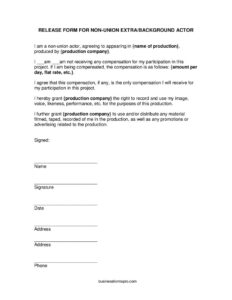
Extras Release Form
Download a free Extras Release Form template for film and video productions to secure background actor consent — free PDF and DOCX download, no signup.
PDF
DOCX
6 downloads
0
likes
Download Files
- DOCX
An Extras Release Form is a short consent document that a film, TV, or video production has a non-union background actor sign so the producer can legally record and use that person’s image, voice, and performance. It’s the most common way productions clear extras who appear on camera, and you can download it free here in PDF and DOCX with no signup required.
What Is an Extras Release Form?
An Extras Release Form is a written agreement between a production company and a non-union extra (also called a background actor) granting the production the right to film that person and use the resulting footage. It is typically issued by the production, line producer, or assistant director on set and signed by each extra before they appear on camera. The form documents whether the extra is being paid, confirms the agreed compensation, and transfers the right to use the recorded image and performance in the project and in related promotions. It protects the production from later disputes over consent and gives the extra a clear record of what they agreed to.
When Do You Need an Extras Release Form?
You should collect a signed release from every non-union person who appears recognizably on camera. Common situations include:
- Crowd and background scenes — filling a restaurant, office, sports stadium, or street with extras who walk through or sit in frame.
- Low-budget and independent films that hire local volunteers or paid day players rather than union performers.
- Student and short film projects where friends, classmates, or community members appear as background.
- Corporate, commercial, or training videos that show employees or recruited participants in the shot.
- Web series, music videos, and social content where bystanders or recruited extras are featured.
- Events or live recordings where attendees appear in the captured footage and the producer plans to distribute it.
Whenever footage may be used commercially, promoted, or distributed, a signed release reduces the risk of a person later objecting to how their likeness was used.
What an Extras Release Form Should Have
A complete release for this purpose includes the title of the production and the name of the production company, a statement that the signer is a non-union actor, and a clear indication of whether compensation is being paid. It should describe any compensation (a daily rate, a flat fee, or none at all) and confirm that this is the only payment the extra will receive. The core grant gives the production the right to record and use the person’s image, voice, likeness, and performance, plus the right to use and distribute the material in the production and in promotion or advertising. Finally, it needs identifying and signature lines: printed name, signature, date, address, and phone number.
How to Fill Out an Extras Release Form
- Name of production: Write the official title of the film, video, or project the extra is appearing in.
- Production company: Enter the legal name of the company producing the project — this is the party receiving the rights.
- Compensation status: Have the extra check whether they am or am not receiving compensation for their participation.
- Compensation details: If they are being paid, describe the arrangement in the blank provided — for example, an amount per day, a flat rate, or other agreed terms.
- Review the grant of rights: Confirm the signer understands they are granting the production company the right to record and use their image, voice, likeness, and performance, and to distribute it in the production and related promotions.
- Name: The extra prints their full legal name.
- Signature: The extra signs the form.
- Date: Enter the date of signing — usually the shoot day.
- Address and phone: Record the extra’s mailing address and a contact phone number for the production’s files.
Paid Versus Unpaid Extras
The compensation section matters because it sets expectations. If an extra is volunteering or working in exchange for credit, experience, meals, or copy of the footage, check the “am not” box and leave the rate blank — though it’s still wise to note any non-cash arrangement separately. If they are paid, write the exact terms in the compensation line: a per-day rate, a flat fee for the project, or hourly. The form’s language confirms this is the only compensation the extra will receive, which helps prevent later claims for additional money, residuals, or royalties on a non-union project.
Collecting and Storing Releases on Set
On a busy shoot, the simplest approach is to have every extra complete and sign a release during check-in, before they step on camera. Keep the signed forms organized by shoot day and store them safely — distributors, broadcasters, and insurers may request proof that everyone on screen was cleared. Digital scans or photos of the signed paper provide a useful backup. Because rights granted here support future distribution and advertising, losing a release can complicate licensing the finished work later.
Common Mistakes to Avoid
- Skipping releases for “just background” people — if they’re recognizable on camera, get a signature.
- Leaving the compensation boxes unchecked, which creates ambiguity about whether and how the extra was paid.
- Forgetting to fill in the production title or company name, making it unclear what project the consent covers.
- Missing contact details — incomplete address or phone fields make it hard to follow up later.
- Using one blanket form for a minor — a parent or legal guardian generally needs to sign for anyone under 18.
- Failing to keep copies after the shoot, leaving the production without proof of consent.
Frequently Asked Questions
What is an Extras Release Form used for? It is used to get a non-union background actor’s written consent to be filmed and to grant the production company the right to use and distribute their image, voice, and performance. Productions collect it to clear everyone who appears on camera and to avoid disputes over how the footage is used.
Do unpaid extras still need to sign a release? Yes. Whether or not someone is paid, their consent to be recorded and to have their likeness used and distributed should be documented in writing. The form includes an “am not receiving any compensation” option precisely for volunteer or unpaid extras.
Does an Extras Release Form need to be notarized or witnessed? Notarization is generally not required for a standard extras release; the extra’s signature and date are typically enough. Requirements can vary by jurisdiction and by what a distributor or insurer asks for, so check your local rules and any contract terms.
Is a signed Extras Release Form legally binding? When properly completed and signed by a competent adult, a release generally functions as a binding grant of the rights it describes. For minors, a parent or legal guardian usually must sign. Because enforceability depends on local law, consult a qualified professional for specific situations.
How much does this Extras Release Form cost? The template on this page is completely free to download in both PDF and DOCX, with no signup or account required. You can edit it to add your production’s name and details before printing copies for your shoot.
Can I edit the template for my production? Yes. The DOCX version is editable so you can insert your production title, company name, and adjust the compensation language to match your arrangement. Review your changes carefully to make sure the grant of rights and consent language remain clear.
This Extras Release Form template is provided as a general example for informational purposes only and is not legal advice. Production and likeness-rights requirements vary by jurisdiction and by union and distributor agreements. Consult a qualified entertainment attorney before relying on any release for your project.
Related Forms
- Video Production Proposal
- Script Supervisor Notes
- Extras Breakdown
- Appearance Release Form
- Deal Memo
- Actor Release Form
Browse more in Film Production Forms.