
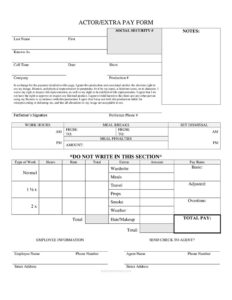
Actor Pay Form
Download a free Actor Pay Form template to document performer pay, hours, and likeness release on set — free download in PDF and DOCX, no signup.
PDF
DOC
6 downloads
0
likes
Download Files
- DOC
An Actor Pay Form is a single-page production document that records an actor’s or extra’s pay details for a shoot day while also capturing a likeness release in the same place. Productions most often use it on set to log call time, hours, and the agreed rate so payroll can be processed quickly and consistently. It’s free to download here in both PDF and DOCX, with no signup required.
What Is an Actor Pay Form?
An Actor Pay Form is a combined pay voucher and release used by film, television, and commercial productions to document what a performer is owed for a given day of work. It identifies the performer, the show or production, the hours worked, and the rate applied, then totals the amount due. Just as importantly, the form includes a release in which the performer grants the production the right to use their image, likeness, and physical representation. Production coordinators, accountants, assistant directors, and casting departments typically rely on it. In one tidy page, it links the money paid to the consent given, which is why it travels with daily paperwork from set to the production office.
When Do You Need an Actor Pay Form?
Reach for this form whenever a performer is engaged and paid for a production day. Common situations include:
- Booking background extras for a crowd scene who need a quick voucher logging their hours and flat rate.
- Day-playing principal actors hired for one or a few shoot days outside a long-term contract.
- Commercial and corporate shoots where talent must sign a likeness release tied to their pay.
- Music videos, web series, and student or independent films that need lightweight payroll paperwork.
- Stunt, smoke, wardrobe, or prop work that may carry adjustments or bumps on top of the basic rate.
- Reconciling overtime and meal penalties at wrap, when actual set dismissal time differs from the planned schedule.
Because the form bundles pay and release together, it suits productions of every size that want one consistent record per performer, per day.
What an Actor Pay Form Should Have
A complete Actor Pay Form ties together three things: who the performer is, what they did and when, and how much they earned. The employee section captures the name, contact details, and identifying information. The work section records the type of work, call time, set dismissal, hours, and any meal breaks. The pay section lists the basic rate, overtime tiers, adjustments, and the final total. A signature line and the release language make the document binding, and an agent section handles where the check should be sent. The reserved “Do Not Write In This Section” area is left for the production accountant.
How to Fill Out an Actor Pay Form
- Production header: Enter the Show, Company, Production #, and Date at the top so the voucher is matched to the right shoot.
- Employee Information: Write the Employee Name (First, Last Name), any “Known As” or character/stage name, Performer Phone #, and the mailing address (Street Address, City, State, Zip).
- Identification: Add the Social Security # for payroll. Provide the Agent Name and Phone Number, then mark “Send Check To Agent?” if payment routes through representation.
- Type of Work: Indicate the role — Extras, principal, or specialty work such as Smoke, Hair/Makeup, Wardrobe, or Props handling.
- Work Hours: Record Call Time (AM/PM), Set Dismissal, From and To times, total Hours, plus Meals, Meal Breaks, Travel, and Weather notes.
- Pay Rates: Enter the Basic rate, Normal hours, and Overtime at the 1 1/2 x and 2 x tiers. Note any Adjusted Rate, Amount, and Meal Penalties.
- Total: Add it all to a Total Pay figure, use the Notes field for explanations, and have the performer sign the Performer’s Signature line.
The Likeness Release Built Into the Form
Unlike a plain pay voucher, this form carries release language stating that, in exchange for the payment shown, the performer grants the production and associated entities the right to use their image, likeness, and physical representation in perpetuity — under their name, a fictitious name, or in character. The signer also waives the right to inspect or approve the finished product, agrees to hold the client harmless, and accepts that alterations to the image are permitted. Because signing acknowledges these terms, performers should read the page before signing and ask questions if anything is unclear. The combined structure means the production has documented consent attached directly to the payment record, which simplifies clearances later.
Tips for Production Accountants and ADs
Collect the form at wrap each day while times are fresh, and confirm Set Dismissal against the call sheet before computing overtime. Verify that the basic rate, any adjustments, and meal penalties match the booking agreement. Leave the “Do Not Write In This Section” box for accounting to enter coded figures, and keep a copy with the daily production report. If the performer works under an agent, double-check the “Send Check To Agent?” box so payment isn’t misrouted. Legible handwriting on times and totals prevents payroll delays.
Common Mistakes to Avoid
- Leaving call or dismissal times blank, which makes overtime and meal penalties impossible to verify.
- Forgetting the Social Security # or address, stalling payroll and tax reporting.
- Mixing up AM and PM on Call Time or Set Dismissal, throwing off the hour calculation.
- Skipping the Performer’s Signature, which leaves the pay and the likeness release unconfirmed.
- Not marking “Send Check To Agent?” when an agent is listed, causing the check to go to the wrong party.
- Failing to note specialty work like Smoke, Wardrobe, or Props that may carry a bump or adjusted rate.
Frequently Asked Questions
What is an Actor Pay Form used for? It documents a performer’s pay for a shoot day — their hours, rate, adjustments, and total — while also recording a release granting the production rights to use their image and likeness. It serves as both a payroll voucher and a consent record in one page.
How do I fill out an Actor Pay Form? Enter the production header, the performer’s name and contact details, identification and agent information, the type of work, the work hours including call and dismissal times, and the pay rates. Total the pay, add any notes, and have the performer sign the signature line.
Does the form need to be signed? Yes. The Performer’s Signature confirms both the pay terms and the likeness release language printed on the page. Without it, the production lacks documented consent and the pay record is incomplete.
Does an Actor Pay Form need to be notarized or witnessed? Typically no notarization or witness is required for a routine pay voucher and release of this kind. Productions usually rely on the performer’s signature alone, though specific requirements can vary by project, union rules, and jurisdiction.
How are overtime and meal penalties calculated? Overtime is recorded at the 1 1/2 x and 2 x tiers based on hours worked beyond the normal day, while meal penalties apply when required breaks are missed or delayed. The exact thresholds depend on your production’s agreement or any applicable union rules.
How much does this Actor Pay Form template cost? Nothing — it’s a free download from Business Forms Pro in both PDF and DOCX formats, with no signup or account needed. You can edit the DOCX to match your production’s rate structure and branding.
This Actor Pay Form template is a general example provided for informational purposes only and is not legal, financial, or tax advice. Production, payroll, and likeness-release requirements vary by jurisdiction and by union or guild rules — consult a qualified professional before relying on this document.
Related Forms
- Location Use Release Form
- Extras Breakdown
- Daily Film Production Report
- Script Supervisor Notes
- Daily Production Report
- Appearance Release Form
Browse more in Film Production Forms.