
Job Invoice
Download a free Job Invoice template to bill for labor, materials, and miscellaneous charges on completed jobs — free PDF and DOCX download, no signup.
PDF
DOCX
0
likes
Download Files
- DOCX
A Job Invoice is a billing document a contractor or service provider gives a customer to itemize the labor, materials, and miscellaneous charges for a specific completed job. People most often use it to collect payment after finishing project-based work — from plumbing repairs to landscaping installs. You can download this Job Invoice template free in both PDF and DOCX formats, with no signup required.
What Is a Job Invoice?
A Job Invoice is a written request for payment tied to a single, defined job rather than ongoing or recurring service. It is issued by the business that performed the work — a contractor, tradesperson, repair shop, or service company — and sent to the customer who ordered it. The document records what was done, where it was done, who authorized it, and how the final amount breaks down across material, labor, and extra charges. Because it separates these categories and shows a clear grand total, a Job Invoice doubles as both a payment demand and a service record. It supports your bookkeeping, helps the customer understand exactly what they are paying for, and creates a paper trail if a billing question ever arises.
When Do You Need a Job Invoice?
Any time you complete a discrete job and need to be paid for it, a Job Invoice gives you a structured, professional way to bill. Common situations include:
- A plumber or electrician finishes a service call and needs to bill for parts and hours separately.
- A general contractor completes a renovation phase and itemizes lumber, fixtures, and labor.
- An HVAC technician installs or repairs a unit and adds disposal or trip charges as miscellaneous items.
- A landscaper finishes a planting or hardscape job at a specific property address.
- An auto repair shop bills for parts, shop labor hours, and shop supplies on one ticket.
- A handyman wraps up several small tasks and needs one combined, signed invoice.
In each case the invoice ties the charges to a named customer, a job location, and the person who authorized the work — which matters when the billing address and the work site are different.
What a Job Invoice Should Have
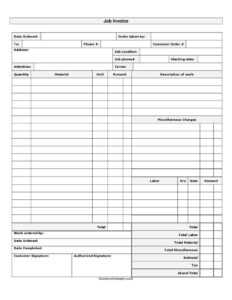
A complete Job Invoice clearly identifies both parties and the job, then itemizes every charge. Essential elements include the customer’s name, address, and phone; the job location and job phone if different; the date the order was taken and who took it; the customer order number for reference; and payment terms. The body should list materials with quantity, unit, and amount, a description of the work performed, and labor broken out by hours and rate. It should total labor, material, and miscellaneous charges separately, then show a subtotal, tax, and grand total. Finally, signature lines for both the customer and an authorized representative confirm the work was ordered and accepted.
How to Fill Out a Job Invoice
- Enter the date ordered and the name of the employee under order taken by.
- In the to field add the customer’s name, then their phone #, address, and the customer order # for cross-reference.
- Record the job location and job phone # if the work site differs from the billing address.
- Fill in the starting date, the attention line for the contact person, and the agreed terms (for example, due on receipt or net 15).
- For materials, list each item with quantity, material name, unit, and line amount.
- Write a clear description of work performed, and note any miscellaneous charges such as fees or disposal costs.
- Under labor, enter hrs, the rate, and the resulting amount.
- Note work ordered by, date ordered, and date completed.
- Add total labor, total material, and total miscellaneous, then calculate the subtotal, apply tax, and write the grand total.
- Have the customer signature and authorized signature lines signed.
Separating Labor, Material, and Miscellaneous
One feature that makes this Job Invoice useful is its three-bucket structure. Materials capture physical goods you supplied — pipe, paint, fixtures, plants — priced by unit and quantity. Labor captures your time, calculated as hours multiplied by an hourly rate. Miscellaneous covers everything that fits neither category: trip charges, equipment rental, dump fees, permit costs, or shop supplies. Keeping these separate is more than tidy bookkeeping. Customers reviewing the invoice can quickly see what they are paying for, and the breakdown reduces disputes because each charge stands on its own line. It also helps at tax time, since material costs and labor are often tracked differently. When you total each bucket before reaching the subtotal, both you and the customer can verify the math step by step.
Getting Paid: Terms and Follow-Up
The terms field sets expectations for when payment is due, so fill it in clearly rather than leaving it blank. Common options include due on receipt, net 15, or net 30. Send the invoice promptly after the date completed while the work is fresh in the customer’s mind. Keep a copy for your records along with the signed authorization. If payment is late, the customer order number and the signed invoice make it easy to reference the exact job when you follow up. A signature on both lines confirms the customer authorized the work and accepts the charges, which strengthens your position if a balance goes unpaid.
Common Mistakes to Avoid
- Leaving the terms field blank, which invites slow or disputed payment.
- Combining labor and materials into one lump sum instead of using the separate totals.
- Forgetting to fill in the job location when it differs from the billing address.
- Omitting tax or applying the wrong rate for your jurisdiction.
- Skipping the customer signature or authorized signature, weakening the record of acceptance.
- Vague description of work entries that leave the customer unsure what they paid for.
Frequently Asked Questions
What is a Job Invoice used for? It is used to bill a customer for a specific completed job, itemizing the materials, labor hours, and any miscellaneous charges involved. The format separates these categories so the customer can see exactly how the grand total was reached. It also serves as a record of what work was performed and who authorized it.
How do I fill out a Job Invoice? Start with the customer and job details — name, address, phone, job location, and order number — then list materials by quantity and unit, describe the work, and record labor as hours times rate. Total each category, add tax to the subtotal, and write the grand total. Finish by collecting the customer and authorized signatures.
What is the difference between a Job Invoice and a regular invoice? A standard invoice may simply bill for goods or a flat service fee, while a Job Invoice is built around a single defined job with separate fields for labor hours, materials, and miscellaneous charges. It also captures job-specific details like the work site location, starting date, and completion date. This makes it ideal for trades and project-based work.
Does a Job Invoice need to be signed? This template includes lines for both a customer signature and an authorized signature. Signatures are not always legally required, but they confirm the customer ordered the work and accepts the charges, which is helpful if a payment dispute arises. Having both parties sign creates a stronger record.
How should I calculate tax on the invoice? Apply the sales or service tax rate required in your jurisdiction to the appropriate portion of the subtotal, since taxability of labor versus materials can vary by location. The template provides a dedicated tax line so the charge is shown clearly before the grand total. Check your local rules to confirm what is taxable.
Is this Job Invoice template really free? Yes. You can download this Job Invoice template free in both PDF and DOCX formats with no signup required. The DOCX version is editable, so you can add your business name, logo, and standard rates before printing or sending.
This Job Invoice template is a general example provided for informational purposes only and is not legal, financial, or tax advice. Tax treatment, signature requirements, and billing practices vary by jurisdiction. Consult a qualified professional to ensure your invoices meet the requirements that apply to your business.
Need to work out sales tax? Use our free Sales Tax Calculator to add or remove sales tax from any amount in seconds.
Official resource: for the rules that apply to your situation, see the U.S. Small Business Administration.
Related Forms
Browse more in Invoices and Order Forms.