
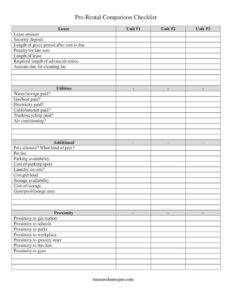
Pre-Rental Comparison Checklist
Compare up to three rentals side by side with this free Pre-Rental Comparison Checklist template — track rent, fees, utilities and amenities. Free download.
PDF
DOC
1 downloads
0
likes
Download Files
- DOC
A Pre-Rental Comparison Checklist is a worksheet that lets you evaluate two or three potential rental units side by side before signing a lease. People most often use it when they’re touring apartments and want an objective way to weigh rent, deposits, included utilities, and location instead of relying on memory. It’s free to download in both PDF and DOCX formats — no signup required.
What Is a Pre-Rental Comparison Checklist?
A Pre-Rental Comparison Checklist is a simple decision-making tool used by renters, and sometimes by relocation agents or property managers helping clients choose between listings. It documents the key financial terms, included services, amenities, and neighborhood factors for each unit in a single layout. Rather than juggling notes from several showings, you record the same details for every property in parallel columns — Unit #1, Unit #2, and Unit #3. The result is a clear, apples-to-apples comparison that highlights real differences in cost and convenience. It isn’t a binding contract; it’s a planning document that helps you ask the right questions and avoid choosing a place based only on first impressions or a single attractive feature.
When Do You Need a Pre-Rental Comparison Checklist?
This checklist is most useful any time you have more than one viable option and want to make a confident choice. Common scenarios include:
- Apartment hunting in a new city where you’re touring several buildings in one or two days and need to keep details straight.
- Deciding between a cheaper unit with no included utilities and a pricier one that bundles water, heat, and trash.
- Comparing pet policies and pet fees when you have a dog or cat that not every landlord will accept.
- Weighing amenities like on-site laundry, parking, storage, or a gym against the monthly rent.
- Evaluating commute and lifestyle by comparing proximity to your workplace, schools, grocery stores, and bus lines.
- Splitting a rental with roommates and needing a shared document everyone can review before committing.
What a Pre-Rental Comparison Checklist Should Have
A complete checklist captures every factor that affects your monthly cost and daily life. The strongest comparisons cover three areas: financial terms (lease length, rent, security deposit, grace period, late penalties, cleaning fees), included services and amenities (which utilities are paid, pet policy, parking, laundry, storage, common areas), and location (proximity to work, schools, transit, and shopping). Listing the same line items for each unit is what makes the document valuable — a missing field for one property can hide a real cost. Leave space for an “Additional” note so you can record anything unique, such as a renovated kitchen or a strict noise policy.
How to Fill Out a Pre-Rental Comparison Checklist
- Label the three columns Unit #1, Unit #2, and Unit #3 with the address or building name of each property.
- Under Lease, note the type and record the monthly Lease amount and the Security deposit required for each.
- Enter the Length of grace period after rent is due and the Penalty for late rent so you can compare flexibility.
- Fill in the Length of lease and the Required length of advanced notice for moving out, plus any Amount due for cleaning fee.
- For Utilities, mark whether Water/sewage, Gas/heat, Electricity, Cable/internet, and Trash/recycling are paid, and note Air conditioning availability.
- Record the Pets allowed policy (and what kinds), the Pet fee, Parking availability and Cost of parking spots.
- Note Laundry on-site and Cost per load, Storage availability and Cost of storage, and any Gym/pool/lounge area.
- Finish with the Proximity fields — gas station, schools, parks, workplace, grocery store, bus line, and gym — and add notes in Additional.
How to Read the Results and Decide
Once each column is filled in, the checklist works best when you separate “true monthly cost” from advertised rent. A unit listed at a lower lease amount may actually cost more once you add electricity, gas, internet, parking, and a pet fee that another property includes for free. Total those recurring charges for each unit and compare the real bottom line. Then weigh the one-time costs — security deposit and cleaning fee — against your move-in budget. Finally, factor in the location columns: a slightly higher rent that cuts your commute or sits near a bus line can save money and time every day. Highlight the best value in each row so a clear winner often emerges visually.
Tips for an Accurate Comparison
Bring the checklist with you to each showing and fill it out on the spot rather than from memory. Ask the leasing agent to confirm which utilities are tenant-paid, because “utilities included” sometimes covers only water and trash. Take photos of each unit and label them with the unit number so they match your notes. If a fee is described as “varies” or “to be determined,” write that down instead of guessing — unconfirmed costs are a common source of budget surprises.
Common Mistakes to Avoid
- Leaving fields blank for one unit, which makes a fair side-by-side comparison impossible.
- Comparing rent only and ignoring utilities, parking, and pet fees that change the real monthly total.
- Forgetting to confirm the security deposit and cleaning fee, which affect how much cash you need up front.
- Overlooking the required advance notice to move out and the late-rent penalty, which matter later in the lease.
- Judging proximity by impression rather than checking actual distance or commute time to work and transit.
- Treating the checklist as a lease — it records what you were told, but only the signed lease is binding.
Frequently Asked Questions
What is a Pre-Rental Comparison Checklist used for? It’s a worksheet for comparing up to three rental units side by side before you sign a lease. It tracks the same financial terms, included utilities, amenities, and location factors for each property so you can choose objectively rather than by first impression.
How do I fill it out? Label each column with a unit’s address, then enter the lease amount, security deposit, fees, included utilities, pet and parking policies, and proximity details for each. Filling it in during your tour keeps the information accurate and consistent across all three units.
Is this checklist a legal contract? No. It is a personal planning and comparison tool, not a lease or binding agreement. Only the lease you and the landlord sign creates legal obligations, so verify any figure on the checklist against the written lease before committing.
What’s the difference between rent and total monthly cost? Rent is the advertised lease amount, while total monthly cost adds tenant-paid utilities, parking, pet fees, laundry, and storage. A lower rent can end up costing more once those extras are included, which is exactly why this checklist is helpful.
Should I use one checklist per unit or one for all three? This template is designed with three columns, so you can capture all units on a single page for an easy side-by-side view. If you’re touring more than three properties, simply download and print additional copies.
How much does this template cost? Nothing — it’s a free download available in PDF and DOCX with no signup required. You can fill out the DOCX on your computer or print the PDF to carry with you during apartment tours.
This template is a general example provided for informational purposes only and is not legal, financial, or housing advice. Rental terms, fees, and tenant protections vary by location and by individual lease. Always review the actual lease agreement and consult a qualified professional before making a rental decision.
Official resource: for the rules that apply to your situation, see HUD.
Related Forms
- Covid Eviction Moratorium Landlord
- Rental Unit HVAC Filter Log
- Request for Landlord Repairs
- Landlord Change of Ownership
- Rental Appliance Condition Record
- Landlord Lease Renewal
Browse more in Landlord Documents.