
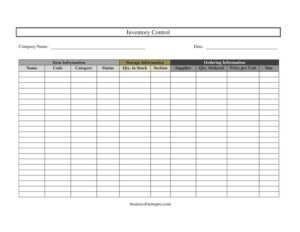
Inventory Control
Track stock levels, suppliers, and orders with this free Inventory Control template, available as a free download in PDF and DOCX formats.
PDF
DOCX
2 downloads
0
likes
Download Files
- DOCX
An Inventory Control form is a simple tracking document that records what stock you have, where it is stored, and what you have on order. Businesses use it most often to keep an accurate, up-to-date count of items so they never run out of essentials or over-order slow-moving goods. You can download this template free in both PDF and DOCX formats, with no signup required.
What Is an Inventory Control Form?
An Inventory Control form is a structured record used to monitor the items a business holds in stock and manage replenishment. It is typically maintained by warehouse staff, store managers, office administrators, or small business owners who need a clear picture of available quantities at any moment. The form captures item details, storage locations, current stock counts, and ordering information in one place. By logging this data consistently, a company can spot shortages before they become problems, confirm what has been reordered, and reconcile physical counts against records. It works equally well for retail goods, raw materials, office supplies, tools, or any countable asset that moves in and out of a location.
When Do You Need an Inventory Control Form?
This form is useful any time you need to keep tabs on physical stock and ordering activity. Common situations include:
- Retail and store management — tracking merchandise quantities so popular items stay on the shelf and reorders happen on time.
- Warehouse operations — recording where each item lives by section and confirming counts during cycle counts or full audits.
- Small business supply tracking — monitoring office consumables, packaging, or tools to avoid emergency last-minute purchases.
- Manufacturing and assembly — keeping raw materials and components stocked so production lines never stall.
- Seasonal or event prep — building a list of items, suppliers, and order due dates ahead of a busy period.
- Year-end and audit reporting — providing a documented snapshot of stock value and on-order amounts for accounting purposes.
What an Inventory Control Form Should Have
A complete and useful inventory record includes three core groups of information. Item information identifies exactly what is being tracked — a clear name, a unique code, and a category for grouping. Storage information tells anyone reading the log where to physically find the item and how many are on hand right now. Ordering information connects each item to its supplier, the quantity currently ordered, the unit price, and the date the order is due to arrive. Add the company name and the date of the record at the top so the snapshot is anchored in time. Together these elements turn a loose list into a reliable control document you can act on.
How to Fill Out an Inventory Control Form
Work through the template field by field, completing one row per item:
- Company Name — enter your business or department name at the top so the record is clearly attributed.
- Date — record the date this inventory snapshot was taken; this is essential for tracking changes over time.
- Name — under Item Information, write the full, recognizable name of the product or material.
- Code — add the SKU, barcode, or internal part number that uniquely identifies the item.
- Category — assign a grouping (for example, electronics, packaging, raw materials) to make sorting easier.
- Status — note the item’s current state, such as in stock, low, on order, or discontinued.
- Qty. in Stock — under Storage Information, enter the verified physical count on hand.
- Section — record the aisle, shelf, bin, or zone where the item is stored.
- Supplier — under Ordering Information, name the vendor you buy this item from.
- Qty. Ordered — list how many units are currently on order, if any.
- Price per Unit — enter the cost of a single unit to help calculate value and order totals.
- Due — note the expected delivery or restock date for the pending order.
Tips for Keeping Your Inventory Accurate
An inventory log is only as good as the discipline behind it. Update the form on a regular schedule — daily for fast-moving stock, weekly or monthly for slower items. Set a minimum reorder point for each item and flag the Status field as low the moment a count drops below it, so reordering becomes routine rather than reactive. Use consistent codes and category names across every entry; mismatched naming is the fastest way to lose track of stock. When physical counts disagree with your records, investigate the difference rather than simply overwriting the number, since gaps often reveal shrinkage, miscounts, or unlogged shipments. Keeping the Price per Unit current also lets you calculate total inventory value at a glance.
How It Differs From a Purchase Order or Packing List
An Inventory Control form is sometimes confused with related documents, but it serves a distinct purpose. A purchase order is a single transaction request sent to a supplier, and a packing list details the contents of one shipment. The inventory control form, by contrast, is an ongoing master record that reflects your total stock position and pulls in ordering details only to show what is expected next. Think of the purchase order and packing list as inputs, and the inventory control sheet as the running ledger that ties everything together. This makes it the central reference point for anyone deciding what to buy, what to move, or what to count.
Common Mistakes to Avoid
- Skipping the date — without it, you cannot tell how current the counts are or compare snapshots over time.
- Inconsistent item codes — duplicate or missing codes make it impossible to track an item reliably.
- Estimating quantities — recording guessed counts instead of verified physical counts undermines the whole purpose.
- Ignoring the Status field — leaving status blank hides which items need urgent reordering.
- Forgetting to log orders — omitting Qty. Ordered and Due dates leads to duplicate purchases or unexpected stockouts.
- Letting prices go stale — outdated unit prices distort your inventory valuation and budgeting.
Frequently Asked Questions
What is an Inventory Control form used for? It is used to record and monitor the items a business keeps in stock, including how many are on hand, where they are stored, and what is on order. It helps prevent stockouts, reduces over-ordering, and gives a clear snapshot of inventory value at a given date.
How do I fill out the Inventory Control template? Start by entering your company name and the date, then complete one row per item. Fill in the item name, code, category, and status, followed by the quantity in stock and its storage section, then add supplier, quantity ordered, price per unit, and the expected due date.
Is this Inventory Control form free to download? Yes. You can download it free from Business Forms Pro in both PDF and DOCX formats, with no signup or payment required. The DOCX version is fully editable so you can add columns or adjust headings to fit your operation.
How often should I update my inventory records? It depends on how quickly your stock moves. Fast-selling or high-value items may warrant daily or weekly counts, while slower items can be reviewed monthly. Regular, consistent updates keep the record trustworthy and your reorder decisions accurate.
Can I use this form for both retail and warehouse inventory? Absolutely. The fields work for any countable items, whether finished retail goods, raw materials, tools, or office supplies. Use the Section field for storage locations and the Category field to group items in whatever way suits your business.
Does the form calculate inventory value automatically? The PDF is a manual form, but the DOCX version can be adapted into a spreadsheet or table where you multiply Qty. in Stock by Price per Unit to estimate value. For ongoing automated calculations, consider importing the structure into spreadsheet software.
This Inventory Control template is provided as a general example for informational purposes only and does not constitute legal, financial, accounting, or tax advice. Inventory valuation and record-keeping requirements vary by jurisdiction and industry — consult a qualified professional to ensure your practices meet applicable standards.
Related Forms
- Auto Maintenance Log
- Vehicle Maintenance Log
- Project Status Report
- Interview Preparation Worksheet
- Daily Music Practice Log
- Monthly Project Timetable
Browse more in Log and Inventory.