
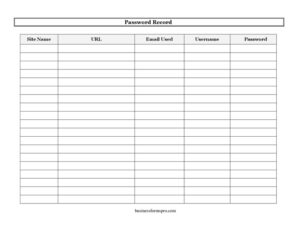
Password Record
Track logins safely with our free Password Record template, listing site names, URLs, usernames, emails, and passwords in one place — free download.
PDF
DOCX
4 downloads
0
likes
Download Files
- DOCX
A Password Record is a simple log that lets you store website names, URLs, usernames, email addresses, and passwords together in one organized place. People most often use it to stop scrambling for forgotten logins and to keep account access consistent across a household, team, or business. It’s free to download here in both PDF and DOCX, with no signup required.
What Is a Password Record?
A Password Record is a structured list used to document the credentials needed to access online accounts and services. It’s typically maintained by an individual managing personal accounts, an office administrator overseeing shared logins, or a small business owner tracking subscriptions and tools. Each row captures a single account: the site or service name, its web address, the username, the email address tied to the account, and the password. The goal is to give you a single, reliable reference instead of relying on memory or scattered sticky notes. While it doesn’t replace a dedicated password manager, a Password Record is an accessible, low-tech way to keep credentials organized, especially for accounts that several people may need to use.
When Do You Need a Password Record?
A Password Record is useful any time you manage more accounts than you can comfortably remember. Common situations include:
- Managing personal accounts — banking, shopping, streaming, and social media logins that accumulate over the years.
- Running a small business — tracking logins for email, accounting software, web hosting, and vendor portals used by the team.
- Onboarding employees — handing off shared accounts for tools, social media pages, or subscriptions to a new hire.
- Household coordination — letting a spouse or family member access shared utility, insurance, or subscription accounts.
- Estate or emergency planning — keeping a trusted person informed of important accounts in case you become unavailable.
- Periodic security reviews — auditing which sites you use, spotting duplicate passwords, and updating weak ones.
What a Password Record Should Have
A complete Password Record makes each entry easy to identify and use. The essential elements are the Site Name so you can quickly recognize the service, the URL so you land on the correct login page, the Username chosen for that account, the Email Used for registration and recovery, and the Password itself. Together these five fields cover everything needed to sign in. A well-kept record also benefits from consistent formatting, dated updates when passwords change, and clear handwriting or typing so no character is mistaken. Because it contains sensitive data, the record should also be stored securely rather than left in plain view.
How to Fill Out a Password Record
Work through one account per row, completing each field carefully:
- Site Name: Enter a clear, recognizable name for the service, such as “City Bank,” “Company Email,” or “Netflix.” Use the name you’ll actually search for later.
- URL: Write the exact web address of the login page — for example, the full link beginning with https. This saves time and helps you avoid lookalike phishing sites.
- Username: Record the username you created for the account. If the account uses your email address as the username, you can note that here or leave it and rely on the email field.
- Email Used: Enter the email address tied to the account, especially important because it’s often used for password resets and security alerts. Some people use different emails for different account types, so be precise.
- Password: Write the current password exactly, including capital letters, numbers, and symbols. Double-check each character, since a single mistyped symbol will block access.
Repeat for each account, and update the password field whenever you change credentials.
Tips for Keeping Your Password Record Secure
Because a Password Record concentrates sensitive information in one document, how you store it matters as much as how you fill it out. If you use the printable PDF, keep the physical copy in a locked drawer, safe, or another secure location rather than taped to a monitor or left on a desk. If you use the DOCX version on a computer, consider protecting the file with a password and storing it on an encrypted or access-controlled device. Avoid emailing the completed record as plain text, and be cautious about saving it to shared cloud folders where others can view it. For accounts that support it, enable two-factor authentication so a stolen password alone won’t grant access. Finally, review the record periodically to remove closed accounts and replace weak or reused passwords with stronger, unique ones.
Password Record vs. Password Manager
A Password Record and a digital password manager serve the same purpose but in different ways. A password manager is software that encrypts credentials, autofills logins, and can generate strong random passwords automatically. A Password Record is a manual document you fill out yourself, which makes it flexible, free, and easy to use offline or share on paper — but it offers no encryption or autofill unless you add those protections yourself. Many people use both: a manager for everyday logins and a printed record as a backup or for emergency access by a trusted person. Choose the approach that fits your comfort level and security needs.
Common Mistakes to Avoid
- Leaving it in plain sight — an unsecured record defeats its purpose and exposes every account at once.
- Writing passwords ambiguously — confusing a zero with the letter O, or a one with a lowercase L, will lock you out.
- Forgetting to update changes — an outdated password is as useless as no record at all.
- Omitting the URL — without the correct web address, you may waste time or land on a fraudulent lookalike site.
- Mixing up email and username — leaving both blank or guessing can complicate sign-ins and password resets.
- Keeping closed accounts — clutter from dead accounts makes the active ones harder to find.
Frequently Asked Questions
What is a Password Record used for? A Password Record is used to keep track of the login details for your online accounts in one organized place. It stores the site name, URL, username, email, and password so you can quickly find credentials without relying on memory. It’s especially helpful for managing many personal accounts or shared business logins.
How do I fill out a Password Record? Complete one row per account, entering the Site Name, the login URL, your Username, the Email Used to register, and the current Password. Write each entry clearly and exactly, paying attention to capital letters, numbers, and symbols. Update any field whenever the account details change.
Is it safe to write down passwords? Writing down passwords can be safe if the record is stored securely — for example, in a locked drawer, a safe, or a password-protected file. The risk comes from leaving the document where others can easily find it. For added protection, enable two-factor authentication on important accounts.
How is this different from a password manager? A password manager is encrypted software that autofills and generates passwords, while this template is a manual document you maintain yourself. The record is free, simple, and works offline or on paper, but it doesn’t encrypt your data automatically. Many people use both for convenience and backup.
How much does this Password Record template cost? It’s completely free to download from Business Forms Pro in both PDF and DOCX formats. There’s no signup, subscription, or payment required. You can print it, fill it out by hand, or edit the editable version on your computer.
Can I customize the Password Record template? Yes. The DOCX version is fully editable, so you can add columns such as security questions, last-updated dates, or notes, and remove fields you don’t need. Adjust it to match how you organize your accounts.
This Password Record template is provided as a general example for informational purposes only and does not constitute security, legal, or professional advice. Storing credentials carries inherent risks, and best practices vary depending on your situation — consult a qualified IT or security professional for guidance on protecting your sensitive information.
Related Forms
- Phone Message Log
- Inventory Cards
- Computer Update Tracker
- Meeting Minutes
- Petsitter Daily Log
- Client Call Log
Browse more in Log and Inventory.