
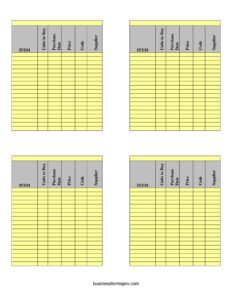
Inventory Management System
Track stock, purchases, suppliers, and pricing with this free Inventory Management System template—download as PDF or DOCX with no signup required.
PDF
DOCX
6 downloads
0
likes
Download Files
- DOCX
An Inventory Management System is a structured log used to track the items a business buys, stores, and sells, recording details like quantity, purchase date, price, product code, and supplier. The most common reason people reach for one is to stop running out of (or over-ordering) stock by keeping a clear, current record of what’s on hand. This template is free to download in PDF and DOCX with no signup required.
What Is an Inventory Management System?
An Inventory Management System is a recordkeeping tool—on paper or in a spreadsheet—that captures every item a business purchases and stocks, along with the key data needed to reorder, value, and audit that inventory. It is used by retailers, restaurants, warehouses, workshops, e-commerce sellers, and office managers who need to know exactly what they have and where it came from. The system documents each item’s name, the units bought, when it was purchased, the price paid, an internal or supplier code, and the vendor who supplied it. Together, these details turn a pile of boxes into an organized, searchable list that supports purchasing decisions, cost control, and accurate financial reporting.
When Do You Need an Inventory Management System?
Almost any operation that holds physical goods benefits from a consistent inventory log. Common situations include:
- Reordering stock — knowing your current units and reorder points so you never sell out of a popular item or tie up cash in slow movers.
- Comparing suppliers — recording the supplier and price for each purchase so you can spot which vendor offers the best value over time.
- Month-end and year-end counts — reconciling physical stock against your records for accounting, tax, or audit purposes.
- Tracking purchase history — referencing the purchase date and price when a product is recalled, returned, or repriced.
- Opening a new location or warehouse — building a baseline catalog of every item with its code and source before you go live.
- Managing seasonal or perishable goods — using purchase dates to rotate older stock first and reduce waste.
What an Inventory Management System Should Have
A complete inventory record balances detail with usability. At minimum it should identify each product clearly, quantify it, and capture the financial and sourcing data you need to make decisions. The core elements are a unique item name or description, the number of units involved, the date of purchase, the unit or total price, a code for quick lookup, and the supplier name. Beyond those fields, a strong system stays consistent: every entry uses the same naming convention, the same date format, and the same currency. Consistency is what makes the log searchable, sortable, and trustworthy when you need to total quantities or values later.
How to Fill Out an Inventory Management System
Work through each entry one row at a time, using the actual fields on this template:
- Item — enter the product name or description. Be specific and consistent (for example, “Ceramic Mug 12oz White” rather than just “Mug”) so duplicates don’t sneak in.
- Units to Buy — record the quantity you are ordering or have on hand. Note your unit of measure (each, case, box, kg) and keep it uniform across entries.
- Purchase Date — log the date the item was bought or received. Use one date format throughout, such as MM/DD/YYYY, so the column sorts correctly.
- Price — enter the cost. Decide upfront whether this is the per-unit price or the total line cost, and apply that choice consistently across the whole log.
- Code — add the SKU, barcode, or internal reference code for fast lookups and scanning. A unique code per item prevents confusion between similar products.
- Supplier — name the vendor or distributor the item came from. This makes reordering and price comparisons quick and supports returns or warranty claims later.
Tips for Keeping an Accurate Inventory Log
The value of an inventory system lies in how reliably it is maintained. Update the log at the moment goods arrive rather than days later, when memory fades and receipts get lost. Assign one person or a clear rotation responsibility for entries so nothing slips through the cracks. Periodically run a physical count and compare it to your records to catch shrinkage, miscounts, or data-entry errors. When you create codes, build a simple, logical scheme—such as a category prefix followed by a number—so new items fit naturally into the system. Finally, keep your supplier names spelled exactly the same each time; a single typo can split one vendor into two and skew your purchasing analysis.
Paper Log vs. Spreadsheet vs. Software
This template works well as a printable PDF for quick stockroom counts or as an editable DOCX you can adapt. A printed sheet is convenient on a clipboard during a physical count, while a digital version lets you sort, filter, and total columns automatically. Many small businesses start with this kind of simple log and graduate to dedicated inventory software only once volume grows enough to justify it. The fields here—item, units, date, price, code, and supplier—map directly onto the columns most inventory programs use, so this template also doubles as a planning tool before you migrate to a larger system.
Common Mistakes to Avoid
- Inconsistent item names — listing the same product under slightly different descriptions, which creates phantom duplicates and breaks your counts.
- Mixing price types — recording per-unit cost in some rows and total cost in others, making your inventory value impossible to total accurately.
- Skipping the code field — leaving codes blank slows down lookups and makes scanning or reordering far harder.
- Delayed updates — logging purchases long after they arrive, so the system never reflects true on-hand stock.
- Forgetting the supplier — omitting the vendor means you can’t compare sources or quickly reorder when stock runs low.
- Never reconciling — trusting the log without periodic physical counts, allowing small errors to compound over time.
Frequently Asked Questions
What is an Inventory Management System used for? It is used to track every item a business stocks, including how many units were bought, when, at what price, from which supplier, and under what code. This helps you reorder on time, control costs, value your stock, and prepare for audits or tax reporting.
How do I fill out the Inventory Management System template? Enter one item per row and complete each field: the item name, units to buy, purchase date, price, code, and supplier. Keep your formats and naming consistent across all entries so the log stays sortable and accurate.
Is this inventory template free to download? Yes. You can download the Inventory Management System template free in both PDF and DOCX formats, with no signup or account required. Use the PDF for printing and the DOCX if you want to edit columns to fit your business.
Should I record the per-unit price or total price? Either works, but you must choose one method and apply it consistently throughout the log. Mixing the two makes it impossible to total your inventory value correctly, so decide upfront and note your choice if multiple people share the sheet.
What is the code field for? The code is a unique identifier—such as a SKU, barcode, or internal reference number—that lets you look up, scan, and reorder items quickly. A consistent coding scheme prevents confusion between similar products and speeds up physical counts.
Can I use this template for a small business or warehouse? Absolutely. The fields suit retail shops, restaurants, e-commerce sellers, workshops, and warehouses of almost any size. As your volume grows, the same columns map cleanly onto dedicated inventory software, making this a useful starting point.
This template is a general example provided for informational purposes only and does not constitute legal, financial, or tax advice. Inventory, accounting, and reporting requirements vary by jurisdiction and industry—consult a qualified professional to ensure your records meet applicable standards.
Related Forms
- Inventory Cards Spreadsheet — Black And White
- Project Status Report
- Baby Care Daily Log
- Lost And Found Log
- Gas Mileage Log
- Website Password Tracker
Browse more in Log and Inventory.