
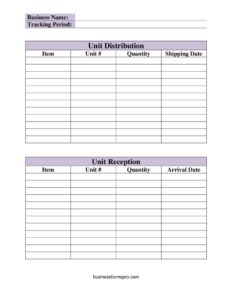
Inventory Tracking Spreadsheet
Track stock movement with a free Inventory Tracking Spreadsheet template recording units shipped and received—free download in PDF and DOCX.
PDF
DOCX
6 downloads
0
likes
Download Files
- DOCX
An Inventory Tracking Spreadsheet is a working document that records the items, units, and quantities your business ships out and receives back over a defined period. People most often use it to keep an accurate, running picture of what stock is in transit versus what has arrived, so nothing slips through the cracks. You can download this template free in PDF and DOCX, with no signup required.
What Is an Inventory Tracking Spreadsheet?
An Inventory Tracking Spreadsheet is a simple log that documents the flow of goods in and out of a business location. It is typically maintained by warehouse staff, store managers, distribution coordinators, or small business owners who need a reliable record of stock movement. The spreadsheet captures two sides of every transaction: distribution (items leaving) and unit reception (items arriving). By listing the item, unit number, quantity, and the relevant date for each, it shows exactly what was sent, what came back, and when. It is a practical alternative to memory or scattered notes, giving you a single reference for reconciliation, audits, and day-to-day operations.
When Do You Need an Inventory Tracking Spreadsheet?
This form fits any situation where goods move between locations or change hands and you need a written trail. Common scenarios include:
- Shipping orders to customers or branches — log each item, unit number, quantity, and shipping date as goods leave.
- Receiving deliveries from suppliers — record arriving stock and arrival dates to confirm what actually showed up.
- Managing equipment or rental returns — track which units went out and verify they came back during the tracking period.
- Reconciling month-end or quarter-end counts — compare distribution totals against reception totals to spot shortages.
- Coordinating between a warehouse and retail floor — keep both the sending and receiving sides accountable.
- Preparing for an audit or insurance claim — present a clear, dated history of stock movement.
What a Complete Inventory Tracking Spreadsheet Should Have
To be useful, the spreadsheet needs enough detail to identify every transaction without ambiguity. A complete record includes the business name so the document is tied to your organization, and a clearly stated tracking period so readers know the date range it covers. Each line of the distribution section should show the item name or description, the unit #, the quantity, and the shipping date. Each line of the reception section should mirror that with the item, unit #, quantity, and arrival date. Consistent unit numbering across both sections is what allows you to match an outgoing shipment to an incoming return or delivery, which is the heart of accurate tracking.
How to Fill Out an Inventory Tracking Spreadsheet
- Business Name: Enter the name of your company or location at the top so the log is clearly attributed.
- Tracking Period: Write the start and end dates this sheet covers, such as a single week, month, or fiscal quarter.
- Distribution – Unit: Begin the outgoing section. Note the unit, department, or location sending the goods.
- Item: Describe the product being shipped (name, SKU, or model) clearly enough to identify it later.
- Unit #: Record the specific unit number or asset tag for traceability.
- Quantity: Enter how many units of that item are leaving.
- Shipping Date: Log the date the item was dispatched.
- Unit Reception: Move to the incoming section. Identify the unit or location receiving the goods.
- Item, Unit #, Quantity: Record the same identifying details for the arriving stock.
- Arrival Date: Enter the date the goods were received, then repeat for each subsequent line.
Tips for Keeping Accurate Records
The value of this spreadsheet depends on discipline. Record entries at the moment goods move rather than reconstructing them later, when details blur. Use consistent item names and unit numbers so the same product is always written the same way—small variations make totals impossible to match. If you maintain the spreadsheet digitally, consider color-coding the distribution and reception sections, or adding a running balance column so discrepancies surface immediately. Keep the tracking period short and well-defined; many businesses start a fresh sheet each month so older records stay tidy and searchable. Finally, save or file completed sheets in date order so you can trace any item’s history across multiple periods.
Distribution vs. Reception: Why Both Sides Matter
This template deliberately separates outgoing distribution from incoming reception, and that split is its strength. The distribution side answers “what did we send and when,” while the reception side answers “what arrived and when.” When you compare the two using matching unit numbers and quantities, gaps become obvious: a unit that shipped but never shows up in reception may be lost, delayed, or unreturned. Tracking both halves on one sheet means you do not have to cross-reference separate logs, and it keeps the sending and receiving teams looking at the same numbers. That shared view is what turns a pile of delivery notes into genuine inventory control.
Common Mistakes to Avoid
- Leaving the tracking period blank — without a date range, the sheet cannot be filed or reconciled meaningfully.
- Inconsistent item descriptions — writing the same product different ways breaks your ability to total or match entries.
- Skipping the unit # — without it, matching shipments to receptions becomes guesswork.
- Recording quantities from memory — always count and log at the point of movement, not afterward.
- Confusing shipping and arrival dates — keep them in their correct columns so transit times stay accurate.
- Never reconciling the two sections — the data is only useful if you periodically compare distribution against reception.
Frequently Asked Questions
What is an Inventory Tracking Spreadsheet used for? It is used to record the items, units, and quantities a business ships out and receives back over a set tracking period. The goal is a clear, dated history of stock movement that helps you reconcile inventory, spot shortages, and prepare for audits.
How do I fill out the Inventory Tracking Spreadsheet? Start with your business name and the tracking period, then log each outgoing transaction in the distribution section with the item, unit number, quantity, and shipping date. Record arrivals in the reception section with the same details plus the arrival date, adding one line per transaction.
What is the difference between the distribution and reception sections? The distribution section logs goods leaving your location, while the reception section logs goods arriving. Tracking both lets you match outgoing units to incoming ones using the unit number and quantity, making missing or delayed items easy to identify.
Is this spreadsheet legally binding? An inventory tracking spreadsheet is an internal operational record, not a contract, so it is not legally binding on its own. However, accurate, dated records can serve as useful supporting documentation in audits, disputes, or insurance claims.
Can I customize the template for my business? Yes. The DOCX version is fully editable, so you can add columns such as supplier, cost, location, or a running balance, and adapt the item and unit fields to match your numbering system. Tailor it to whatever level of detail your operation requires.
How much does this template cost? Nothing—it is completely free to download here in both PDF and DOCX formats, with no signup or account required. Use the PDF for quick printing and the DOCX when you want to edit the fields.
This Inventory Tracking Spreadsheet template is provided as a general example for informational purposes only and does not constitute legal, financial, accounting, or tax advice. Recordkeeping and reporting requirements vary by jurisdiction and industry, so consult a qualified professional to ensure your inventory practices meet applicable standards.
Related Forms
- Office Supplies Inventory
- Beauty Salon Equipment And Furniture Inventory Card
- College Application Comparison Checklist
- Home Repair Bid Comparison
- Time Management Log
- Project To Do List
Browse more in Log and Inventory.