
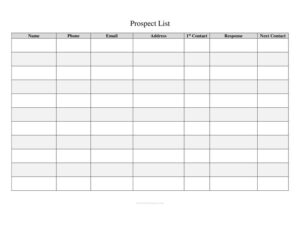
Prospect List
Track leads and sales opportunities with a free Prospect List template—organize contacts, follow-ups, and status in one place. Free download in PDF and DOCX.
PDF
DOC
6 downloads
0
likes
Download Files
- DOC
A Prospect List is a structured record of potential customers a salesperson or business plans to contact and pursue. People most often use it to keep every lead, follow-up date, and deal stage in one organized place so nothing slips through the cracks. You can download this Prospect List template free in both PDF and DOCX formats, with no signup required.
What Is a Prospect List?
A Prospect List is a working document that captures the names, contact details, and status of individuals or companies you intend to sell to or partner with. It is typically created and maintained by sales reps, business development teams, small business owners, real estate agents, and recruiters. Unlike a finished customer database, a prospect list focuses on people who have not yet become clients—leads at various stages of qualification. The form documents who the prospect is, how to reach them, where they came from, what they might buy, and what action comes next. Kept current, it becomes a simple pipeline that shows at a glance which opportunities are hot, which need follow-up, and which can be dropped.
When Do You Need a Prospect List?
A Prospect List is useful any time you are pursuing more leads than you can reliably hold in your head. Common situations include:
- Launching a new sales campaign and needing to track outreach to dozens or hundreds of contacts.
- Working a trade show or networking event where you collect business cards and want to log them before they pile up.
- Cold calling or cold emailing, where recording the date, response, and next step keeps your follow-up disciplined.
- Real estate or insurance prospecting, where agents track potential buyers, sellers, or policyholders over long sales cycles.
- Recruiting or business development, where you build a target list of companies or candidates to approach.
- Onboarding a new sales rep who needs a clear, shareable snapshot of the territory’s open opportunities.
In each case the list turns scattered notes into a single source of truth your whole team can read and act on.
What a Prospect List Should Have
An effective Prospect List balances enough detail to be useful with enough simplicity to keep updated. Strong lists include a unique identifier or row number, the prospect’s name and company, complete contact information, the source of the lead, an estimate of value or interest, a current status or stage, the date of last contact, the next planned action with its due date, and a notes field for context. A header section identifying the salesperson, territory, or campaign and the date range gives the list meaning. The goal is a layout you can scan top to bottom and instantly see what needs your attention today versus what can wait.
How to Fill Out a Prospect List
Because this is a flexible log template, fill it column by column and add one row per prospect:
- Header details: Enter your name or the sales rep responsible, the territory or campaign name, and the date the list was created or last reviewed.
- Prospect name: Record the individual contact’s full name in each row.
- Company / organization: Add the business they represent, if applicable.
- Contact information: Fill in phone, email, and any address or LinkedIn handle so anyone can reach the lead.
- Source: Note how the lead arrived—referral, website form, trade show, cold call, or advertisement.
- Interest / product: Briefly describe what they are interested in and an estimated deal value if known.
- Status / stage: Mark the pipeline stage, such as new, contacted, qualified, proposal sent, or closed.
- Last contact date: Enter the most recent date you reached out or heard back.
- Next step & date: Write the next action and when it is due so follow-ups never get lost.
- Notes: Capture useful context—objections raised, budget, timing, or personal details.
Tips for Keeping Your Prospect List Effective
A prospect list only works if it stays current. Update it immediately after every call or email rather than at the end of the week, when details are easily forgotten. Sort or color-code by status so the warmest leads rise to the top, and review the full list on a fixed schedule—weekly or biweekly—to schedule next steps. Be honest about removing dead leads; a bloated list of unresponsive contacts hides the real opportunities. If you use the DOCX version, you can add or rename columns to fit your industry, while the PDF works well as a printable call sheet you can mark up by hand.
Prospect List vs. Customer Database
It helps to know what a Prospect List is not. A customer database stores records of people who have already bought from you—billing history, account numbers, and support notes. A Prospect List, by contrast, tracks people earlier in the journey, before any transaction. Many businesses graduate a row from the prospect list into the customer database once a deal closes. Keeping the two separate prevents your active pipeline from being cluttered with closed accounts and gives you a clean view of where new revenue will come from.
Common Mistakes to Avoid
- Letting it go stale: An out-of-date list is worse than no list because it gives false confidence.
- Missing the next-step column: Without a planned action and date, leads quietly go cold.
- Incomplete contact details: A name with no phone or email can’t be acted on.
- Vague status labels: Use consistent stage names so everyone interprets them the same way.
- Mixing prospects and customers: Combining them blurs your true pipeline picture.
- Hoarding dead leads: Failing to prune unresponsive contacts buries the prospects worth pursuing.
Frequently Asked Questions
What is a prospect list used for? It is used to organize and track potential customers throughout the sales process. By recording contact details, lead source, status, and next steps in one place, it helps salespeople prioritize follow-ups and avoid losing opportunities. It essentially serves as a lightweight sales pipeline.
How do I create a prospect list? Start by downloading this free template and entering one prospect per row with their name, company, and contact information. Then add the lead source, their interest, the current stage, and the next action you plan to take. Update each row after every interaction to keep it accurate.
What is the difference between a prospect and a lead? A lead is any potential contact who has shown some interest or matches your target, while a prospect is a lead who has been qualified as a realistic fit for your offering. Many teams use a prospect list to track both, marking the status column to show how far each contact has progressed.
Is this prospect list template free? Yes. You can download it at no cost in both PDF and DOCX formats, with no account or signup required. The DOCX version is fully editable so you can add columns or rename fields to match your sales process.
How often should I update my prospect list? Update it immediately after each call, email, or meeting so the status and next-step columns always reflect reality. In addition, review the entire list on a regular schedule—weekly is common—to plan upcoming outreach and remove dead leads.
Can a team share one prospect list? Yes, and many small teams do. Use the header to note which rep owns each section or territory, and agree on consistent status labels so everyone reads the list the same way. For larger teams, the template can serve as a starting structure before moving to dedicated CRM software.
This Prospect List template is provided as a general example for informational purposes only and does not constitute legal, financial, or business advice. Sales practices, data-protection rules, and record-keeping requirements vary by jurisdiction and industry—consult a qualified professional to ensure your processes comply with applicable regulations.
Related Forms
- Supplier Schedule
- Interruptions Log
- Individual Computer Inventory
- Interview Preparation Worksheet
- Yearly Multiple Project Timetable
- Photo Log
Browse more in Log and Inventory.