
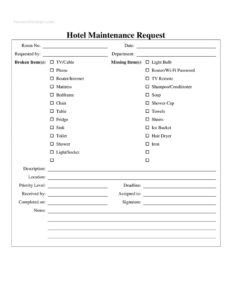
Hotel Maintenance Request
Download a free Hotel Maintenance Request form template in PDF and DOCX to log broken or missing room items, assign repairs, and track completion fast.
PDF
DOCX
2 downloads
0
likes
Download Files
- DOCX
A Hotel Maintenance Request is a simple log form that hotel staff use to report broken, faulty, or missing items in a guest room and route the issue to the maintenance or housekeeping team. The most common reason people use it is to capture exactly what needs fixing in a specific room so repairs happen quickly and nothing slips through the cracks. You can download this form free in PDF and DOCX, with no signup required.
What Is a Hotel Maintenance Request?
A Hotel Maintenance Request is an internal document that records a problem in a guest room or facility and tracks it from report to resolution. It is usually filled out by front desk agents, housekeeping staff, or supervisors who notice or are told about an issue. The form documents what is broken or missing, where it is located, how urgent it is, who reported it, and who is responsible for the fix. Because it serves as both a request and a tracking log, it creates accountability and a paper trail. For hotels, this means faster turnaround on repairs, fewer guest complaints, and a clear maintenance history for each room.
When Do You Need a Hotel Maintenance Request?
This form is useful any time a room or facility needs attention. Common scenarios include:
- A housekeeper finds a broken item during turnover — a non-working TV, a dripping faucet, or a cracked chair — and needs to report it before the room is sold again.
- A guest calls the front desk because the router or Wi-Fi is down, the toilet won’t flush, or the shower has no hot water.
- Inventory checks reveal missing items such as towels, a hair dryer, an iron, or the TV remote that must be replaced.
- A maintenance technician needs a written work order before purchasing parts or scheduling a repair.
- A manager wants to track recurring problems in a particular room to decide whether equipment should be replaced entirely.
- An incoming shift hands off open issues to the next team so nothing is forgotten overnight.
What a Hotel Maintenance Request Should Have
A complete request leaves no ambiguity about the problem or who owns it. The strongest forms capture the room number and date, the name and department of the person reporting, a clear list of broken or missing items, a written description, the exact location, a priority level, and a deadline. Equally important is the tracking half of the form — who received the request, who it was assigned to, and the date it was completed. A signature and a notes field round out the record. Together these elements turn a vague complaint into an actionable, traceable work order.
How to Fill Out a Hotel Maintenance Request
- Enter the Room No. and the Date the issue is being reported.
- Fill in Requested by with your name and your Department (front desk, housekeeping, engineering, etc.).
- Under Broken Item(s), check or list the affected equipment: TV/Cable, Phone, Router/Internet, Mattress, Bedframe, Chair, Table, Fridge, Sink, Toilet, Shower, or Light/Socket.
- Under Missing Item(s), note anything that needs replacing: Light Bulb, Router/Wi-Fi Password, TV Remote, Shampoo/Conditioner, Soap, Shower Cap, Towels, Sheets, Ice Bucket, Hair Dryer, or Iron.
- Use the Description field to explain the problem in plain words — for example, “hot water tap turns but no hot water.”
- Specify the Location within the room (bathroom, bedside, entry) so the technician finds it fast.
- Set a Priority Level (low, medium, high, urgent) and a Deadline for completion.
- The maintenance lead records Received by and Assigned to, then enters Completed on after the fix, adds a Signature, and uses Notes for parts used or follow-up.
Setting Priority Levels That Actually Work
Priority is the field that determines whether a repair happens in an hour or in a week, so use it consistently across your team. Treat anything that makes a room unsellable or unsafe — a broken toilet, no hot water, a dead light socket, or a non-functioning lock — as high or urgent. Cosmetic or convenience issues, like a worn chair or a missing ice bucket, can usually be flagged as low or medium. Pairing the priority with a realistic Deadline helps the maintenance team plan their day and prevents minor tickets from blocking critical repairs. When priorities are applied the same way by every shift, managers can trust the form to surface the most pressing problems first.
Using the Form as a Tracking Log
Because this template includes Received by, Assigned to, and Completed on fields, it doubles as a maintenance log rather than a one-way request slip. Keep completed forms filed by room number so you can spot patterns — if the same Wi-Fi router or fridge keeps appearing, that’s a signal to replace the unit instead of repairing it again. A binder or shared folder of these forms also supports staff handoffs between shifts and gives management a clear record of response times. Over time, this simple paper trail becomes a useful tool for budgeting replacements and holding vendors accountable.
Common Mistakes to Avoid
- Leaving the room number blank — without it, the request can’t be acted on at all.
- Vague descriptions like “TV broken” with no detail on whether it won’t turn on, has no signal, or is missing the remote.
- Skipping the priority level, which causes urgent and minor issues to be treated the same.
- Not recording who it’s assigned to, so nobody owns the task and it stalls.
- Forgetting to fill in Completed on, leaving open tickets that look unresolved.
- Mixing broken and missing items carelessly — a missing remote is a quick restock, while a broken TV needs a technician.
Frequently Asked Questions
What is a Hotel Maintenance Request form used for? It is used to report a problem in a guest room or hotel facility — such as a broken appliance or a missing amenity — and to track that issue until it is fixed. It serves as both a work order and a record, helping staff communicate clearly and ensuring repairs aren’t overlooked.
Who fills out the form? Usually front desk staff, housekeepers, or supervisors who discover or receive a complaint about an issue complete the request portion. The maintenance or engineering team then fills in the received, assigned, and completed fields as they handle the job.
How do I prioritize requests? Mark anything that makes a room unsafe or unsellable — like a broken toilet, no hot water, or a faulty lock — as high or urgent. Cosmetic or convenience issues can be low or medium priority. Always pair the priority with a realistic deadline.
Can I use this form to track recurring problems? Yes. Because each completed form records the room number, the item, and the date, filing them by room lets you spot equipment that keeps failing. That history helps you decide when to replace a unit instead of repairing it repeatedly.
Is this Hotel Maintenance Request form free? Yes, it is completely free to download in both PDF and DOCX formats with no signup required. You can use the PDF as-is or open the DOCX to add your hotel’s logo, branding, or extra fields.
Can I customize the list of items? Absolutely. The DOCX version lets you edit the broken and missing item lists to match your property — for example, adding minibar, safe, air conditioning, or balcony door fields that fit your rooms.
This template is a general example provided for informational purposes only and is not legal, safety, or compliance advice. Hotel operating procedures and safety requirements vary by property and jurisdiction; consult your management and a qualified professional to ensure your maintenance processes meet applicable standards.
Related Forms
- Vehicle Maintenance Log
- Yearly Multiple Project Timetable
- Elapsed Time Log
- Trucker Log
- Employee Covid Attestation Log
- Document Tracker
Browse more in Log and Inventory.