
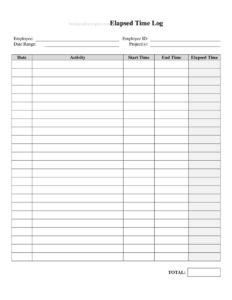
Elapsed Time Log
Track start times, end times, and total duration with this free Elapsed Time Log template, available as a free download in PDF and DOCX formats.
PDF
DOCX
2 downloads
0
likes
Download Files
- DOCX
An Elapsed Time Log is a simple tracking sheet used to record when an activity starts, when it ends, and how much total time passed in between. People most often reach for it to capture billable hours, document task duration, or measure how long a recurring process takes — and you can grab it free here as a downloadable PDF or DOCX with no signup required.
What Is an Elapsed Time Log?
An Elapsed Time Log is a record-keeping document that captures the duration of one or more activities by noting a start point, an end point, and the resulting elapsed time. It is used by freelancers, project teams, lab technicians, fleet operators, students, and anyone who needs an accurate paper or digital trail of how time was spent. Unlike a basic to-do list, the log focuses on measurement: each entry shows exactly how many minutes or hours a task consumed. The result is a clear, dated record you can use for invoicing, payroll support, productivity reviews, equipment monitoring, or compliance. Because it is straightforward and flexible, the same template works across dozens of settings — from a workshop bench to a service call.
When Do You Need an Elapsed Time Log?
An Elapsed Time Log earns its place anywhere precise duration matters. Common scenarios include:
- Billing clients by the hour — consultants, contractors, and agencies log start and stop times so invoices reflect actual worked time.
- Tracking machine or equipment run time — recording how long a pump, generator, or printer operated to schedule maintenance.
- Documenting laboratory or test procedures — capturing how long a sample incubated, cured, or processed.
- Measuring task efficiency — managers timing how long routine workflows take to identify bottlenecks.
- Logging service or repair calls — technicians noting arrival and departure to justify labor charges.
- Personal or academic time studies — students and self-employed workers reviewing where their hours go.
Types of Elapsed Time Tracking
Some logs track a single continuous activity from one start to one finish, while others list many short tasks across a day. You might also keep a cumulative log that totals time across several sessions for the same project. Choosing the right style up front keeps your totals meaningful and easy to add up later.
What an Elapsed Time Log Should Have
A complete Elapsed Time Log includes a few core elements that make each entry trustworthy and easy to total. At minimum, it should record the date of the activity, a description of the task or item being timed, a start time, an end time, and the calculated elapsed time. Many logs add a column for the person responsible, a project or job number, and a notes field for interruptions or context. A running total or subtotal at the bottom helps when you need a daily or weekly figure. Consistency is what gives the log value: the same time format, the same units, and the same level of detail in every row.
How to Fill Out an Elapsed Time Log
- Enter the date. Write the calendar date for the activity so entries can be sorted and matched to invoices or reports later.
- Describe the task or item. In the description field, note exactly what you are timing — a client name, a job number, a machine ID, or a process step.
- Record the start time. Write the exact clock time the activity began, using a consistent format such as 9:15 AM or 24-hour time.
- Record the end time. When the activity finishes, log the stop time in the same format you used for the start.
- Calculate the elapsed time. Subtract start from end and enter the duration in hours and minutes, keeping units consistent across all rows.
- Add notes if needed. Capture pauses, interruptions, or anything that explains an unusually long or short entry.
- Total the column. At the end of the day, shift, or project, sum the elapsed-time entries for a clean grand total.
Tips for Accurate Time Logging
The usefulness of an Elapsed Time Log depends almost entirely on how disciplined you are about recording entries in real time. Log the start the moment you begin rather than reconstructing it later, when memory fades and estimates creep in. Decide on a single rounding rule — for example, to the nearest five or fifteen minutes — and apply it everywhere so your totals stay consistent. If you pause an activity, either stop the clock and start a new line or note the break in the notes column so the elapsed figure remains honest. When several people share one log, have each person initial their rows to keep accountability clear.
Elapsed Time Log vs. Timesheet
People sometimes confuse an Elapsed Time Log with a timesheet, but they serve slightly different purposes. A timesheet is usually tied to payroll and summarizes hours worked per day or pay period for a specific employee. An Elapsed Time Log is more granular and activity-focused: it measures the duration of individual tasks or events regardless of who performed them, which makes it ideal for billing detail, equipment monitoring, and process analysis. Many businesses use both — the log captures the raw detail, and those totals feed the timesheet or invoice.
Common Mistakes to Avoid
- Mixing time formats — switching between AM/PM and 24-hour notation makes elapsed calculations error-prone.
- Filling in times from memory — reconstructing hours after the fact almost always produces inaccurate totals.
- Forgetting to log the end time — an open entry with no stop time cannot be totaled and may be lost entirely.
- Skipping the description — a row of times with no task label is useless when you review the log weeks later.
- Inconsistent rounding — rounding some entries and not others distorts the grand total.
- Not totaling regularly — letting entries pile up without subtotals makes invoicing and reporting tedious and mistake-prone.
Frequently Asked Questions
What is an Elapsed Time Log used for? It is used to record the duration of activities by capturing a start time, an end time, and the total time that passed between them. People use it for billing, equipment run-time tracking, lab procedures, service calls, and personal productivity reviews. The log creates a clear, dated record you can total and reference later.
How do I calculate elapsed time correctly? Subtract the start time from the end time, being careful to account for crossing the noon or midnight boundary. Converting both times to a 24-hour format first reduces errors, especially for activities that run across the lunch hour or overnight. Keep your minutes and hours consistent so the column adds up cleanly.
Is this Elapsed Time Log free to download? Yes. You can download the template for free here in both PDF and DOCX formats with no signup or account required. Use the PDF for quick printing and on-the-spot logging, or the DOCX if you want to customize columns and headings before you print.
Can I use it for billing clients? Absolutely. The log’s start, end, and elapsed-time fields, combined with a task description, give you the supporting detail many clients expect on an invoice. Just apply a consistent rounding rule and keep descriptions specific so each charge is easy to justify.
Does an Elapsed Time Log need to be signed or witnessed? For most internal or personal uses, no signature is required. In settings where the log supports billing, compliance, or payroll, having the responsible person initial each entry adds accountability, and some organizations require a supervisor sign-off on the totals. Follow your employer’s or client’s documentation policy.
What’s the best way to keep the log accurate? Record each entry in real time rather than from memory, use one consistent time format, and pick a single rounding standard. Add a note whenever an activity is paused or interrupted, and subtotal the elapsed-time column at the end of each day or project so errors are caught early.
This Elapsed Time Log template is provided as a general example for informational purposes only and does not constitute legal, financial, or tax advice. Record-keeping, billing, and labor-documentation requirements vary by jurisdiction and industry — consult a qualified professional to confirm your specific obligations.
Related Forms
- Store Closing Procedure Checklist
- Retirement Income Sources
- Cash Register Log
- Monthly Outdoor Maintenance Log
- Auction Sell List
- Salad Bar Items Inventory Spreadsheet
Browse more in Log and Inventory.