
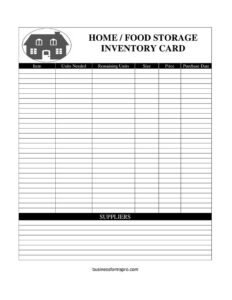
Home Food Storage Inventory Card
Track your pantry and food storage with a free Home Food Storage Inventory Card template — log items, units, prices, and suppliers. Free download in PDF and DOCX.
PDF
DOCX
2 downloads
0
likes
Download Files
- DOCX
A Home Food Storage Inventory Card is a simple tracking sheet for recording the food and supplies you keep in your pantry, freezer, or emergency storage. Most people use it to know exactly what they have on hand, what needs replenishing, and what it cost — so nothing expires unnoticed and grocery trips stay organized. You can download it free in PDF and DOCX, with no signup required.
What Is a Home Food Storage Inventory Card?
A Home Food Storage Inventory Card is a record-keeping document used by households to catalog the food items they store over time. It lists each item alongside how many units you aim to keep, how many remain, the size or quantity of each unit, the price paid, the purchase date, and where it was bought. Whether you are managing a deep pantry, building an emergency food supply, or simply trying to reduce waste, the card gives you a clear snapshot of your stock. It works as both a tracking log and a planning tool, helping you reorder before you run out and rotate older items first.
When Do You Need a Home Food Storage Inventory Card?
This card is useful any time you keep more food than fits in a single cabinet and need to keep track of it. Common situations include:
- Building an emergency or long-term food supply where you want a target quantity of staples like rice, beans, and canned goods.
- Managing a chest freezer or second refrigerator so frozen items get used before freezer burn sets in.
- Stocking a large household pantry for a family, sharing what is on hand to avoid buying duplicates.
- Tracking seasonal bulk purchases like case lots, warehouse-club buys, or harvest preserves.
- Monitoring spending on groceries by recording price and supplier for budgeting and price comparisons.
- Running a small home-based food operation such as a bakery or catering side business that needs basic ingredient counts.
What a Home Food Storage Inventory Card Should Have
A complete inventory card captures enough detail to answer three questions at a glance: what do I have, how much do I need, and where did it come from. The essential elements are a clear item name, a units-needed target so you know your goal, the remaining units currently in storage, the size of each unit (ounces, pounds, cans, or count), the price paid, the purchase date for rotation, and the supplier so you can rebuy from the same source. Together these fields turn a loose pile of groceries into a manageable, trackable system you can update over time.
How to Fill Out a Home Food Storage Inventory Card
Work through one row per item and keep your entries consistent so totals are easy to read later.
- Item: Write the name of the food or supply — for example, “white rice,” “canned tomatoes,” or “powdered milk.” Be specific enough to distinguish similar products.
- Units Needed: Enter your target quantity for this item, such as the number of cans or bags you want to keep in storage at all times.
- Remaining Units: Record how many you currently have. Comparing this to Units Needed tells you instantly what to buy.
- Size: Note the size of each unit — 16 oz, 5 lb, a #10 can, or a 24-count case — so quantities are meaningful.
- Price: Log the price you paid per unit or per package, useful for budgeting and spotting deals.
- Purchase Date: Add the date you bought the item to support first-in, first-out rotation.
- Suppliers: Write where you bought it, such as a specific store or online vendor, for easy reordering.
Tips for Rotating and Maintaining Your Stock
An inventory card is only as good as your habit of updating it. Use the purchase date column to practice first-in, first-out rotation: place newer items behind older ones and use the oldest stock first. Review the card monthly and compare Remaining Units against Units Needed to build a quick shopping list. When you spot an item dipping below target, note your usual supplier so you can rebuy at the best price. Tracking price over time also reveals which stores consistently cost less, helping you time bulk purchases around sales or seasonal lows.
Digital vs. Printed Inventory Cards
The DOCX version is handy if you want a digital copy you can sort, total, and update on a computer, especially for larger stockpiles. The PDF version prints cleanly and can be taped inside a pantry door or stored in a binder near your storage area, where you can mark it with a pen as you use items. Many households keep both: a printed card for quick at-the-shelf updates and a digital master they refresh periodically. Choose whichever fits how you actually manage your food.
Common Mistakes to Avoid
- Inconsistent units: Mixing cans, pounds, and counts in the same column makes totals confusing — pick a clear unit for each item.
- Forgetting to update Remaining Units: An inventory only helps if it reflects what is actually on the shelf today.
- Ignoring purchase dates: Without dates you can’t rotate properly, and older food may expire before it’s used.
- Setting unrealistic Units Needed targets: Aim for amounts you will realistically eat before they spoil.
- Leaving the supplier blank: When it’s time to reorder, you may forget where you found the best price or product.
- Tracking only some items: A partial inventory leaves gaps; log everything you intend to manage for an accurate picture.
Frequently Asked Questions
What is a Home Food Storage Inventory Card used for? It is used to keep an organized record of the food and supplies in your pantry, freezer, or emergency storage. By tracking quantities, sizes, prices, dates, and suppliers, it helps you avoid waste, prevent over-buying, and reorder before you run out.
How do I fill out the Units Needed and Remaining Units fields? Units Needed is your target — the amount you want to keep on hand for that item. Remaining Units is what you actually have right now. The gap between the two is your shopping list for the next trip.
Is this card only for emergency or prepper food storage? No. While it works well for long-term and emergency supplies, it is equally useful for everyday pantry management, freezer organization, budgeting groceries, and tracking bulk or warehouse-club purchases.
How often should I update the inventory card? Update it whenever you buy or use a tracked item, or do a full review at least once a month. Regular updates keep the Remaining Units accurate, which is what makes the card genuinely useful for planning.
Can I track expiration dates with this template? The card includes a Purchase Date field, which supports first-in, first-out rotation. You can note expiration dates next to the item name or in the size column if you want to monitor them more closely.
Is this Home Food Storage Inventory Card free to download? Yes. You can download it free in both PDF and DOCX formats with no signup required, and adapt the columns to fit your household’s needs.
This template is a general example provided for informational purposes only and is not professional, nutritional, or food-safety advice. Storage recommendations and expiration guidelines vary by product and region — consult product labels and a qualified professional for guidance specific to your situation.
Related Forms
- Bill Reminder Tracker
- Yearly Project Timetable
- Supplier Schedule
- Beauty Salon Equipment And Furniture Inventory Card
- Time Management Log
- Basic Inventory Card
Browse more in Log and Inventory.