
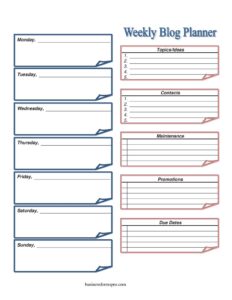
Weekly Blog Planner
Plan posts, due dates, and promotions with our free Weekly Blog Planner template — organize your content calendar and download free in PDF or DOCX.
PDF
DOCX
2 downloads
0
likes
Download Files
- DOCX
A Weekly Blog Planner is a simple content calendar that maps out your blog topics, due dates, promotions, and maintenance tasks across a single week. Most people use it to stay consistent with publishing and avoid scrambling for ideas at the last minute. You can download it free in PDF or DOCX, with no signup required.
What Is a Weekly Blog Planner?
A Weekly Blog Planner is a one-page organizing tool used by bloggers, content marketers, freelance writers, and small business owners to schedule a week of content at a glance. It documents what you intend to publish, when each piece is due, where and how you’ll promote it, and any behind-the-scenes upkeep your site needs. Instead of juggling notes across apps, sticky notes, and your inbox, the planner gathers everything into a single sheet organized by day, from Sunday through Saturday. It also reserves space for ongoing reference items like contacts, topic ideas, and maintenance reminders, so the week’s plan stays connected to your broader content strategy and editorial goals.
When Do You Need a Weekly Blog Planner?
This planner earns its keep any time you’re trying to publish on a predictable rhythm. Common scenarios include:
- Sticking to a publishing schedule — you’ve committed to two or three posts a week and need to see deadlines laid out clearly.
- Managing guest writers or contributors — you track who owes what and when using the contacts and due dates fields.
- Coordinating promotions — you plan which posts get pushed to email, social, or paid channels and on which days.
- Batching content work — you write on Monday, edit on Wednesday, and publish on Friday, and the day columns keep each task visible.
- Running a side blog around a full-time job — limited hours mean you need a tight, realistic weekly map.
- Keeping a site healthy — recurring maintenance like plugin updates, broken-link checks, or image optimization gets a dedicated home.
What a Weekly Blog Planner Should Have
A complete planner balances the week-by-day view with reference space you’ll glance at repeatedly. The essentials are a labeled column or row for each day of the week, a running list of topics and ideas so you never start from a blank page, clearly marked due dates, a promotions section to plan distribution, a maintenance area for technical and housekeeping tasks, and a contacts list for the people involved in producing or sharing your content. Together these elements turn a vague intention to “post more often” into a concrete, actionable schedule you can follow and revisit.
How to Fill Out a Weekly Blog Planner
- Topics/Ideas: Start here by dumping every post idea, headline, or angle you’re considering. This becomes your pool to pull from as you fill the week.
- Due Dates: Note hard deadlines — draft due, edit due, publish date — so nothing sneaks up on you.
- Sunday through Saturday: Work through each day column and assign specific tasks: outline on Monday, draft Tuesday, edit Thursday, publish Friday. Be concrete about what happens each day.
- Promotions: For each post going live, list the channels and timing — newsletter blast, scheduled tweets, a LinkedIn post, or a Pinterest pin.
- Maintenance: Record recurring upkeep such as backups, comment moderation, SEO checks, or updating an older post.
- Contacts: Add the names and details of anyone you’ll need — a co-author, designer, virtual assistant, or editor — so follow-ups are one glance away.
Tips for Using the Day-by-Day Columns
The seven day columns are the heart of the planner, and how you use them shapes how productive your week feels. Rather than cramming a whole post into one day, spread the lifecycle of each piece across the week: research and outline early, draft midweek, edit and add images later, and reserve the publish day for final formatting and the promotion push. Color-coding or simple labels — for example, “D” for draft and “P” for publish — make the sheet scannable at a glance. If you publish on a fixed day, build everything backward from it so the deadline drives the schedule instead of catching you off guard.
Connecting Promotions and Maintenance to Your Workflow
Two sections people often underuse are Promotions and Maintenance, yet they’re where consistent blogs separate themselves. Treat promotion as part of every post’s plan, not an afterthought: a piece that took hours to write deserves more than a single share. Use the promotions area to schedule repeat distribution over the days that follow publication. The maintenance section, meanwhile, keeps your site from quietly degrading — broken links, slow images, and outdated content all hurt reader trust. Assigning even fifteen minutes a week to one maintenance item keeps the workload from piling into an overwhelming cleanup project later.
Common Mistakes to Avoid
- Overloading the week — planning five posts when you realistically finish two leads to discouragement and abandoned planners.
- Leaving the ideas list empty — without a topic pool, you waste the first part of every week deciding what to write.
- Skipping promotion planning — publishing without a distribution plan means great content goes unseen.
- Ignoring due dates — vague intentions slip; concrete dates create accountability.
- Forgetting maintenance — neglected technical upkeep accumulates into bigger problems.
- Not reviewing last week — failing to carry over unfinished tasks means ideas and drafts fall through the cracks.
Frequently Asked Questions
What is a Weekly Blog Planner used for? It’s a one-page tool for organizing a single week of blogging — your topics, deadlines, daily tasks, promotions, and site maintenance. People use it to publish consistently and avoid last-minute scrambling. It keeps your content strategy and your day-to-day work connected in one view.
How do I fill out the day columns? Assign a specific task to each day rather than trying to complete a whole post in one sitting. For example, outline on Monday, draft Tuesday and Wednesday, edit Thursday, and publish Friday. Spreading the work across Sunday through Saturday makes a realistic schedule you can actually follow.
Is this planner only for professional bloggers? Not at all. It works just as well for hobbyists, small business owners maintaining a company blog, freelancers, and content teams. Anyone who wants to post on a regular schedule and track ideas, deadlines, and promotion will find it useful.
Can I edit the template to fit my workflow? Yes. The DOCX version is fully editable, so you can rename sections, add columns, or adjust the layout to match how you work. You might expand the promotions area or add a metrics column to track how each post performs.
How much does the Weekly Blog Planner cost? It’s completely free to download here in both PDF and DOCX formats, with no signup or account required. Print it for a paper planner or edit the digital version — whichever suits your routine.
How is this different from a monthly content calendar? A monthly calendar gives you the big-picture publishing schedule across weeks, while this weekly planner zooms in on the day-to-day execution of a single week. Many people use both together — the monthly view for strategy and the weekly planner for getting the work done.
This template is provided as a general example for informational and organizational purposes only. It is not professional, legal, or business advice, and best practices for content planning vary by individual and team. Adapt it to your own needs and consult a qualified professional where appropriate.
Related Forms
- Book Inventory
- Evidence Log
- Library Loan List
- Hospital Comparison
- Perpetual Inventory Form
- Inventory Schedule
Browse more in Log and Inventory.