
Software Inventory
Track every program, license, and renewal with our free Software Inventory template — organize software assets and avoid lapses with a free download.
PDF
DOCX
4 downloads
0
likes
Download Files
- DOCX
A Software Inventory is a structured log that records every software program your organization owns, along with its licenses, versions, and renewal dates. People most often use it to keep track of which applications are installed, who supplied them, and when each license needs to be renewed. You can download this template free in both PDF and DOCX formats — no signup required.
What Is a Software Inventory?
A Software Inventory is a record kept by IT teams, office managers, or business owners to document all the software an organization has purchased or licensed. It captures key details such as the program name, version, supplier, purchase price, license code, and renewal date in a single, easy-to-scan list. Rather than scattering license keys across emails and invoices, the inventory centralizes everything in one place. This makes it far easier to confirm you are properly licensed, plan for renewals, and budget for upgrades. Whether you manage five applications or five hundred, a Software Inventory turns a chaotic collection of installs into an organized, auditable asset register.
When Do You Need a Software Inventory?
Software accumulates quickly, and without a record it becomes nearly impossible to know what you actually own. Common situations where this form is essential include:
- Preparing for a license audit — vendors may request proof that your installations match your purchased licenses.
- Onboarding a new IT manager who needs a full picture of the software environment they are inheriting.
- Budgeting for the year, when you need to total subscription and renewal costs in advance.
- Tracking renewal dates so antivirus, productivity suites, or design tools never lapse unexpectedly.
- Decommissioning old hardware and needing to know which licenses can be reassigned to other machines.
- Merging or relocating offices, where consolidating software assets prevents duplicate purchases.
What a Software Inventory Should Have
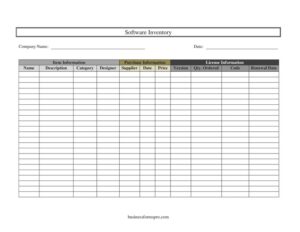
A complete Software Inventory groups its details into logical blocks so nothing important is missed. At a minimum it should include the company name and the date the record was compiled or last updated. For each program, the inventory should capture item information (name, description, category, and the designer or publisher), purchase information (supplier, purchase date, and price), and license information (version, quantity ordered, license code, and renewal date). Together these fields tell you not only what software you have, but where it came from, what it cost, how many seats you bought, and when you need to act again. Consistent categories and accurate license codes are what make the document genuinely useful during an audit or budget review.
How to Fill Out a Software Inventory
- Company Name: Enter the name of your business or department at the top so the record is clearly attributed.
- Date: Record the date you are compiling or updating the inventory to track how current the information is.
- Name: Under Item Information, write the exact software title, such as the product and edition.
- Description: Add a short note on what the software does or which team uses it.
- Category: Classify the program — for example, productivity, security, design, or accounting.
- Designer: List the publisher or developer who created the software.
- Supplier: Under Purchase Information, note the reseller or vendor you bought it from.
- Date: Enter the purchase date for warranty and renewal reference.
- Price: Record the amount paid, including currency.
- Version: Under License Information, write the specific version or release number.
- Qty. Ordered: Note how many seats or licenses you purchased.
- Code: Enter the license key or activation code.
- Renewal Date: Record when the license or subscription expires so you can renew on time.
Organizing Your Inventory by Category
The Category field is more powerful than it first appears. By assigning each program a clear, consistent category — operating systems, security, communication, design, finance, or development tools — you can sort and filter the inventory to answer practical questions fast. For instance, you can quickly total your annual security spend, or see how many design seats are coming up for renewal next quarter. Decide on a fixed set of categories before you start and apply them uniformly; mixing “antivirus” and “security” for the same type of tool undermines your ability to group entries. A well-categorized inventory also makes it easier to spot redundancy, such as paying for two programs that do the same job.
Keeping Renewal Dates Under Control
One of the biggest benefits of a Software Inventory is preventing surprise lapses and unexpected auto-renewal charges. Because the template captures a Renewal Date for every entry, you can review the column regularly and flag anything due within 30 to 60 days. Many organizations copy upcoming renewals into a shared calendar with reminders, or sort the inventory by renewal date so the soonest expirations rise to the top. Pairing the renewal date with the Qty. Ordered and Price fields also lets you forecast costs accurately, decide whether you still need every seat, and negotiate better terms before committing to another term.
Common Mistakes to Avoid
- Leaving license codes blank — without the activation key, a reinstall can become a costly scramble.
- Forgetting to update the date after edits, so you can no longer tell how current the record is.
- Storing the inventory in an unsecured file — license codes are sensitive and should be access-controlled.
- Using inconsistent categories, which makes sorting and reporting unreliable.
- Omitting the supplier or purchase date, leaving you unable to verify warranty or support eligibility.
- Recording fewer seats than you actually installed, which can create compliance gaps during an audit.
Frequently Asked Questions
What is a Software Inventory used for? It is used to track every software program an organization owns, along with its license details, versions, suppliers, and renewal dates. The goal is to stay compliant, control costs, and never let a critical license expire unnoticed. It also gives IT teams a clear picture of the entire software environment.
How do I fill out a Software Inventory template? Start with your company name and the date, then add a row for each program. For every entry, complete the item, purchase, and license sections — name, description, category, designer, supplier, purchase date, price, version, quantity ordered, license code, and renewal date.
Is this Software Inventory template free to download? Yes. You can download it completely free from Business Forms Pro in both PDF and DOCX formats, with no signup or account required. The DOCX version is fully editable so you can adapt the columns to your needs.
How often should I update my software inventory? Review it at least quarterly, and update it immediately whenever you purchase new software, renew a license, or retire a program. Keeping the date field current ensures everyone knows how fresh the information is. Regular updates also make audits far less stressful.
Where should I store license codes safely? Because license keys are sensitive, store the completed inventory in a secure, access-controlled location such as a password-protected file or a restricted shared drive. Avoid emailing the full inventory or leaving it on shared, open folders. Limit access to only the staff who genuinely need it.
Can this template handle subscription software? Yes. For subscription products, treat the renewal date as the next billing or expiration date and note the term in the description. Tracking these dates helps you anticipate recurring charges and decide whether to keep, downgrade, or cancel each subscription.
This Software Inventory template is provided as a general example for informational purposes only and does not constitute legal, financial, or licensing-compliance advice. Software licensing terms and audit requirements vary by vendor and jurisdiction — consult the relevant license agreements and a qualified professional before relying on this document.
Related Forms
- Side Hustle Expenses Log
- List of Home Services
- Project Action Log
- Perpetual Inventory Form
- Beauty Salon Manicure And Pedicure Inventory Card
- Employee Computer Accounts Tracker
Browse more in Log and Inventory.