
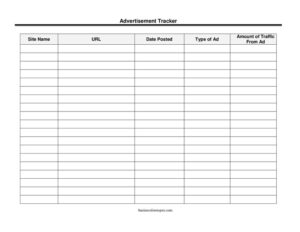
Advertisement Tracker
Track every ad placement, cost, and traffic source with this free Advertisement Tracker template — organize campaigns and compare results. Free download.
PDF
DOCX
0
likes
Download Files
- DOCX
An Advertisement Tracker is a simple log used to record where your ads are running, when they went live, and how much traffic each one drives. Marketers, small business owners, and freelancers use it to keep every ad placement in one place so they can compare performance and decide where to keep spending. It’s free to download here in both PDF and DOCX formats, with no signup required.
What Is an Advertisement Tracker?
An Advertisement Tracker is a record-keeping document that captures the essential details of every advertisement you publish across different platforms. Instead of relying on memory or scattered notes, you log each ad’s posting date, the site it appeared on, the type of ad, its URL, and the amount of traffic it generated. It’s typically maintained by whoever manages marketing — a business owner, a marketing coordinator, an agency account manager, or a solo entrepreneur running their own campaigns. The purpose is to create a clear, at-a-glance history of advertising activity so you can see what’s working, spot underperformers, and report results to clients or partners with confidence.
When Do You Need an Advertisement Tracker?
Any time you’re running ads in more than one place, a tracker keeps the picture organized. Common situations include:
- Running ads across multiple platforms — when you’re posting on social media, search engines, directories, and partner sites, a single log shows them all side by side.
- Comparing channel performance — to find out whether a forum post, a banner placement, or a classified listing brings in the most traffic.
- Managing a marketing budget — keeping a record of every placement helps you justify where ad effort and money are going.
- Reporting to a client or manager — agencies and freelancers use the tracker to show exactly where work was placed and what it delivered.
- Reviewing a campaign after it ends — a completed log makes the post-campaign analysis quick and evidence-based.
- Testing new placements — when trying an unfamiliar site or ad type, the tracker captures the result so you know whether to repeat it.
What an Advertisement Tracker Should Have
A useful tracker stays focused on the details that drive decisions. At minimum it should record the date each ad was posted, the name of the site or platform, the type of ad, the link to the live placement, and the traffic that ad produced. Each row should represent one distinct placement so nothing gets blended together. The strongest trackers also leave room for notes — anything from a campaign name to an observation about timing. The goal is a clean, consistent format you can scan in seconds and update as soon as a new ad goes live, without redesigning the sheet every time.
How to Fill Out an Advertisement Tracker
Work through the fields one placement at a time and fill in a new row whenever you publish an ad:
- Date Posted — enter the day the advertisement went live. Use a consistent format throughout the log so entries sort correctly and you can match traffic to timing.
- Site Name — write the platform or website where the ad appeared, such as a social network, a search engine, an industry directory, or a community forum. Be specific enough that you’d recognize it later.
- Type of Ad — note the ad format. Examples include a banner image, a text ad, a sponsored post, a video spot, a classified listing, or an email placement.
- URL — paste the direct link to the live ad or the landing page it points to. This lets you revisit the placement and confirm it’s still running.
- Amount of Traffic From Ad — record the visits, clicks, or sessions the ad generated, ideally pulled from your analytics tool. Update this number as more data comes in.
Review the full log regularly so the traffic figures stay current and you can spot trends as they form.
How to Read the Results and Act on Them
The tracker only earns its value when you use the numbers it captures. Sort or scan your entries by the Amount of Traffic From Ad column to see which placements outperform the rest, then look at the Type of Ad and Site Name columns to understand why. If a particular format on a particular site consistently brings strong traffic, that’s a signal to invest more there. Conversely, placements that generate little traffic over a fair test period are candidates to pause or drop. Pay attention to the Date Posted field too — timing can matter, and you may notice that ads launched on certain days or seasons perform better. Over time the log becomes a reference you can return to before planning your next campaign.
Keeping the Tracker Accurate
Consistency is what makes an Advertisement Tracker trustworthy. Decide upfront how you’ll define and measure traffic — clicks, unique visitors, or sessions — and apply that same definition to every row. Pull the numbers from the same analytics source each time so figures are comparable. Log each placement promptly rather than reconstructing details from memory weeks later. If you run the same ad on several sites, give each its own row so you can compare them fairly. A few minutes of disciplined updating turns a basic sheet into a reliable record of your entire advertising effort.
Common Mistakes to Avoid
- Leaving the traffic field blank — without the numbers, the tracker can’t tell you which ads are worth repeating.
- Inconsistent date formats — mixing styles makes the log hard to sort and harder to match traffic to timing.
- Vague site names — writing “social media” instead of the actual platform leaves you guessing later.
- Combining multiple placements in one row — blending ads hides which one actually performed.
- Forgetting to record the URL — without the link you can’t verify whether an ad is still live or revisit the landing page.
- Updating sporadically — letting entries pile up leads to forgotten details and unreliable data.
Frequently Asked Questions
What is an Advertisement Tracker used for? It’s used to log every ad you run — the date, the site, the format, the link, and the traffic it produced — in one organized place. This lets you compare placements and decide where your advertising effort pays off. It’s especially useful when you’re running ads across several platforms at once.
How do I fill out an Advertisement Tracker? Add a new row each time you publish an ad and complete the Date Posted, Site Name, Type of Ad, URL, and Amount of Traffic From Ad fields. Pull the traffic figure from your analytics tool and update it as more data arrives. Keep your formats consistent so the log stays easy to read.
What should I enter in the “Type of Ad” field? Enter the format of the placement, such as a banner, text ad, sponsored post, video, classified listing, or email ad. Being specific helps you later identify which formats perform best. Use the same labels across entries so you can group similar ads.
How do I measure the traffic from each ad? Use an analytics platform or the dashboard provided by the ad site to count clicks, visits, or sessions tied to that placement. Adding tracking parameters to your URLs makes it easier to attribute traffic accurately. Apply the same measurement method to every row for fair comparisons.
Is the Advertisement Tracker editable? Yes. The DOCX version can be customized to add columns such as cost, campaign name, or conversions, while the PDF is ready to print and fill in by hand. Adapt it to match the way you run and report on your ads.
How much does this template cost? Nothing — it’s completely free to download in both PDF and DOCX, with no signup or account required. You can use it for personal projects, client work, or internal marketing without restriction.
This Advertisement Tracker template is provided as a general example for informational purposes only and does not constitute marketing, legal, financial, or professional advice. Advertising practices, platform rules, and data-measurement standards vary, so consult a qualified professional for guidance specific to your situation.
Related Forms
- Inventory Cards — Black And White
- Short Term Disability Claims Tracker
- Large-Print Packing List
- Daily Music Practice Log
- Employee Covid Vaccine Log
- Evidence Log
Browse more in Log and Inventory.