
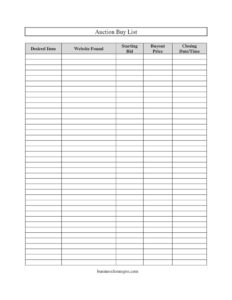
Auction Buy List
Track items you want to bid on with this free Auction Buy List template, organizing prices, deadlines, and sources in one place — free download.
PDF
DOCX
0
likes
Download Files
- DOCX
An Auction Buy List is a simple tracking sheet that helps you organize the items you plan to bid on, recording their starting bids, buyout prices, and closing times in one place. People most often use it to avoid missing auction deadlines and overspending across multiple listings. You can download this template free in PDF and DOCX with no signup required.
What Is an Auction Buy List?
An Auction Buy List is a log or inventory document used by bidders, resellers, collectors, and procurement teams to keep track of the items they intend to purchase at auction. Instead of relying on memory or scattered browser tabs, the list captures the essentials for each prospective purchase: what the item is, where it was found, what it currently costs to bid, the buyout option, and when bidding closes. It functions both as a planning tool before an auction and as a reference during the active bidding window. Whether you bid on online marketplaces, estate sales, government surplus auctions, or local liveractions, the Buy List gives you a single, organized view of every opportunity you are watching.
When Do You Need an Auction Buy List?
This template is useful any time you are tracking more than one potential auction purchase. Common situations include:
- Online reselling: A flipper monitoring dozens of listings across multiple sites needs a way to compare starting bids and buyout prices at a glance.
- Collecting: A hobbyist hunting for specific records, coins, or memorabilia wants to log each desired item and its closing time so nothing slips by.
- Estate and storage-unit auctions: Buyers scouting lots in advance can note what they want and the price ceiling they are willing to meet.
- Business procurement: A company sourcing used equipment or furniture from surplus auctions can track items and stay within budget.
- Coordinating multiple deadlines: When several auctions close on the same day, the Closing Date/Time column keeps you from missing a key bid.
- Comparison shopping: Seeing starting bids and buyout prices side by side helps you decide whether to bid patiently or buy outright.
What an Auction Buy List Should Have
A complete Buy List does more than name items — it gives you enough information to act quickly and decisively. The strongest lists include a clear description of each desired item, the website or venue where it was located, the current or starting bid, any buyout (buy-it-now) price, and the exact closing date and time. Adding your own maximum bid, condition notes, or shipping estimates alongside these core fields makes the list even more useful. The goal is to capture everything you would otherwise have to look up again, so you can make a confident purchasing decision in seconds.
How to Fill Out an Auction Buy List
Work through the template one row per item, completing each field with accurate, current details:
- Desired Item: Write a clear, specific description of what you want to buy — include brand, model, size, or other identifying details so you can tell similar listings apart.
- Website Found: Record the auction site, platform, or venue where the item is listed, ideally with the direct link or lot number so you can return to it quickly.
- Starting Bid: Note the opening or current bid amount. This is your baseline for deciding how aggressively to compete.
- Buyout Price: Enter the buy-it-now or instant-purchase amount if the listing offers one. Compare this against the starting bid to decide whether bidding or buying outright makes more sense.
- Closing Date/Time: Fill in the exact moment the auction ends, including the time zone. This is the most time-sensitive field — order your rows by closing time so the soonest deadlines stay at the top.
Review the list before each auction window and update bids as they change so your figures stay accurate.
Tips for Getting the Most From Your Buy List
Keep the list sorted by Closing Date/Time so the most urgent items rise to the top and you never miss a deadline. Set a personal maximum for each item before bidding begins and write it next to the starting bid — this protects you from emotional, last-second overbidding. Note the time zone in the Closing Date/Time field, since online auctions often display deadlines in the seller’s local time. Finally, archive completed rows rather than deleting them; a record of what you won, lost, and what it sold for becomes valuable data for future bidding decisions.
Auction Buy List vs. a General Inventory Log
It helps to understand how a Buy List differs from an inventory record. A Buy List is forward-looking: it tracks items you intend to acquire, focusing on prices and deadlines that drive a purchasing decision. A traditional inventory log, by contrast, tracks items you already own, focusing on quantity, location, and condition. Many resellers use both — a Buy List to plan acquisitions and an inventory sheet to manage stock once items arrive. Using the two together creates a clean pipeline from prospecting to purchasing to selling.
Common Mistakes to Avoid
- Vague item descriptions: Writing just “camera” instead of the exact model leads to confusion when several similar listings appear.
- Ignoring the time zone: Logging a closing time without noting the zone can cause you to miss a bid by hours.
- Skipping the buyout price: Without it recorded, you cannot quickly judge whether bidding or buying outright is the better deal.
- Letting bids go stale: Starting bids change as others compete; failing to update them leaves you working from outdated numbers.
- No saved link or lot number: Forgetting where you found an item wastes time hunting for it again before the deadline.
- Not setting a maximum: Tracking items without a price ceiling makes it easy to overspend in the heat of a bidding war.
Frequently Asked Questions
What is an Auction Buy List used for? It is a tracking sheet that helps you organize every item you plan to bid on, recording the item, where you found it, the starting bid, the buyout price, and the closing time. It keeps your auction activity in one place so you can act quickly and avoid missing deadlines.
How do I fill out the Auction Buy List? Add one row per item and complete the Desired Item, Website Found, Starting Bid, Buyout Price, and Closing Date/Time fields for each. Keep the entries current and sort by closing time so the most urgent auctions stay at the top.
Is this Auction Buy List free to download? Yes. You can download the template free in both PDF and DOCX formats with no signup or payment required. The editable DOCX version lets you add your own columns, such as a maximum bid or condition notes.
What is the difference between the starting bid and the buyout price? The starting bid is the opening or current bid amount you would need to beat to compete, while the buyout price is an instant-purchase option that ends bidding immediately. Comparing the two helps you decide whether to bid patiently or buy the item outright.
Can I use this list for both online and in-person auctions? Absolutely. The fields work for online marketplaces, estate sales, storage-unit auctions, and live events alike — simply note the venue in the Website Found field and the deadline in Closing Date/Time.
Why is recording the closing date and time so important? Auctions end at a fixed moment, and a missed deadline means a lost opportunity. Logging the exact closing time, including the time zone, lets you prioritize bids and place them before the window closes.
This template is a general example provided for informational purposes only and is not legal, financial, or tax advice. Auction terms, bidding rules, and buyer obligations vary by platform and jurisdiction, so review the specific auction’s rules and consult a qualified professional before making significant purchasing decisions.
Related Forms
- Supplier Comparison Spreadsheet
- Weekly Cleaning Log
- Emergency Supplies List
- Warranty Log
- Wilderness Emergency Checklist
- Computer Time Tracker
Browse more in Log and Inventory.