
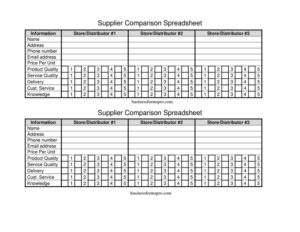
Supplier Comparison Spreadsheet
Use this free Supplier Comparison Spreadsheet template to evaluate vendors on price, quality, and service side by side — free download in PDF and DOCX.
PDF
DOCX
8 downloads
0
likes
Download Files
- DOCX
A Supplier Comparison Spreadsheet is a side-by-side worksheet for evaluating multiple vendors against the same criteria so you can choose the best fit for your business. Most people use it to weigh price, quality, and service across two or three competing distributors before placing a large or recurring order. It’s free to download in PDF and DOCX, with no signup required.
What Is a Supplier Comparison Spreadsheet?
A Supplier Comparison Spreadsheet is a structured document that lines up several suppliers in parallel columns and scores each against identical factors such as price per unit, product quality, delivery, and customer service. It’s used by purchasing managers, small business owners, procurement teams, and office administrators who need an objective, documented way to choose a vendor. Rather than relying on memory or scattered quotes, the form captures each supplier’s contact details and performance in one place. This makes the decision transparent, repeatable, and easy to share with colleagues or managers who need to approve the purchase. The result is a clear record of why one supplier was selected over another.
When Do You Need a Supplier Comparison Spreadsheet?
This form is useful any time you’re choosing between vendors or revisiting an existing relationship. Common scenarios include:
- Sourcing a new product — comparing three distributors for the best combination of price per unit and product quality before committing.
- Annual vendor review — checking whether your current store or distributor still offers competitive pricing and service quality.
- Switching suppliers — documenting why you’re moving from one vendor to another based on delivery or customer service issues.
- Bulk or recurring purchases — justifying a high-volume order where small per-unit differences add up significantly over time.
- Securing internal approval — giving a manager or finance team a clear, apples-to-apples breakdown to sign off on.
- Requesting and organizing quotes — keeping each supplier’s information, contact details, and pricing in one comparable layout.
What a Supplier Comparison Spreadsheet Should Have
A complete comparison sheet keeps the same criteria across every supplier so the evaluation stays fair. At minimum it should capture each vendor’s identity and contact information (name, address, phone number, email address), the commercial terms (price per unit), and the qualitative factors that affect long-term value: product quality, service quality, customer service, delivery reliability, and the supplier’s knowledge and information sharing. Listing all three stores or distributors in adjacent columns lets you scan across a single row — for example, comparing price per unit across all candidates at once. The clearer and more consistent your criteria, the more defensible your final choice.
How to Fill Out a Supplier Comparison Spreadsheet
Work through the template column by column so each supplier is rated on the same basis:
- Label each column for Store/Distributor #1, #2, and #3 so it’s obvious which supplier each entry belongs to.
- Enter the supplier Name at the top of each column — the business or distributor’s official name.
- Add the Address for each vendor, including the location you’d order or receive shipments from.
- Record the Phone Number and Email address so you can follow up or place orders quickly.
- Fill in Price Per Unit for the product you’re sourcing, making sure all quotes cover the same quantity and specification.
- Rate Product Quality and Service Quality using a consistent scale (for example, 1–5 or poor/fair/good/excellent).
- Note Delivery — typical lead time, reliability, or shipping cost.
- Assess Cust. Service (customer service responsiveness) and the supplier’s Knowledge of the product.
- Capture Information — how clearly and completely they share specs, terms, and updates.
- Compare across rows and mark your preferred supplier once every field is filled.
How to Score and Weight Your Criteria
Not every factor matters equally. Before you compare, decide which criteria carry the most weight for this particular purchase. If you’re buying a commodity item, price per unit and delivery may dominate. If you’re sourcing something specialized, product quality, knowledge, and customer service often outweigh a small price gap. A simple approach is to assign each supplier a 1–5 score per factor, then total the columns. For a more refined result, multiply each score by a weighting (for example, price ×3, quality ×2, delivery ×1) and add the weighted totals. Writing the weighting down keeps the comparison honest and prevents a single attractive price from masking weak service or unreliable delivery. Keep your scale notes near the sheet so anyone reviewing it understands how the numbers were reached.
Turning the Comparison Into a Decision
Once every field is complete, the spreadsheet should make the trade-offs visible. Look beyond the lowest price per unit: a vendor that’s slightly more expensive but stronger on delivery, customer service, and product quality may cost less over a full year. Highlight the leading supplier, add a short note explaining why, and keep the completed sheet on file. If you revisit the same vendors later, you’ll have a baseline to measure against — and a paper trail that supports your purchasing decisions during audits or budget reviews.
Common Mistakes to Avoid
- Comparing unequal quotes — make sure price per unit reflects the same quantity, specification, and shipping terms for every supplier.
- Judging on price alone — ignoring service quality, delivery, and customer service often leads to costly problems later.
- Using inconsistent rating scales — switching between scales between columns makes the totals meaningless.
- Leaving contact fields blank — missing phone numbers or email addresses slow down follow-up and ordering.
- Letting data go stale — old quotes and ratings can mislead; refresh the sheet before each major decision.
- Skipping notes — failing to record why one supplier won makes it hard to justify the choice later.
Frequently Asked Questions
What is a Supplier Comparison Spreadsheet used for? It’s used to evaluate multiple vendors side by side using the same criteria — price per unit, product and service quality, delivery, customer service, and more. The goal is to choose the best supplier objectively and keep a record of why that choice was made.
How do I fill out a Supplier Comparison Spreadsheet? Label a column for each store or distributor, enter their name and contact details, then record price per unit and rate each qualitative factor on a consistent scale. Once every field is complete, compare across rows and select the supplier with the strongest overall result.
How many suppliers can I compare? This template is set up for three stores or distributors, which is a practical number for most decisions. If you need to compare more, you can duplicate the columns in the DOCX version or run a second sheet.
Should I always choose the cheapest supplier? Not necessarily. The lowest price per unit can be offset by slow delivery, poor customer service, or lower product quality, so weigh all the criteria together. Scoring and weighting each factor helps reveal the best overall value rather than just the lowest price.
Is this Supplier Comparison Spreadsheet free? Yes. You can download it free in both PDF and DOCX formats with no signup required. The DOCX version is editable, so you can add your own criteria, weightings, or extra supplier columns.
Can I customize the criteria? Absolutely. The template includes common factors like price, quality, delivery, and customer service, but you can add fields such as payment terms, minimum order quantity, or warranty to match what matters most for your purchase.
This template is a general example provided for informational purposes only and does not constitute legal, financial, or procurement advice. Business needs and contract requirements vary, so review any supplier agreement carefully and consult a qualified professional before making purchasing commitments.
Related Forms
- Travel Abroad Packing Checklist
- Edit Log
- Evidence Inventory
- Safe Deposit Box Inventory
- Pool Maintenance Log
- Beauty Salon Supplies Inventory Card
Browse more in Log and Inventory.