
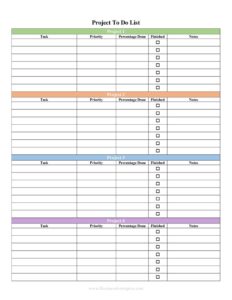
Project To Do List
Organize tasks, deadlines, and priorities with a free Project To Do List template you can download instantly as a PDF or DOCX, no signup required.
PDF
DOCX
1 downloads
0
likes
Download Files
- DOCX
A Project To Do List is a simple tracking sheet that captures every task tied to a single project so nothing slips through the cracks. People use it most often to break a big project into manageable steps, assign owners, and watch progress from start to finish. You can download it free here in both PDF and DOCX formats, with no signup required.
What Is a Project To Do List?
A Project To Do List is a structured document that lists the individual tasks needed to complete a project, along with details like who is responsible, when each task is due, and whether it is done. It is typically created and maintained by a project manager, team lead, or anyone juggling multiple moving parts. Unlike a quick scribbled note, a project to do list keeps tasks organized in one place so the whole team shares the same picture. It documents what needs to happen, in what order, and by when. The goal is simple: turn a vague objective into a clear, trackable sequence of actions that anyone can follow and update.
When Do You Need a Project To Do List?
This form is useful any time a goal involves more than a couple of steps or more than one person. Common scenarios include:
- Launching a new project where you need to map out every deliverable before work begins.
- Coordinating a team so each member knows their assigned tasks and deadlines.
- Managing an event such as a product launch, conference, or office move with dozens of small tasks.
- Tracking a home or renovation project where vendors, materials, and timelines must line up.
- Running a recurring workflow like a monthly report cycle or onboarding checklist that repeats with predictable steps.
- Preparing for a deadline where you want a clear view of what is finished and what remains outstanding.
Types of Project To Do Lists
Although the format is flexible, most lists fall into a few practical styles. A simple task list records tasks and a done checkbox for quick personal use. A prioritized list ranks items by urgency so the team always knows what to tackle first. A delegated list assigns each task to a named owner with a due date, ideal for group projects. A phased list groups tasks under milestones or stages so a long project reads as a sequence of smaller wins. You can use this single template for any of these approaches by simply adjusting how you fill in the columns.
What a Project To Do List Should Have
A complete and useful project to do list generally includes the following elements:
- A clear project name or title at the top so the list is easy to identify.
- A task description column that states each action plainly.
- A priority indicator (high, medium, low) to guide the order of work.
- An assigned to or owner field when more than one person is involved.
- A due date for each task to keep momentum.
- A status or completion checkbox to mark progress.
- A notes space for context, blockers, or links to related materials.
How to Fill Out a Project To Do List
Filling out the list is straightforward once you have downloaded the template:
- Enter the project name at the top so everyone knows which effort the list belongs to.
- Add an owner or date created if your version includes those header fields, giving the document an anchor in time.
- In the first task row, write a clear, action-oriented description such as “Draft kickoff agenda” rather than a vague label.
- Set the priority for that task so the team knows where to focus first.
- Fill in the assigned to field with the responsible person’s name if you are sharing the work.
- Add a realistic due date, working backward from the project deadline where possible.
- Leave the status checkbox blank for now; mark it complete as work finishes.
- Use the notes column for dependencies, links, or reminders.
- Repeat for each task, then review the full list to confirm nothing is missing.
Tips for Keeping the List Useful
A to do list only helps if it stays current. Update it at a regular cadence — a quick daily or weekly review keeps it honest. Break large tasks into smaller ones so progress feels achievable and stalls are easy to spot. Keep descriptions specific and verb-first so anyone can act on them without asking questions. If you are working in a team, store a shared copy in a common folder so the latest version is always the source of truth. When a task is finished, mark it done rather than deleting it — the completed history is a record of what the project has accomplished and can be handy for reporting.
Common Mistakes to Avoid
- Vague tasks like “work on website” that no one can clearly start or finish.
- No due dates, which lets tasks drift indefinitely with no sense of urgency.
- Skipping the owner field on team projects, so tasks fall into the gap where everyone assumes someone else has it.
- Marking everything high priority, which makes the priority column meaningless.
- Letting the list go stale by not updating statuses, so it no longer reflects reality.
- Overloading a single list with unrelated projects instead of using one list per project.
Frequently Asked Questions
What is a Project To Do List used for? It is used to break a project into individual tasks and track each one through to completion. It helps you assign work, set deadlines, prioritize, and see at a glance what is finished and what still needs attention. It is especially valuable when a project has many steps or multiple contributors.
How do I fill out a Project To Do List? Start by naming the project, then add each task as a separate row with a clear description. Set a priority and due date, assign an owner if needed, and use the status checkbox to mark items complete as you go. Review and update the list regularly so it stays accurate.
Is this Project To Do List template free? Yes. You can download it completely free from Business Forms Pro in both PDF and DOCX formats. There is no signup, payment, or account required.
Can I edit the template to fit my project? Absolutely. The DOCX version is fully editable, so you can add or remove columns, rename fields, change the priority labels, or adjust the layout to match how your team works. The PDF version is best for printing or filling out by hand.
What is the difference between a to do list and a project plan? A to do list is a focused, action-level record of tasks to complete, while a project plan is a broader document covering scope, timelines, budgets, and resources. A to do list is lighter and easier to maintain day to day, and it often lives inside or alongside a larger project plan.
How often should I update my Project To Do List? Update it as often as work changes — daily for fast-moving projects and at least weekly for slower ones. Mark tasks complete promptly, add new tasks as they emerge, and revisit priorities so the list always reflects the current state of the project.
This Project To Do List template is provided as a general example for informational purposes only and is not professional project management, legal, or business advice. Organizational needs and requirements vary, so adapt the template to your situation and consult a qualified professional where appropriate.
Related Forms
- Wine Tasting Log
- Coupon Codes Tracker
- Salad Bar Items Inventory Spreadsheet
- Beauty Salon Supplies Inventory Card
- Project Action Log
- Vehicle Maintenance Log
Browse more in Log and Inventory.