
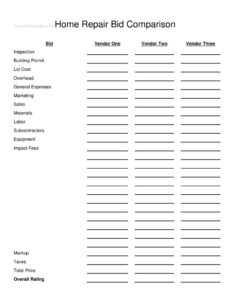
Home Repair Bid Comparison
Compare contractor estimates side by side with this free Home Repair Bid Comparison template — free download in PDF and DOCX, no signup needed.
PDF
DOCX
4 downloads
0
likes
Download Files
- DOCX
A Home Repair Bid Comparison is a simple worksheet that lets you line up estimates from multiple contractors side by side so you can see exactly where their prices differ. Homeowners most often reach for it when they have three quotes in hand and need an apples-to-apples way to decide. It’s free to download in PDF and DOCX, with no signup required.
What Is a Home Repair Bid Comparison?
A Home Repair Bid Comparison is a single-page table that organizes the line items from each contractor’s proposal into matching rows so you can evaluate them together. Instead of flipping between three separate estimates with different layouts and wording, you copy each vendor’s numbers into the same categories — materials, labor, overhead, taxes, and more. Homeowners, property managers, and small landlords use it before signing a contract for repairs or renovations. It documents not just the bottom-line total but the breakdown behind it, plus a place to record your overall impression of each bidder. The goal is a clear, defensible decision based on value, not just the lowest sticker price.
When Do You Need a Home Repair Bid Comparison?
Any time you’ve gathered competing quotes and want to choose wisely, this worksheet earns its keep. Common situations include:
- Roof, siding, or window replacement where three roofers quote wildly different materials and labor figures.
- Kitchen or bathroom remodels that involve subcontractors, permits, and equipment rental you need to compare carefully.
- Storm or insurance repairs where you must justify a contractor selection to an adjuster.
- HOA or rental property maintenance when a board or owner requires documentation that competitive bids were obtained.
- Foundation, plumbing, or electrical work with large dollar amounts where a small percentage difference matters.
- Whenever a permit or impact fee is bundled differently in each proposal and you need to separate it out.
What a Home Repair Bid Comparison Should Have
A useful comparison sheet captures every cost category each contractor lists, expressed consistently. The strongest versions include columns for at least three vendors, a row for every meaningful line item — inspection, permits, materials, labor, subcontractors, equipment, overhead, markup, and taxes — and a clear total price for each. Equally important is a qualitative space: a rating or notes field that reflects responsiveness, references, licensing, and your gut feel. Numbers alone never tell the whole story, so pairing the cost breakdown with an overall rating gives you a balanced view.
How to Fill Out a Home Repair Bid Comparison
- In the Bid column, label or number each estimate you’re comparing for easy reference.
- Enter the company names across Vendor One, Vendor Two, and Vendor Three.
- Record any Inspection charge each contractor lists for assessing the work.
- Add the Building Permit fee, and the Lot Cost if site or property costs apply.
- Fill in business cost lines: Overhead, General Expenses, Marketing, and Sales where the bidder itemizes them.
- Enter the core work costs: Materials, Labor, Subcontractors, and Equipment.
- Record any Impact Fees charged by the local jurisdiction.
- Add the contractor’s Markup (profit margin) and the applicable Taxes.
- Confirm the Total Price for each vendor matches the sum of their line items.
- Finally, assign an Overall Rating to each bid based on price, completeness, and your confidence in the contractor.
Reading the Numbers Behind the Bids
The real value of this sheet is spotting why totals differ. A low bid may hide a thin allowance for materials, while a higher bid might include better-grade products or a more realistic labor estimate. Watch the Markup row: a contractor with low overhead can show a fair markup and still come in competitively, whereas an unusually low markup sometimes signals corners being cut. Compare the Subcontractors and Labor lines together — some contractors self-perform, others farm work out, and that affects accountability. If one vendor bundles Permits and Impact Fees into a single number while another lists them separately, break them apart on your sheet so you’re truly comparing like for like.
Beyond the Lowest Price
Choosing a contractor on price alone is a common regret. Use the Overall Rating field to weigh factors the dollar figures miss: license and insurance verification, length of time in business, references you actually called, warranty terms, and how clearly each estimate was written. A bid that is well-organized and itemized often reflects a contractor who runs an organized job site. Keep your completed comparison with the original estimates; if you later need to justify your choice to a spouse, an HOA board, or an insurer, the documentation is already in one place.
Common Mistakes to Avoid
- Comparing totals only — two $20,000 bids can be very different once you read the materials and labor rows.
- Leaving cells blank instead of asking the contractor what a missing line item costs, which skews the comparison.
- Ignoring permits and impact fees that one vendor included and another excluded, creating a hidden gap.
- Forgetting taxes when one estimate shows a pre-tax figure and another a tax-inclusive total.
- Skipping the rating field and reducing a major decision to a single number.
- Not verifying that each Total Price actually adds up from the line items provided.
Frequently Asked Questions
What is a Home Repair Bid Comparison used for? It is a worksheet for placing multiple contractor estimates side by side using the same cost categories. This lets you compare materials, labor, overhead, markup, taxes, and totals consistently rather than juggling differently formatted proposals. The result is a clearer, better-informed hiring decision.
How do I fill it out? Enter each contractor’s name across the vendor columns, then copy their quoted figures into the matching rows — inspection, permits, materials, labor, subcontractors, equipment, overhead, markup, and taxes. Confirm each Total Price adds up, then assign an Overall Rating to capture quality and trust factors. The field-by-field steps above walk through the whole process.
Is this form legally binding? No. The comparison sheet is an internal planning and decision tool; it is not a contract and does not commit you or the contractor to anything. The binding agreement is the signed contract you eventually execute with your chosen vendor.
How many bids should I compare? Three is the common rule of thumb, which is why the template provides three vendor columns. Three quotes usually give enough range to spot an outlier that is suspiciously high or low while keeping the comparison manageable. You can adapt the worksheet for more or fewer bids as needed.
Should I always pick the lowest bid? Not necessarily. The lowest total may reflect cheaper materials, an unrealistic labor estimate, or omitted permits and fees. Use the line-item breakdown and the Overall Rating to weigh value, reliability, and completeness alongside price.
Is this template really free? Yes. You can download the Home Repair Bid Comparison in both PDF and DOCX formats at no cost, with no signup or account required. Use it as-is or edit the DOCX to add categories specific to your project.
This template is a general example provided for informational purposes only and is not legal, financial, or construction advice. Contractor licensing, permit requirements, and tax rules vary by jurisdiction, and bid practices differ by project. Consult a qualified professional before making contracting or financial decisions.
Related Forms
- Cigar Tasting Log
- Club Tracking Payments
- Company Growth Chart
- Phone Tree
- Log Sheet
- Movie Inventory List
Browse more in Log and Inventory.