
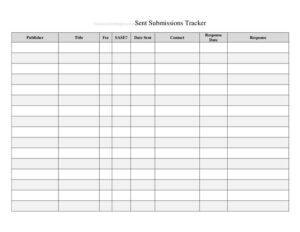
Submission Tracker Sent
Track every submission you send with a free Submission Tracker Sent log template — monitor status, dates, and recipients. Free PDF and DOCX download.
PDF
DOCX
1 downloads
0
likes
Download Files
- DOCX
A Submission Tracker Sent log is a simple record-keeping document that lets you track every submission, application, pitch, or deliverable you have sent out, along with where it went and what happened next. People most often use it to avoid losing track of pending submissions and to follow up at the right time. You can download it free in both PDF and DOCX formats — no signup required.
What Is a Submission Tracker Sent Log?
A Submission Tracker Sent log is a structured worksheet used to document outbound submissions in one organized place. Whether you are a writer sending manuscripts to publishers, a freelancer pitching clients, a grant applicant submitting proposals, or an administrator mailing required forms, this log captures who issued the submission, where it was sent, the date, and its current status. It belongs to the broader family of logs and inventory tools because it treats each submission as a trackable item moving through a pipeline. The purpose is accountability and visibility: at a glance you can see what is still pending, what has been accepted or rejected, and what needs a follow-up. Instead of digging through email folders, you keep a single reliable source of truth.
When Do You Need a Submission Tracker Sent Log?
This log earns its place any time you are juggling multiple outbound items and need to remember the details later. Common real-world situations include:
- Writers and artists: tracking short stories, poems, photographs, or query letters sent to magazines, agents, and contests, including simultaneous submissions.
- Freelancers and agencies: logging proposals, quotes, and pitches sent to prospective clients so no lead goes cold.
- Grant and funding teams: recording applications submitted to foundations or programs, each with its own deadline and decision date.
- Job seekers: keeping a tidy history of resumes and applications sent to employers, with interview and response status.
- Compliance and administrative staff: documenting required forms, reports, or filings sent to agencies, vendors, or partners.
- Students and academics: tracking paper submissions to journals or conferences through review and revision rounds.
What a Submission Tracker Sent Log Should Have
A useful sent tracker keeps the columns focused on what you actually need to act on. At minimum, each entry should identify the submission itself, the recipient or destination, the date it was sent, the method used, the current status, and a space for notes and follow-up dates. A good log is scannable, so each submission occupies a single row and statuses use consistent labels (for example, Pending, Accepted, Rejected, Needs Revision). Adding a unique reference number or title makes it easy to cross-reference attachments and correspondence. Finally, leave room for next-step reminders so the document doubles as a lightweight to-do list rather than just a passive history.
How to Fill Out a Submission Tracker Sent Log
Because this template is built as a flexible, column-based log, you complete it row by row as each item leaves your hands. Follow these steps:
- Title the log: at the top, name the tracker and the period or project it covers, plus your name or department as the owner.
- Enter a reference or title: in the first column, record the name or ID of the submission so you can identify it instantly.
- Add the recipient: note the person, company, publication, or agency the item was sent to.
- Record the date sent: write the exact date you transmitted the submission — this drives your follow-up timing.
- Note the method: indicate how it was sent (email, online portal, postal mail, or hand delivery).
- Set the status: use a consistent label such as Pending, Under Review, Accepted, or Rejected.
- Schedule a follow-up: enter the date you plan to check in if you have not heard back.
- Add notes: capture confirmation numbers, contact names, fees, or any special conditions.
Update each row whenever the status changes so the log always reflects reality.
Tips for Getting the Most From Your Tracker
Consistency is what makes a Submission Tracker Sent log valuable over time. Decide on a fixed set of status labels before you start and stick to them, so you can sort and filter without confusion. Color-code or highlight overdue follow-ups if you are using the editable DOCX version. Record the date you sent something the moment it goes out, rather than relying on memory at the end of the week. For high-volume work, group related submissions by project or campaign on separate sheets. Keep a short legend at the bottom explaining any abbreviations you use, especially if other team members will read the log. Periodically archive completed entries so the active list stays uncluttered.
Sent Log vs. Received Log
A sent tracker and a received tracker are two halves of a complete records system, but they serve different purposes. A Submission Tracker Sent log focuses on outbound items — things you have dispatched and are waiting to hear back about — so its emphasis is on follow-up timing and pending status. A received log, by contrast, documents inbound submissions you must process, with emphasis on intake date and review responsibility. If your workflow involves both directions, keep them as separate sheets with matching reference numbers, so an item sent out can be tied to any reply that comes back.
Common Mistakes to Avoid
- Inconsistent status labels: mixing terms like “waiting,” “pending,” and “TBD” makes the log impossible to sort. Pick one vocabulary.
- Skipping the date sent: without an accurate send date you cannot judge when a follow-up is overdue.
- Letting the log go stale: a tracker only works if you update statuses promptly after each change.
- Omitting the method or destination: forgetting where something went makes it hard to resend or chase a reply.
- No follow-up column: a record with no next step quietly becomes a missed opportunity.
- Storing only one copy: keep a backup so a lost file does not erase your entire submission history.
Frequently Asked Questions
What is a Submission Tracker Sent log used for? It is used to keep an organized record of every submission you send out, such as applications, pitches, manuscripts, or forms. The log shows where each item went, when it was sent, and its current status, so nothing slips through the cracks and follow-ups happen on time.
How do I fill out the tracker? Add one row per submission, then fill in the title or reference, the recipient, the date sent, the method, and the status. Set a follow-up date and add notes for confirmation numbers or contacts, and update the status whenever something changes.
Is this template free to download? Yes. The Submission Tracker Sent log is completely free to download in both PDF and DOCX formats, with no signup or payment required. You can print the PDF or edit the DOCX to add your own columns.
Can I customize the columns for my own workflow? Absolutely. The editable DOCX version lets you rename, add, or remove columns to match whatever you submit — for example adding fee amounts for contest entries or decision dates for grant applications.
Is a submission tracker a legally binding document? No. It is an internal organizational tool for your own records and does not create or alter any legal obligation. It simply helps you document and remember what you have sent.
Should I keep separate logs for sent and received items? For most workflows, yes. Keeping outbound and inbound items on separate sheets with matching reference numbers keeps each list focused and makes it easy to connect a submission you sent to any reply you receive.
This template is provided as a general example for informational and organizational purposes only and does not constitute legal, financial, or professional advice. Record-keeping requirements vary by industry and jurisdiction, so consult a qualified professional for guidance specific to your situation.
Related Forms
- Emergency Supplies List
- Phone Message Log
- Inventory Count Sheet
- Casino Earnings Log
- Inventory Schedule
- Monthly Cleaning Log
Browse more in Log and Inventory.