
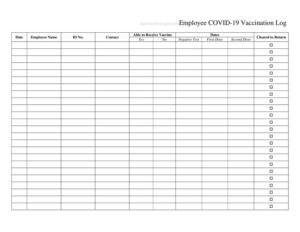
Employee Covid Vaccine Log
Track staff vaccination status with our free Employee Covid Vaccine Log template, available as a free download in PDF and DOCX for accurate records.
PDF
DOCX
0
likes
Download Files
- DOCX
An Employee Covid Vaccine Log is a simple tracking document that records the vaccination status of each worker in an organization. Employers most often use it to maintain an organized, centralized record of who has received which COVID-19 vaccine doses and when. You can download it free in both PDF and DOCX formats, with no signup required.
What Is an Employee Covid Vaccine Log?
An Employee Covid Vaccine Log is a record-keeping form that documents the COVID-19 vaccination details of staff members across a workplace. It is typically maintained by an HR department, office manager, clinic administrator, or safety officer. The log captures key information such as employee name, vaccine manufacturer, dose number, dates administered, and the location or provider who gave each shot. Rather than scattering this information across emails or individual files, the log consolidates it in one place so the organization can quickly reference who is fully vaccinated, who needs a follow-up dose, and when records were last updated. It serves as both an administrative tool and a confidential health record that supports workplace safety planning.
When Do You Need an Employee Covid Vaccine Log?
Organizations of all sizes use a vaccination log when they need a reliable way to monitor staff immunization. Common situations include:
- A healthcare facility, nursing home, or clinic tracking vaccination compliance among clinical and support staff.
- An employer responding to a workplace health and safety policy that asks employees to report their vaccination status.
- A school, daycare, or childcare center keeping records for staff who work closely with vulnerable populations.
- A company scheduling on-site vaccination clinics and recording who participated in each session.
- An HR team preparing to demonstrate, in aggregate, the vaccination coverage of a department or team.
- A small business that wants a single, tidy document to reference booster eligibility and follow-up dose due dates.
What an Employee Covid Vaccine Log Should Have
A complete and useful log balances enough detail to be meaningful with enough simplicity to be maintained over time. The most effective Employee Covid Vaccine Logs include the following elements:
- Employee identification — full name and, where appropriate, an employee ID or department.
- Vaccine details — the manufacturer or vaccine type and lot number if available.
- Dose tracking — first dose, second dose, and booster columns with corresponding dates.
- Provider and location — where each dose was administered.
- Status indicator — a clear marker for fully vaccinated, partially vaccinated, or pending.
- Notes — space for exemptions, reactions, or follow-up reminders.
- Record metadata — the date the log was last updated and who maintains it.
How to Fill Out an Employee Covid Vaccine Log
Because this is a flexible log-style template, fill it out row by row as you collect information from each employee. Follow these steps:
- Add a header. Enter your organization or department name and the date the log is being maintained or last reviewed.
- List the employee. Write the worker’s full name in a new row, and include an employee ID or department if your version provides those columns.
- Record the vaccine type. Note the manufacturer or vaccine name, plus a lot number if you are recording it.
- Enter the first dose date. Document the date the initial dose was administered.
- Enter the second dose date. For multi-dose series, record the second dose date when applicable.
- Log boosters. Add any booster or additional dose dates in the designated column.
- Note the provider or location. Identify where the shot was given, such as a pharmacy, clinic, or on-site event.
- Mark the status. Indicate whether the employee is fully vaccinated, partially vaccinated, exempt, or pending.
- Add notes. Use the notes field for reactions, exemptions, or upcoming due dates, then save and update the file regularly.
Keeping Vaccination Records Confidential
Health information is sensitive, so the way you store and share a vaccination log matters as much as the data itself. Treat the completed log as confidential and restrict access to staff who genuinely need it, such as designated HR or safety personnel. Store digital copies in a secure, access-controlled location rather than a shared open folder, and keep paper versions in a locked file. When you need to report on vaccination rates, share aggregate numbers rather than individual records wherever possible. Privacy and recordkeeping rules vary widely by country, state, and industry, so check the requirements that apply to your workplace before collecting or disclosing any vaccination data.
Tips for Maintaining an Accurate Log
A log is only valuable if it stays current. Set a regular cadence — weekly or monthly — to update entries as employees report new doses. Ask employees to provide a copy of their official vaccination card so you are recording verified dates rather than estimates. Use consistent date formats and standardized vaccine names so the log stays easy to scan. If you run on-site clinics, update the log the same day so nothing slips through the cracks. Finally, keep a backup copy of the file so a single device failure does not erase your records.
Common Mistakes to Avoid
- Leaving the log unprotected. Storing health data in an open, shared location exposes sensitive information.
- Recording incomplete dose information. Missing second-dose or booster dates make status tracking unreliable.
- Inconsistent formatting. Mixing date styles or vaccine spellings creates confusion when reviewing the log.
- Failing to update. A log that is months out of date no longer reflects true coverage.
- Mixing exemptions with status. Always note exemptions clearly so they are not misread as missing data.
- Ignoring local rules. Collecting more data than allowed, or keeping it too long, can create compliance problems.
Frequently Asked Questions
What is an Employee Covid Vaccine Log used for? It is used to record and track the COVID-19 vaccination status of employees in one organized document. Employers rely on it to see who has received each dose, monitor booster eligibility, and support workplace safety planning. It keeps scattered information consolidated in a single, easy-to-reference file.
How do I fill out the vaccine log? List each employee in their own row, then record the vaccine type, the dates of each dose, the provider or location, and an overall status marker. Add notes for exemptions or follow-ups, and update the log whenever new information comes in. Using verified vaccination cards helps ensure the dates you record are accurate.
Is this template free to download? Yes. The Employee Covid Vaccine Log is completely free to download in both PDF and DOCX formats, with no signup or payment required. You can use the PDF as-is or edit the DOCX version to match your organization’s columns.
Is vaccination information confidential? Vaccination details are generally considered sensitive health information and should be treated as confidential. Limit access to designated personnel, store the log securely, and share only aggregate figures when reporting. Privacy obligations vary by jurisdiction and industry, so confirm the rules that apply to your workplace.
Can I customize the log for my workplace? Absolutely. The DOCX version lets you add or remove columns, insert your organization’s name, and adjust the status categories to fit your policies. You can tailor it for booster tracking, department grouping, or on-site clinic events as needed.
Do I need to keep these records for a certain period? Retention requirements for health-related records vary depending on your location, industry, and any applicable workplace policies. Some organizations keep records for a set number of years while others are governed by stricter rules. Check the recordkeeping regulations that apply to your situation before deciding how long to retain the log.
This template is a general example provided for informational purposes only and is not legal, medical, or human-resources advice. Privacy, recordkeeping, and workplace health requirements vary by jurisdiction and industry. Consult a qualified professional to ensure your use of this log complies with the rules that apply to you.
Related Forms
- Computer Update Tracker
- Telemarketer Call Log
- Phone Log
- Cleaning Checklist
- Cigar Tasting Log
- Store Closing Procedure Checklist
Browse more in Log and Inventory.