
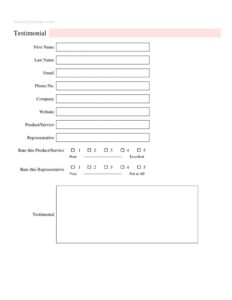
Testimonial Form
Collect authentic customer reviews with our free Testimonial Form template, available as a free download in PDF and DOCX for easy use.
PDF
DOCX
7 downloads
0
likes
Download Files
- DOCX
A Testimonial Form is a simple document businesses use to collect written feedback and ratings from satisfied customers about a product, service, or staff member. The most common reason people use it is to gather authentic, permission-based quotes they can publish on websites, brochures, and social media. It’s completely free to download here in both PDF and DOCX formats, with no signup required.
What Is a Testimonial Form?
A Testimonial Form is a structured questionnaire that invites a customer to share their experience with a company and assign star-style ratings to a product, service, or representative. It is typically issued by the business and completed by the client, capturing both qualitative comments and numerical scores. The form documents who gave the feedback, what they are reviewing, how they rated it, and their permission to be quoted. Marketing teams, small business owners, agencies, and service providers all rely on testimonial forms to build a library of social proof. Because it records the reviewer’s name, company, and contact details, the form also helps verify that each testimonial comes from a real, identifiable customer rather than an anonymous source.
When Do You Need a Testimonial Form?
This form is useful any time you want to capture customer praise in a consistent, reusable way. Common scenarios include:
- After completing a project or sale — request feedback while the positive experience is fresh in the customer’s mind.
- Building a website testimonials page — collect quotes with names and companies to display as social proof.
- Following up on great service — when a representative receives praise, formalize it with a written record.
- Gathering reviews for case studies — pair ratings and comments with a customer’s company and website.
- Running a feedback campaign — send the same form to multiple clients to compare scores across products or staff.
- Supporting sales and proposals — include verified testimonials when pitching to new prospects.
What a Testimonial Form Should Have
A complete testimonial form balances identification, ratings, and the written quote. It should clearly identify the reviewer with name and contact details, capture which product or service is being reviewed, name the representative involved where relevant, and offer simple rating scales. Most importantly, it needs an open text area for the testimonial itself — the words you’ll actually publish. Many businesses also add a line confirming the customer grants permission to use their comments in marketing. Keeping the form short and focused encourages more people to complete it, while the rating fields give you quick, comparable data even from customers who write little.
How to Fill Out a Testimonial Form
Walk through each field in order so nothing is missed:
- First Name and Last Name — enter the reviewer’s full name as it should appear if the testimonial is published.
- Email — provide a working email so the business can follow up or confirm permission.
- Phone No. — add a phone number for verification or thank-you contact.
- Company — list the customer’s business name, which adds credibility to a published quote.
- Website — include the company’s website if it can be linked alongside the testimonial.
- Product/Service — specify exactly what is being reviewed, such as a particular product line or service package.
- Representative — name the staff member or contact who handled the work, if applicable.
- Rate this Product/Service — choose a score from 1 to 5, with 5 being the highest.
- Rate this Representative — rate the individual’s performance on the same 1-to-5 scale.
- Testimonial — write the open comments. Encourage specific, genuine detail about the experience.
Getting Better, More Usable Testimonials
The quality of a testimonial often depends on how you ask. Instead of a blank prompt, guide reviewers with a question like “What problem did this product solve for you?” or “How did our representative help?” Specific answers make far more compelling marketing copy than vague praise such as “great service.” Send the form soon after a positive interaction, keep it brief, and make completion optional rather than pressured. When you receive a strong testimonial, always confirm you have written permission before publishing it with the person’s name and company. A quick thank-you message after submission also leaves a good final impression and may encourage repeat business.
Using and Displaying Testimonials
Once collected, testimonials can power many parts of your marketing. Pair a high product rating with the written quote on a landing page, feature a representative’s strong score in a team bio, or compile multiple submissions into a rotating slider on your homepage. The company name and website fields lend authenticity, so display them where the customer has agreed. Keep your original signed or submitted forms on file as proof that the feedback is real and authorized. Avoid editing testimonials in ways that change their meaning — light trimming for length is fine, but the words should remain the customer’s own.
Common Mistakes to Avoid
- Publishing without permission — always confirm the customer agrees to have their name and quote used publicly.
- Leaving the Product/Service field blank — without context, a glowing review loses much of its value.
- Editing quotes too heavily — altered wording can mislead readers and feels dishonest.
- Ignoring the rating fields — scores give quick, comparable insight even when comments are short.
- Forgetting contact details — missing email or phone makes verification and follow-up impossible.
- Fabricating reviews — invented testimonials can violate advertising rules and erode trust.
Frequently Asked Questions
What is a Testimonial Form used for? It is used to collect customer feedback, ratings, and quotes in a consistent format. Businesses use the completed form to gather authentic social proof for websites, brochures, social media, and sales materials. It also documents who gave the feedback and what they reviewed.
How do I fill out a Testimonial Form? Enter your name, email, phone number, company, and website, then specify the product or service and the representative involved. Choose a 1-to-5 rating for both the product/service and the representative, and write your comments in the testimonial box. Be as specific as possible so the feedback is genuinely helpful.
Do I need permission to publish a testimonial? Yes, you should always have the customer’s clear consent before publishing their words, name, or company. Many businesses add a permission line to the form or follow up by email to confirm. This protects both your business and the customer’s privacy.
Is a Testimonial Form legally binding? A testimonial form itself is generally not a binding contract; it is a feedback and consent document. However, when it includes a permission statement, it can serve as evidence that the customer authorized you to use their words. Advertising rules in many regions also require that published testimonials be truthful and from real customers.
How much does this Testimonial Form cost? Nothing — it is completely free to download from Business Forms Pro in both PDF and DOCX formats. There is no signup, subscription, or hidden fee. You can edit the DOCX version to match your branding and the products or services you offer.
Can I customize the rating scale or fields? Yes. Because the template is provided as an editable DOCX file, you can adjust the 1-to-5 rating scales, rename fields, add a permission checkbox, or remove any questions you don’t need. Keep the form short to encourage more customers to complete it.
This Testimonial Form template is a general example provided for informational purposes only and does not constitute legal, marketing, or professional advice. Advertising and privacy requirements vary by jurisdiction, so consult a qualified professional before publishing customer testimonials.
Related Forms
- VIP Pass Small
- Housesitting Instructions
- Petsitting Instructions
- Course Syllabus
- Entry Form White
- Logic Model
Browse more in Miscellaneous.