
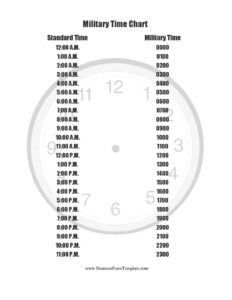
Military Time Chart
Download a free Military Time Chart template to convert 24-hour and standard time instantly, with a printable PDF and editable DOCX, free download.
PDF
0
likes
Download Files
A Military Time Chart is a quick-reference table that converts standard 12-hour clock times into the 24-hour format used by the military, hospitals, aviation, and emergency services. People most often use it to read or write times like 1430 or 2200 without second-guessing the conversion. You can download this Military Time Chart free in both PDF and editable DOCX formats — no signup required.
What Is a Military Time Chart?
A Military Time Chart is a side-by-side reference that lists every hour of the day in both standard 12-hour notation (with AM and PM) and the 24-hour military format. The 24-hour clock counts continuously from 0000 (midnight) through 2359 (one minute before the next midnight), eliminating the need for AM and PM labels. The chart is used by service members, nurses, dispatchers, pilots, transit operators, and anyone who needs to log or schedule events precisely. Because it removes the ambiguity of “12:00” or whether 7 o’clock means morning or evening, the chart is a practical tool for accurate recordkeeping, shift planning, and clear communication across teams that operate around the clock.
When Do You Need a Military Time Chart?
The 24-hour clock appears in far more places than the armed forces. A printed or digital chart is handy whenever you encounter or must produce times in this format. Common situations include:
- Reading military or government documents — orders, schedules, and reports almost always use 24-hour times such as 0600 or 1800.
- Charting in healthcare settings — nurses and clinicians record medication times, vital signs, and procedures in 24-hour format to avoid AM/PM errors.
- Aviation, maritime, and transit work — flight plans, watch schedules, and rail timetables rely on the 24-hour clock for precision.
- Scheduling shift work — factories, dispatch centers, and security teams post rotations using military time so 1900 is never confused with 7 AM.
- Teaching or learning the format — students, new employees, and travelers use the chart to practice converting between systems.
- Coordinating international events — many countries use the 24-hour clock by default, so the chart helps avoid scheduling mix-ups.
How the 24-Hour Clock Works
The logic behind military time is simple once you see it laid out. From midnight to noon, the hours match the standard clock with a leading zero: 1 AM is 0100, 9 AM is 0900, and noon is 1200. After noon, you add 12 to the standard hour: 1 PM becomes 1300, 6 PM becomes 1800, and 11 PM becomes 2300. Midnight is written 0000 (sometimes 2400 at the end of a day). Minutes are read the same way in both systems — 2:45 PM is 1445, spoken as “fourteen forty-five.” The chart removes the mental math by showing every conversion at a glance, which is why it is so useful for quick lookups and printed reference.
What a Military Time Chart Should Include
A complete and useful Military Time Chart should contain the following elements so it functions as a reliable reference:
- A clear title identifying it as a Military Time Chart or 24-hour time conversion chart.
- A column listing each standard 12-hour time with AM or PM labels.
- A matching column showing the equivalent 24-hour military time.
- Coverage of all 24 hours from midnight (0000) through 11 PM (2300).
- The spoken or phonetic reading where helpful, such as “1500 — fifteen hundred.”
- A simple, legible layout suitable for printing and posting near a workstation.
How to Fill Out and Use a Military Time Chart
This template is designed to be used as a ready reference and, if you choose, customized for your own setting. Follow these steps:
- Open the file in your preferred format — PDF for a clean printout or DOCX if you want to edit it.
- Add a heading or label at the top if you want to identify the department, unit, or facility that will use the chart.
- Review the standard time column, which lists each hour from 12:00 AM through 11:00 PM in familiar 12-hour notation.
- Match it to the military time column, confirming each conversion — for example, 12:00 AM equals 0000 and 12:00 PM equals 1200.
- Add common minute increments if your work needs them, such as quarter-hours (0915, 0930, 0945) for finer scheduling.
- Note any custom shift times relevant to your team, like a shift change at 1500 or a roll call at 0600.
- Print and post the chart near workstations, time clocks, or nursing stations, or save the digital version for quick lookups.
Tips for Reading and Writing Military Time
A few habits make the 24-hour clock second nature. Always write four digits, including the leading zero, so 6 AM is 0600 rather than 600 — this keeps logs consistent and unambiguous. Drop the colon in formal military style (1430, not 14:30), though many civilian settings keep the colon for readability. When speaking, hours ending in 00 are read as “hundred” — 0800 is “oh eight hundred” and 1700 is “seventeen hundred.” Remember the noon-and-after rule: any PM time beyond 12:59 PM gets 12 added to its hour. If you ever forget, the chart is your fail-safe. Practicing with familiar daily anchors, such as your own start and end times, helps the conversions stick quickly.
Common Mistakes to Avoid
- Forgetting the leading zero — writing 700 instead of 0700 can cause misreads in logs and schedules.
- Confusing midnight and noon — 0000 (or 2400) is midnight, while 1200 is noon; mixing these is a frequent error.
- Adding 12 to AM hours — only PM times after noon need the +12 adjustment; AM hours stay as listed.
- Reading minutes incorrectly — 1305 is 1:05 PM, not 1:30; keep the last two digits as minutes.
- Mixing formats in one document — switching between 12-hour and 24-hour notation invites confusion and scheduling mistakes.
- Using 2400 mid-day — 2400 marks the very end of a day; the new day starts at 0000.
Frequently Asked Questions
What is a Military Time Chart used for? It is a quick-reference table that converts standard 12-hour times into the 24-hour military format and back again. People use it to read schedules, chart healthcare records, plan shift work, and communicate precise times without AM/PM confusion. It is especially helpful for anyone new to the 24-hour clock.
How do I convert PM times to military time? For any time from 1:00 PM through 11:59 PM, add 12 to the hour and drop the AM/PM label — so 3:00 PM becomes 1500 and 9:30 PM becomes 2130. AM times keep their hour and simply gain a leading zero, such as 7:00 AM becoming 0700. Noon stays 1200 and midnight is written 0000.
Is midnight 0000 or 2400? Both are used, but the conventions differ slightly. Many organizations write the start of a new day as 0000 and use 2400 only to mark the final instant of the previous day. To avoid confusion, most modern systems and this chart treat midnight as 0000.
Do I read military time differently than I write it? Yes. While you write four digits like 1400, you typically speak the hours and minutes together — 1400 is “fourteen hundred” and 1645 is “sixteen forty-five.” Times with a zero minute end in “hundred,” and earlier hours often add “oh,” as in “oh six hundred” for 0600.
Can I edit this Military Time Chart? Yes. The template downloads as an editable DOCX so you can add your organization’s name, insert custom shift times, or include quarter-hour increments. A print-ready PDF version is also available if you simply want to post the standard chart without changes.
Is this Military Time Chart free to download? Yes, completely free. You can download both the PDF and DOCX versions from Business Forms Pro with no signup, subscription, or payment required. Use it personally, post it at work, or share it with a team learning the 24-hour clock.
This Military Time Chart template is provided as a general reference example for informational purposes only and does not constitute professional, operational, or regulatory advice. Time-recording standards and formatting conventions can vary by organization, industry, and jurisdiction, so verify the requirements that apply to your specific setting.
Related Forms
- Letter to Legislator Showing Concern
- Entry Form White
- RSVP List
- Ballot
- Customer Complaint Form
- Premarital Counseling Questionnaire
Browse more in Miscellaneous.