
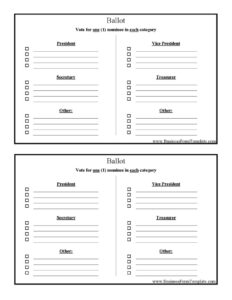
Ballot
Download a free Ballot template to run fair officer elections for president, vice president, secretary, and treasurer — free download in PDF and DOCX.
PDF
3 downloads
0
likes
Download Files
A Ballot is a simple voting document that lets each eligible voter select one nominee in each office category — President, Vice President, Secretary, Treasurer, and Other. Organizations most often use it to run a fair, orderly election of officers at an annual meeting or membership vote, and you can download this Ballot free in PDF and DOCX with no signup required.
What Is a Ballot?
A Ballot is a printed or fillable form on which a voter records their choices in an election. In the context of officer elections, it lists each position to be filled — President, Vice President, Secretary, Treasurer, and an Other category for additional roles — and instructs the voter to choose one nominee per category. It is issued by whoever administers the vote: a club secretary, an election committee, a board chair, or a nonprofit’s nominating committee. The completed Ballot documents each voter’s intent, creates a paper trail that can be counted and recounted, and helps demonstrate that an election was conducted openly and fairly. A well-designed Ballot keeps the process anonymous, easy to read, and quick to tally.
When Do You Need a Ballot?
A Ballot is useful any time a group must select people for defined roles and wants a documented, countable result rather than a show of hands. Common situations include:
- Annual officer elections for a club, association, or society where members vote for President, Vice President, Secretary, and Treasurer.
- Nonprofit or board elections at a yearly membership meeting, where bylaws require a recorded vote.
- Homeowners or condo associations electing a board slate for the coming term.
- Union, fraternal, or volunteer organizations filling leadership positions through a secret ballot.
- Student government, PTA, or school clubs choosing officers for the academic year.
- Committee or chapter votes where an Other category captures roles like Sergeant-at-Arms, Membership Chair, or Director.
Types of Ballots
Although they share the same purpose, ballots come in several forms. A secret (anonymous) ballot carries no voter name and protects privacy, which is the most common choice for officer elections. A signed or proxy ballot identifies the voter and is used when bylaws require verification or when someone votes on another member’s behalf. A mail-in or absentee ballot is distributed in advance so members who cannot attend can still vote. This template works for any of these approaches — simply add a signature or member-number line if your rules require voter identification.
What a Ballot Should Have
To produce a clean, defensible election result, a Ballot should include:
- Clear instructions — in this case, “Vote for one (1) nominee in each category.”
- A heading for each office: President, Vice President, Secretary, Treasurer, and Other.
- The nominee names (or blank lines) under each office so voters can mark or write a choice.
- A consistent marking method, such as a checkbox or line beside each name.
- A write-in option where your bylaws allow it.
- Optional fields for the election date, organization name, or a verification signature if the vote is not anonymous.
How to Fill Out a Ballot
Filling out this Ballot is straightforward. Follow these steps:
- Read the instructions. Note the rule at the top: vote for one (1) nominee in each category. Selecting more than one in a single office can invalidate that race on your ballot.
- Vote for President. Mark the box or line next to your preferred nominee for President, or write in a name if write-ins are permitted.
- Vote for Vice President. Choose a single nominee for the Vice President position the same way.
- Vote for Secretary. Select one candidate for Secretary.
- Vote for Treasurer. Mark one nominee for Treasurer, the role responsible for finances.
- Complete the Other category. Use this field for any additional office your organization fills — write or select the role and your chosen nominee.
- Review and submit. Confirm you have voted in each category you intend to, leave any race blank if you choose to abstain, then fold and deposit the Ballot in the designated box or return it as instructed.
Tips for Running a Fair Vote
The Ballot is only one part of a credible election. Print enough copies for every eligible voter plus a small surplus, and number or initial them if you need to control distribution. Use an opaque ballot box and appoint at least two neutral tellers to count, so no single person controls the tally. Announce the cutoff time clearly and keep all completed ballots until the result is confirmed and any challenge period has passed. If your bylaws spell out quorum, eligibility, or tie-breaking rules, follow them exactly — the Ballot records the choice, but your governing documents decide how it is counted.
Ballot vs. Voice Vote
A voice vote or show of hands is fast and works for routine motions, but it offers no privacy and no permanent record. A written Ballot is better whenever races are contested, the outcome is sensitive, members want anonymity, or your bylaws require a recorded vote. Because each Ballot can be saved and recounted, it also protects the organization if a result is later disputed.
Common Mistakes to Avoid
- Voting for more than one nominee per office — the form clearly asks for one (1) per category, and overvotes can spoil that race.
- Leaving the marking method unclear — a stray mark or partial check may be hard for tellers to interpret.
- Forgetting to define the Other category before distributing, leaving voters unsure what role it covers.
- Mixing signed and anonymous ballots, which undermines the privacy of a secret vote.
- Failing to verify voter eligibility before handing out ballots.
- Discarding ballots too soon — keep them until results are certified and any disputes resolved.
Frequently Asked Questions
What is this Ballot used for? It is used to record each voter’s choice of officers — President, Vice President, Secretary, Treasurer, and an Other position — in an organizational election. It creates a countable paper record so results can be verified and, if necessary, recounted.
How do I fill out the Ballot? Read the instruction to vote for one nominee per category, then mark a single choice in each office you wish to vote on. You may leave a category blank to abstain, and you should never select more than one nominee for the same position.
Does a Ballot need to be signed or notarized? Most officer elections use a secret ballot, so no signature or notarization is required. If your bylaws call for voter verification or proxy voting, add a name or member-number line, but that is a governance choice rather than a legal formality.
Is the Ballot result legally binding? The Ballot itself documents votes; whether the outcome is binding depends on your organization’s bylaws and the meeting rules under which the vote is held. Following your governing documents on quorum, eligibility, and counting is what gives the result authority.
Can I add or remove offices? Yes. The DOCX version is fully editable, so you can rename the Other field, add positions like Director or Sergeant-at-Arms, or remove a role your group does not elect. Adjust the nominee lines to match your slate of candidates.
How much does this Ballot template cost? It is completely free to download in both PDF and DOCX formats, with no signup or payment required. You can print as many copies as you need for your election.
This Ballot template is a general example provided for informational purposes only and is not legal advice. Election and voting requirements vary by organization, bylaws, and jurisdiction — consult your governing documents or a qualified professional before relying on this form.
Related Forms
- Travel Itinerary
- Business Purchase Proposal
- Blank Survey Template
- Nomination Card
- Raffle Ticket White
- Customer Complaint Form
Browse more in Miscellaneous.